56
3
Maintenance
When Normal Cleaning Is Not Effective
Medium Cleaning
When problems such as dot drop-out are not resolved by normal cleaning (P. 40, "Printing Tests and Normal
Cleaning"), perform the more forceful "medium cleaning" to remove clogging from the print heads.
Procedure
Perform a printing test.
P. 40, "Printing Tests and Normal Cleaning"
When the printing test is complete, remove the media.
Press .
Press to display the screen shown on the left.
Press
.
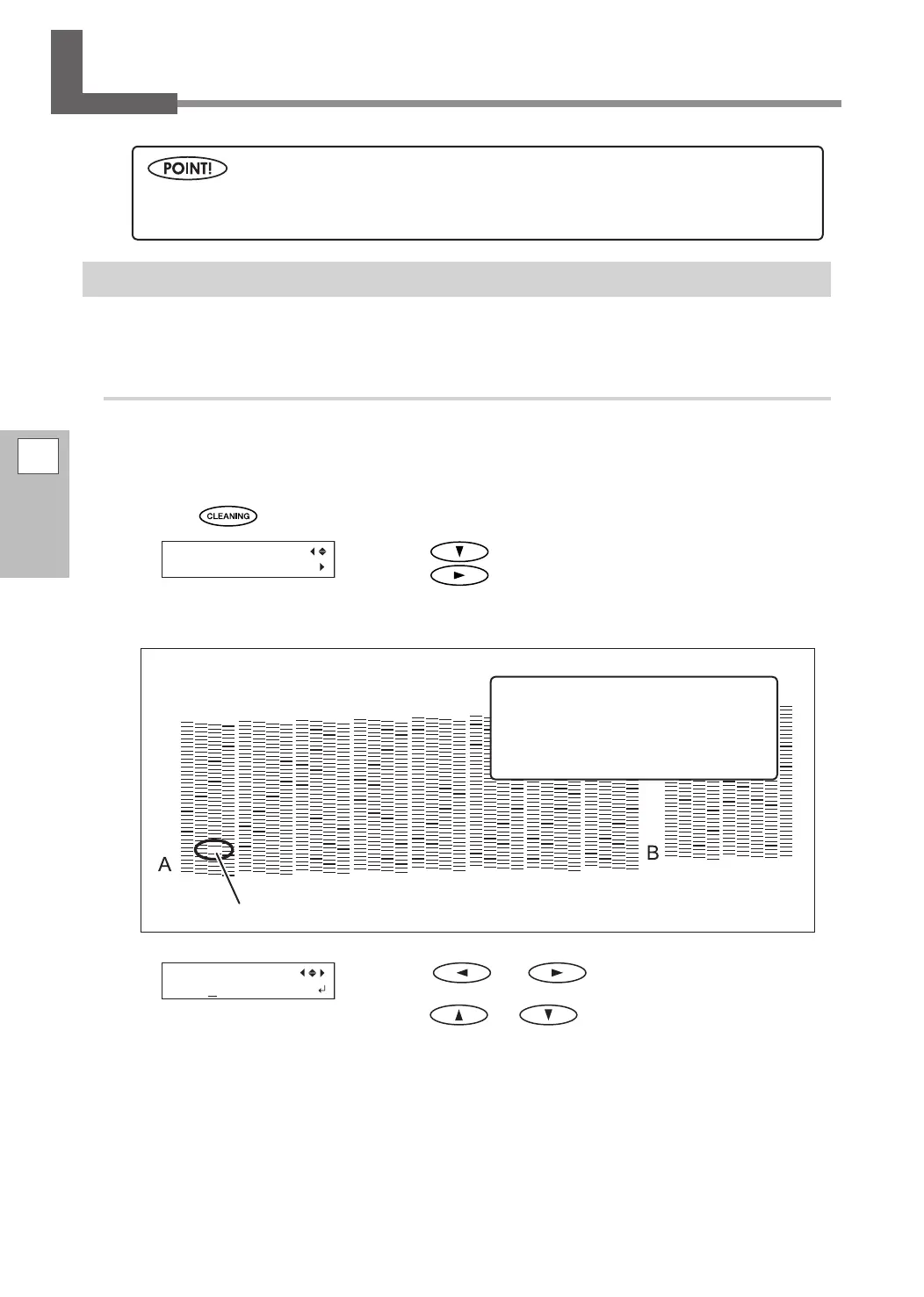
Check for the group with dot drop-out by viewing the printing-test results.
With medium cleaning, only the group of print heads having dot drop-out is cleaned.
Press or to select the group of print
heads that is not to be cleaned.
Press
or to get rid of the group display.
Repeat this process to display only the group of print
heads that requires cleaning.
The only groups that can be cleaned are those that are displayed as
A or B.
"Medium" and "powerful" cleaning consume more ink than "normal cleaning," and overly frequent use
may damage the print heads themselves. Avoid using these cleaning methods more than necessary.
If the printing-test results are difcult
to interpret
Examine the results from dierent angles
in a well-lit location. Take advantage of
reected light to enable visual checking.
Printing-test results
Dot drop-out
Group A Group B















 To Next Page