Fully Utilizing the Correction Function
4
Advanced
Functions
92
Alleviating Horizontal Bands (Feed Correction Function)
Procedure
If using roll media, check that the media is not sagging.
Press .
Press several times to display the screen shown
on the left.
Press
.
Press .
A test pattern is printed.
When printing ends, press , then .
Press or to select the correction value.
Press
to conrm your entry.
Press , then to go back to the original screen.
Description
The movement distance of media experiences subtle changes due to the thickness of the media and the tem-
perature of the media heating system. When the movement distance becomes discrepant, horizontal stripes
are more likely to occur during printing. We recommend performing correction to match the media you're
using and the media heating system. Repeat the process of printing a test pattern and entering a correction
value several times to nd the optimal value. Depending on the software RIP you are using, you can also make
this setting in the software RIP (by, for example, choosing the media type). When you have made the setting
in the software RIP, the software RIP's setting is used and the printer's setting is ignored.
Default Setting
[SETTING]: 0.00%
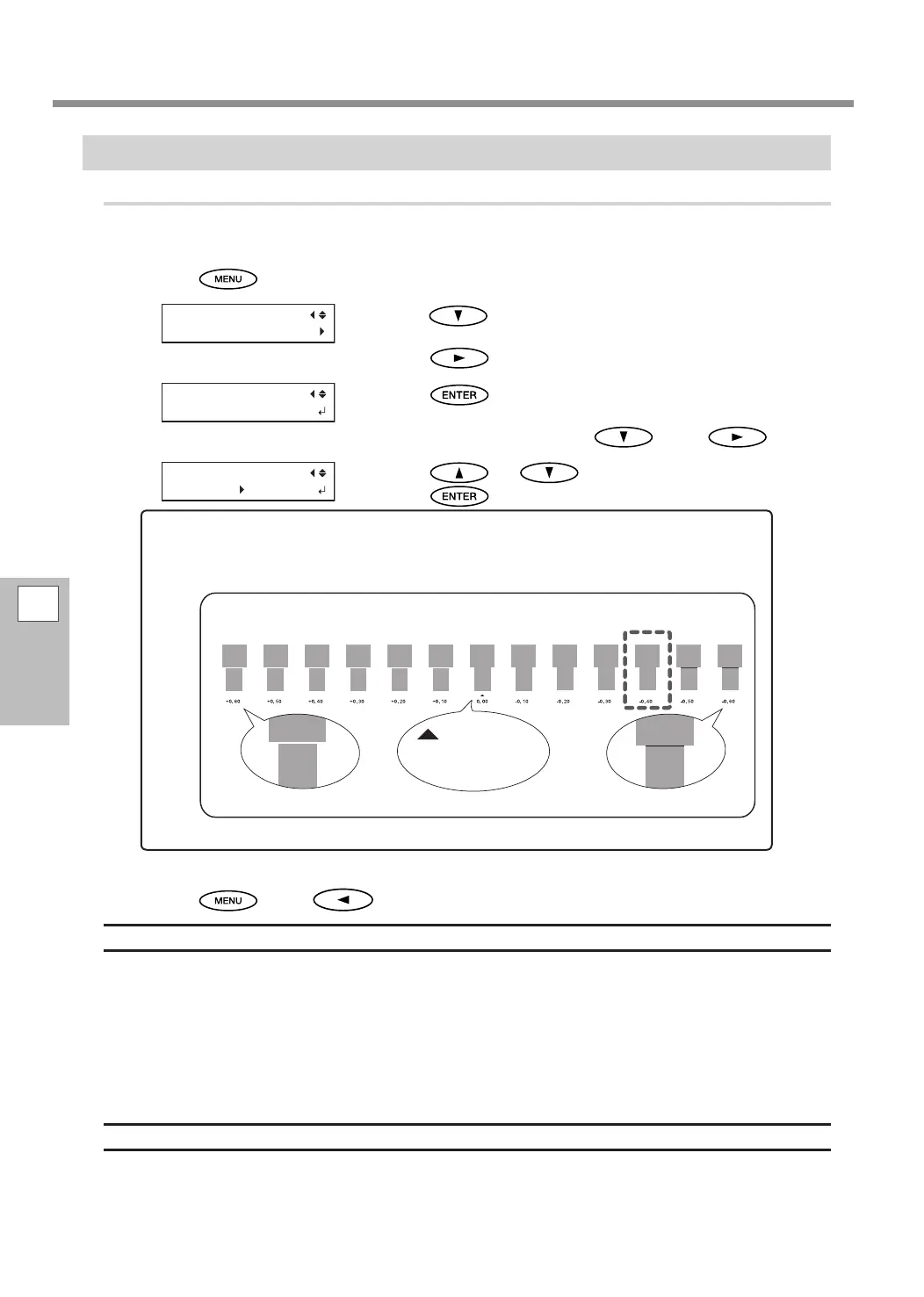
To decide a correction value
Select the value to make the upper/lower rectangular gap and overlap smallest.
When you cannot choose between two numbers, select a value that is halfway between them.
Gap present
Overlap
Smallest gap and overlap
= Current
correction
value















 To Next Page