4-7
4.6 OUTPUTS
Options installed in this instrument determine the outputs
available. A single current output and a RS485 non-isolat-
ed serial port are standard. Table 4-3 lists and explains
dash numbers used to order options. The analog (0/4-
20mA or 0-5 VDC) outputs may be set for primary process
variable (e.g. conductivity) or temperature.
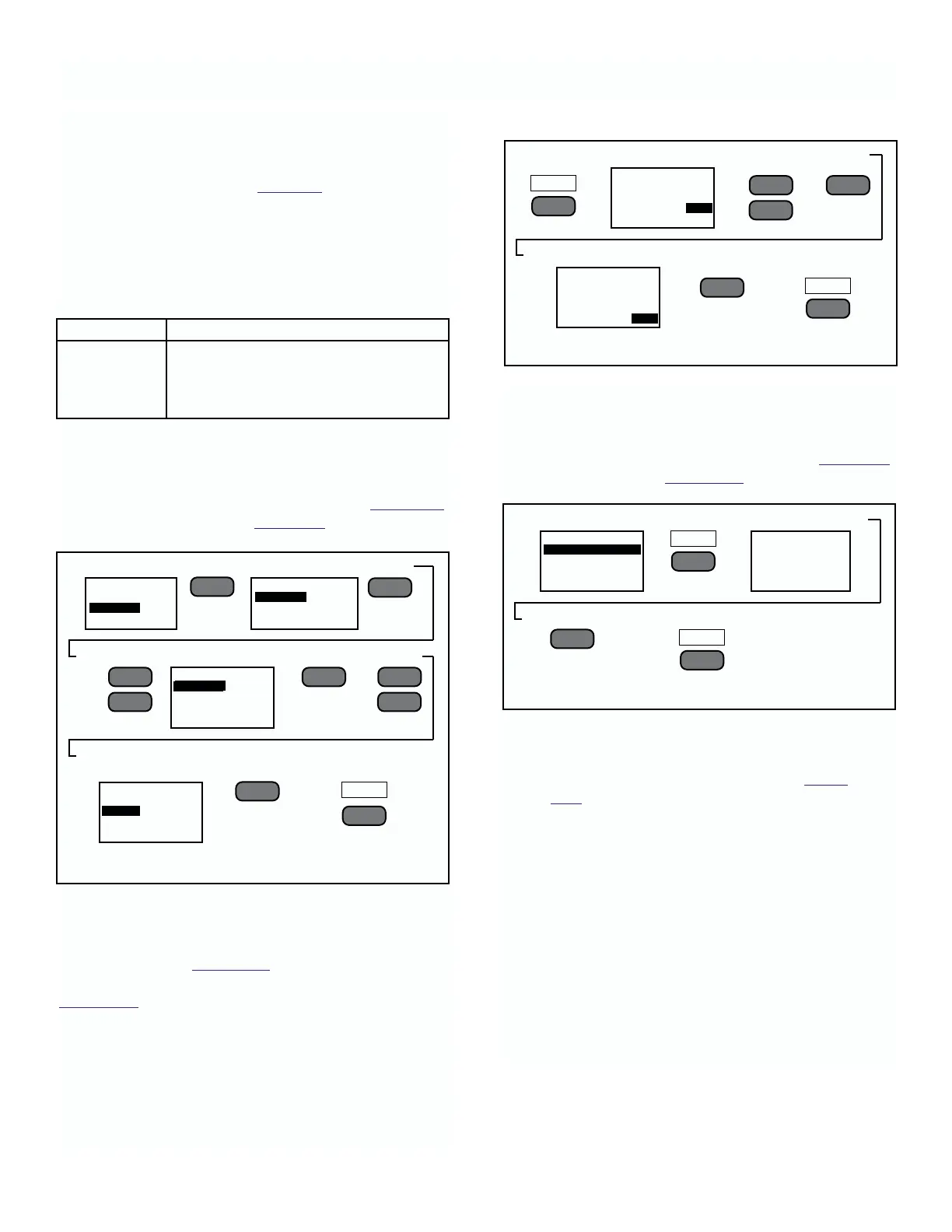
To Set-Up Ouput 1 Range.
Three output ranges are available for Output 1. They are
0-20mA, 4-20mA, and with the voltage option installed,
0-5VDC. To set the output range, complete the 4 steps
required to enter the Main Menu (Refer to Figure 4-1)
and proceed with step 1 of Figure 4-9.
To Scale Output Ranges. (Current or Voltage)
To scale the range of the output to the display start with
steps 1 and 2 of Figure 4-9 to display CURRENT 1
prompts. With these prompts on the screen, go to
Figure 4-10 and start with step 4.
NOTE
With Option -22 installed, the current
range and scales are replaced with
voltage range and scales. Procedures are
the same.
MODEL 2700 SECTION 4.0
CONFIGURATION
1. Select Output
➻
Press
➻
2. Select Output 1
➻
Press
➻
3. with Scroll thru Sensors
➻
Press
➻
4. With
➻
Scroll to Range
➻
Press
➻
5. Twice to enter
to memory
FIGURE 4-9. Setting Output Range
––
l
▲
––
l
▲
OUTPUT STATUS
OUTPUT 1
RS485 NON-ISOLATED
INSTALL OPTION CARD
––
l
▲
EXIT
F4
––
l
▲
MAIN MENU
ALARMS
OUTPUTS
PROGRAM
CURRENT 1
SENSOR 1 mS/cm
4-20 mA
4 mA .0000
20 mA 10.00
CURRENT 1
SENSOR 1 mS/cm
4-20 mA
4 mA .0000
20 mA 10.00
To Set Full Scale Output Level. (Current or Voltage)
To match the full scale output current of this instrument
to the full scale reading of items such as meters, scales,
recorders, etc. complete steps 1 through 3 in Figure 4-9.
Continue with step 3 of Figure 4-11.
NOTE
To set full scale voltage output follow
the same procedures described in Figure
4-10.
To Set-Up Output 2.
When the second current output is installed, its output
range, scaling, and level settings are adjusted in the
same manner as Output 1.
Select Output 2 from the Output Status listing. The
screen titles will be labeled Current 2 and will set up the
output range, scaling, and adjust the output current
level for Output 2. There is no Auto Ranging function for
Output 2.
▲
▼
▲
▼
4. With
➻
Scroll to low Range
➻
5. Use to scroll
➻
Press
numerals.
➻
6. Scroll to High Range
➻
Press
➻
7. Two times to
enter to memory
––
l
▲
––
l
▲
▲
▼
TABLE 4-3. Output Options
Option # Function
-21 Adds second current output
-22 Output 1 is 0-5 VDC
-23 Isolated RS232 serial port
-24 Isolated RS485 serial port
NEXT
F3
EXIT
F4
CURRENT 1
SENSOR 1 mS/cm
4-20 mA
4 mA .0000
20 mA 10.00
CURRENT 1
SENSOR 1 mS/cm
4-20 mA
4 mA .0000
20 mA 10.00
3. From step 3 of Fig 4-9
➻
Press
➻
4.
Follow instructions
➻
Press
➻
5. To enter setting to memory
––
l
▲
ADJ
F1
EXIT
F4
NOW GENERATING
FULL SCALE, USE
UP/DOWN ARROW TO
MATCH EXTERNAL
DEVICE, PRESS ENTER
CURRENT 1
SENSOR 1 mS/cm
4-20 mA
4 mA .0000
20 mA 10.00
FIGURE 4-11. Setting Full Scale Output Level.
FIGURE 4-10. Scaling Output Display











 To Next Page