Installation
Guide
GM
Series
Identify
the
Vehicle
Audio
System
The
first
step
you
need
to
complete
Is
to
CONFIRM
the
Vehicle
Audio
System
before
you
proceed.
The
Rosen
Nav
Systems
are
specifically
designed
to
be
CONFIGURED
to
work
in
appropriate
vehicles.
STEP
1b
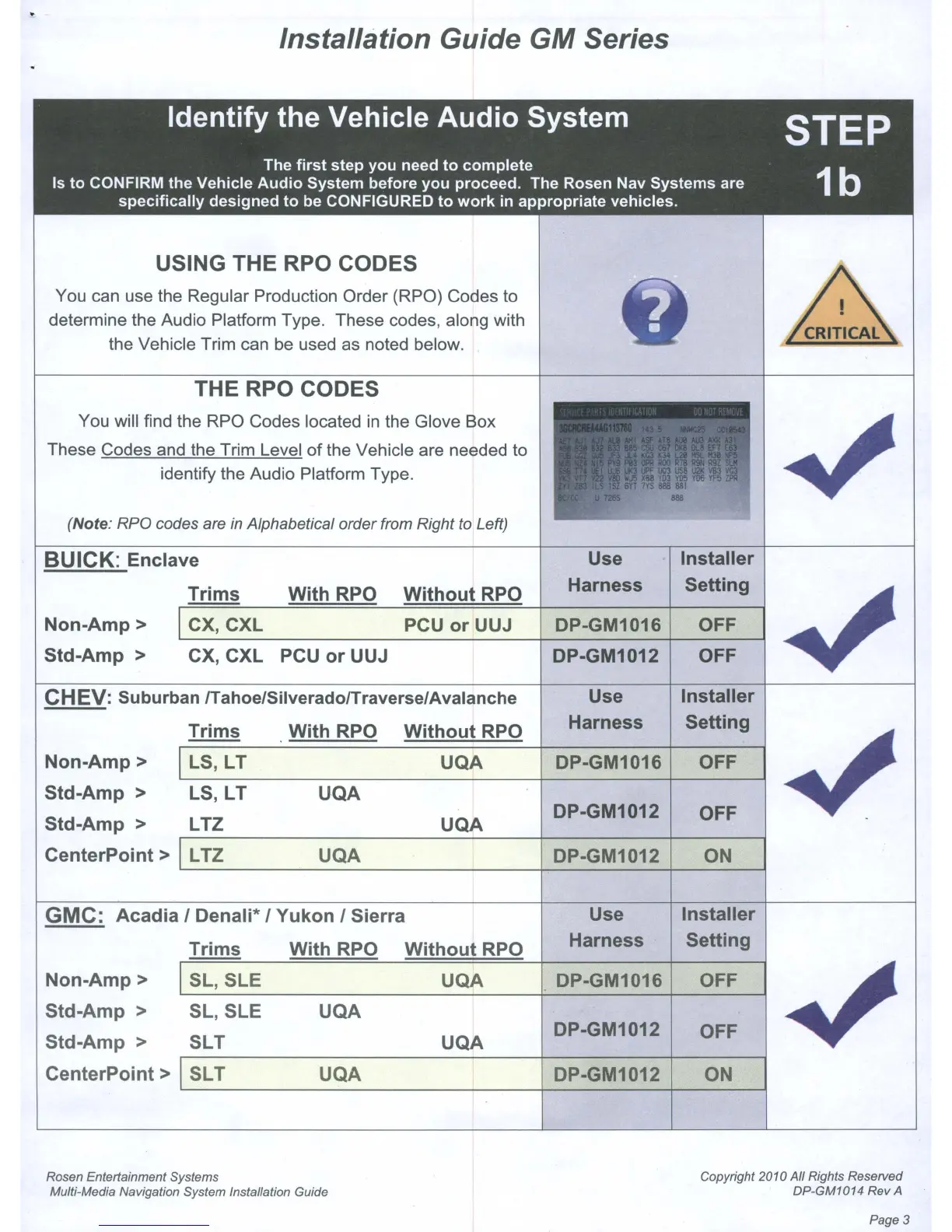
USING THE RPO CODES
You can use the Regular Production Order (RPO) Codes to
determine the Audio Platform Type. These codes, along with
the Vehicle Trim can be used as noted below.
THE RPO CODES
You will find the RPO Codes located
in
the Glove Box
These Codes and the Trim Level of the Vehicle are needed to
identify the Audio Platform Type.
(Note: RPO codes are
in
Alphabetical order from Right to Left)
CHEV:
Suburban
lTahoe/Silverado/Traverse/Avalanche
CX, CXL PCU
or
UUJ
BUICK: Enclave
Use
Installer
Harness
Setting
DP-GM1016
OFF
DP-GM1012
OFF
Use
Installer
Harness Setting
DP-GM1016 OFF
DP-GM1012
OFF
DP-GM1012
ON
PCU
or
UUJ
Without
RPO
UQA
UQA
UQA
UQA
With
RPO
Without
RPO
With
RPO
LTZ
LS,LT
LTZ
LS,LT
Trims
CX,CXL
Trims
Non-Amp>
Std-Amp
>
Std-Amp
>
CenterPoint>
Non-Amp>
Std-Amp
>
GMC:
Acadia
I Denali* I
Yukon
I Sierra
Use
Installer
Trims
With
RPO
Without
RPO
Harness
Setting
Non-Amp>
SL,SLE
UQA DP-GM1016 OFF
Std-Amp
>
SL,SLE
UQA
Std-Amp
> SLT
UQA
DP-GM1012
OFF
CenterPoint>
SLT
UQA
DP-GM1012
ON
Rosen Entertainment Systems
Multi-Media Navigation System Installation Guide
Copyright 2010 All Rights Reserved
DP-GM1014 Rev A
Page
3



 To Next Page