Actuator Input Output Signals
Publication PUB089-005-00_0618 53 of 116
6.2.2 Changing the settings in the Transducer block.
The functional operation of the actuator can be modified over the Foundation Fieldbus by editing the
Transducer Block. Note that changes to some parameters can only be made when this block is in the
‘Out Of Service’ mode (OOS). Using a Configuration Tool such as the NI Configurator, there are two
ways in which the parameters can be modified:
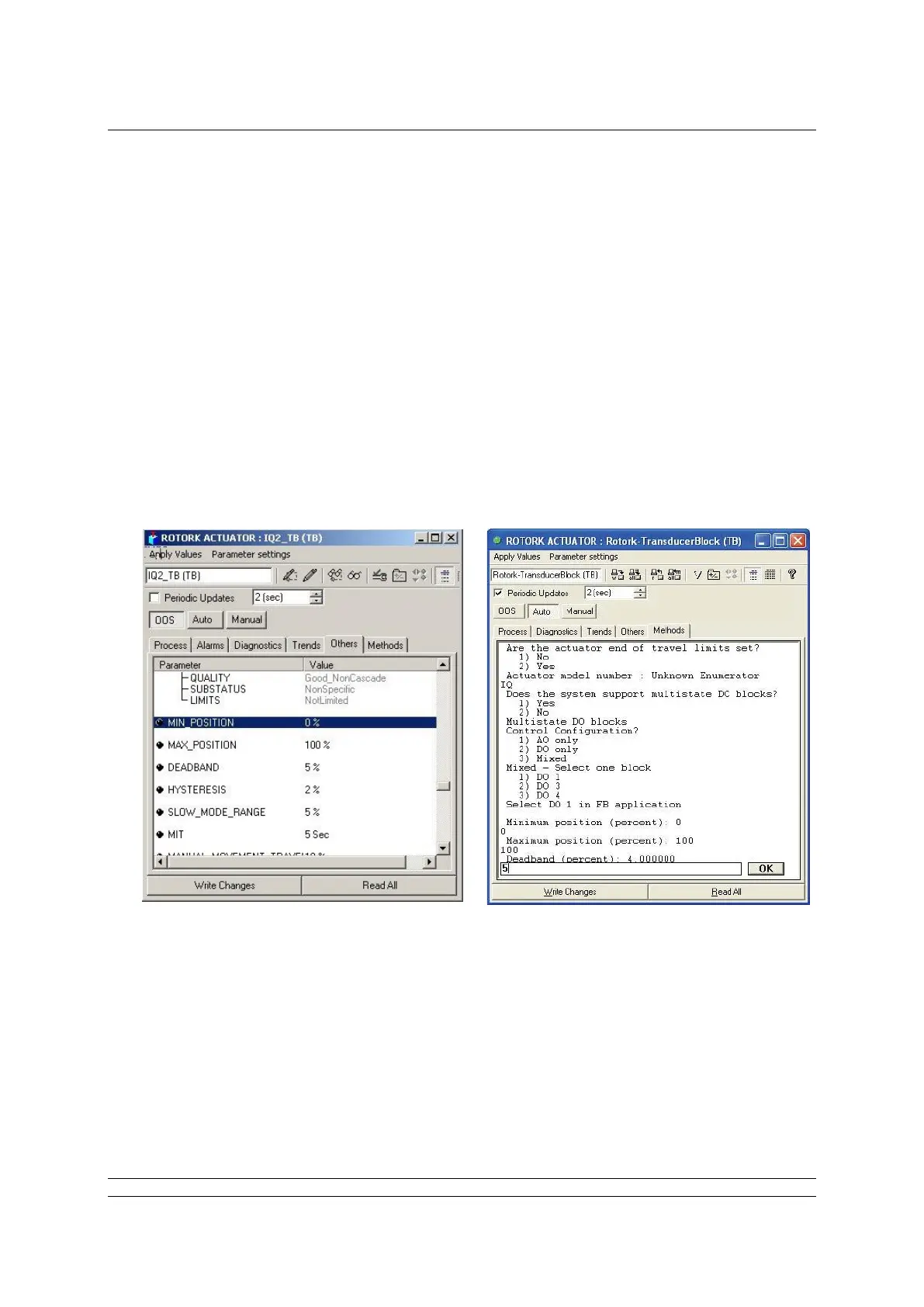
Direct changes to parameter values. Clicking each writable parameter reveals a drop-
down menu from which the desired value can be selected. Parameters not available for
editing are shown greyed out. The changes made must then be downloaded to the FF01
actuator using the “write changes” button.
Editing the Transducer Block using ‘Methods’. The Method provides a step-by-step
prompted entry dialogue that automatically presents each user-changeable parameter for
modification. Non-changeable parameters are not shown. This ‘Method’ of Transducer
Block editing simplifies the search for specific values required for editing as shown below
and is carried out ‘On Line’ to the actuator.


 To Next Page