Setting Up The FF CP Card
Publication PUB089-005-00_0618 79 of 116
8.2 Insight 2
This software can be used to configure and view the settings and configuration of the Rotork actuator.
It can be freely downloaded from the Rotork website. It designed to be run from a Windows computer
and connects to the actuator using Bluetooth. Please see the relevant Rotork technical manual for
more details.
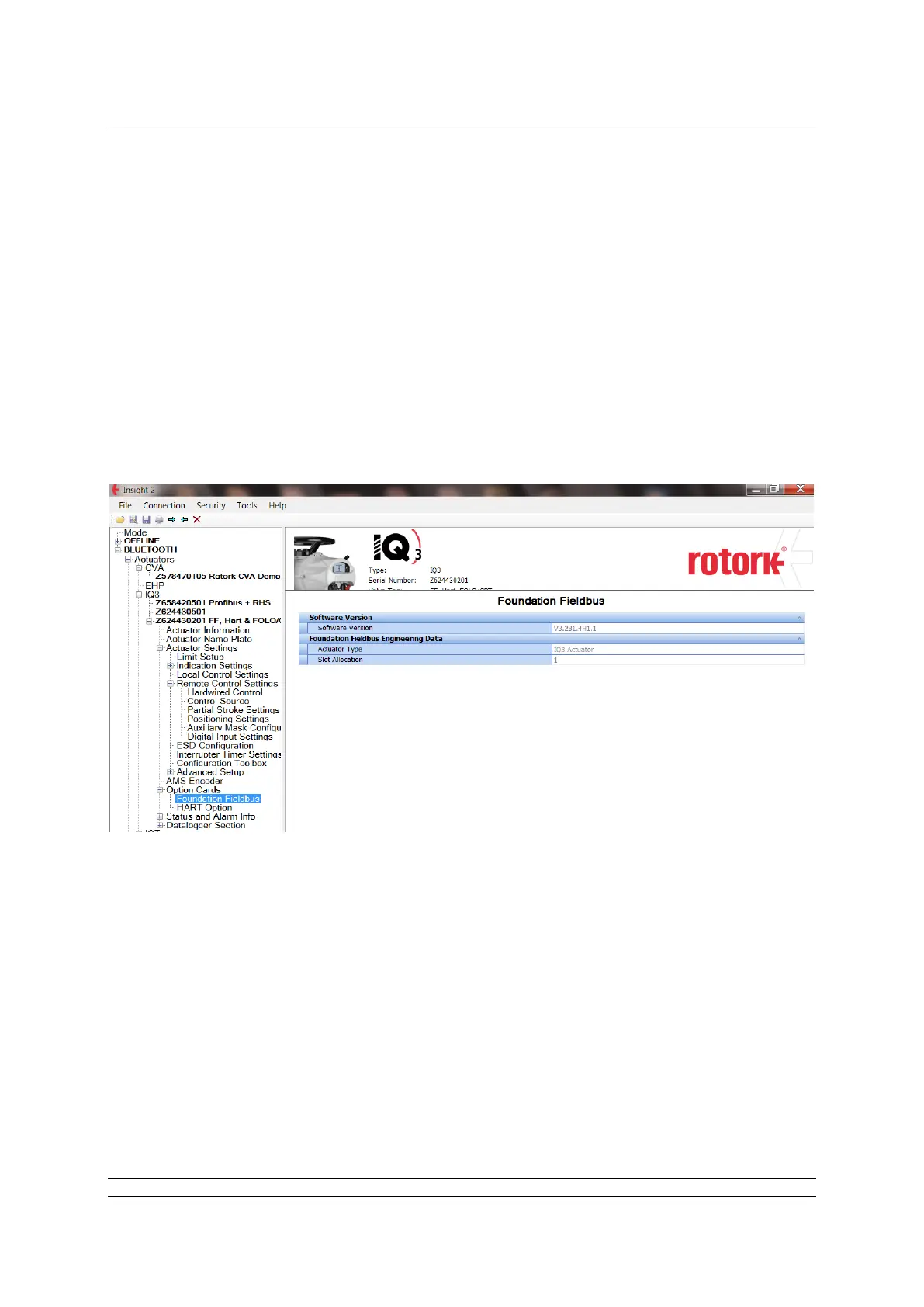
With the FF highway power applied, the FF card’s firmware/hardware revisions can be identified via
this tool. V3.1 / M1.4 / H1.1 (or greater) shows the FF card has a switchable ITK revision capability.
This is useful when the actuator is being used on installations where ITK6.1 is not supported.
Note:
The FF card’s ITK revision cannot be changed via Insight.
The “Control mode” and “Discrete block control” cannot be changed via Insight
Insight can be used to set some, but not all, of the FF01 Transducer block parameters. The
Foundation Fieldbus page, shown above, only allows viewing of the three parameters.


 To Next Page