In order to change the FF01 CP card from a Basic unit to an LM a suitable configuration tool or
dialogue tool must be used.
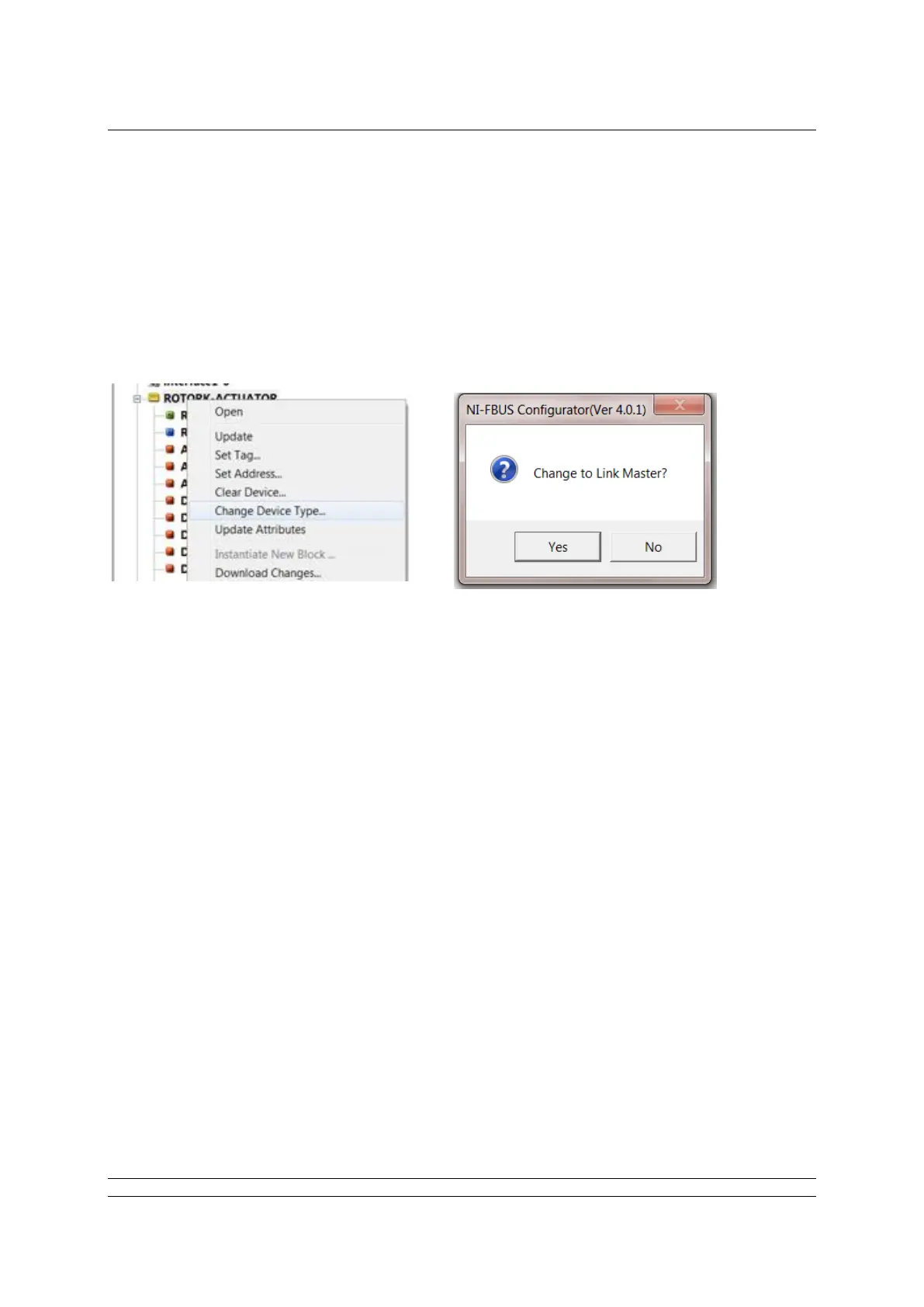
If the NI FF configurator tool is used it’s simply a matter of a right mouse click on the device tag, select
“Change device type” and clicking “Yes” to “Change to Link Master?”.
It will then be necessary to cycle the FF highway power to this card for the change to have an effect.
This approach can also be used to convert an LM to a Basic device.
As an alternative, open the database using a dialog tool and modify the parameter contained in the
Management Information Base (MIB).
The parameter to be altered resides in the MIB type of VFD. The class is called
BOOT_OPERAT_FUNCTIONAL_CLASS
This class can have two values: 01 = Basic Unit
02 = Link Master.
This method cannot be used to change from a Basic to an LM as it’s read only in Basic mode,
however, it can be used to modify from an LM to a Basic device. In this case, edit the parameter value
and download the setting to obtain the desired function. The type of functionality available can also be
read in the parameter
DLME_BASIC_CHARACTERISTICS / DL_OPERAT_FUNCTIONAL_DEVICE_CLASS
A value of 1 indicates a basic unit whilst a 2 indicates a Link Master.


 To Next Page