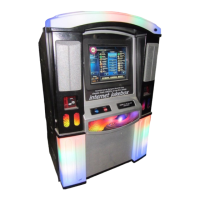
NiteHAWK Internet Jukebox Unpacking & System Description
22022602 1-7
MAJOR COMPONENTS OF THE NiteHAWK
Figures 1-3 and 1-4 show the major components of the NiteHAWK Jukebox. Take a minute
to familiarize yourself with these components.
Core Computer
The core computer is the heart of the system and has a removable hard drive and a single
board computer. The hard drive is the only storage in the system and contains Windows XP
Embedded Operating System software, all Application software, all music, and all setup and
audit data. The single board computer converts music selections stored on the hard drive
into a stereo signal for the system’s audio components. It also connects to the Internet, the
SVGA touch-screen monitor, and the Rowelink modules.
Touch-screen 19” LCD Monitor
All machine operations are done through the touch-screen monitor. These include viewing
and making selections, displaying the selection being played, displaying pricing and credits,
viewing and changing setup and audit data, and downloading “Music On Demand”
selections.
System Power Supply
The system power supply produces +9 VDC, +12 VDC, +24 VDC, and contains a relay to
switch the jukebox lights, touch-screen monitor, and Bill Acceptor ON or OFF. It has an IEC
320 power inlet, two 6A circuit breakers and two 4A fuses.
Transformer Assembly
The transformer assembly supplies power for the Audio/Video Controller, 1000-Watt Audio
Digital Amplifier, and the system power supply described above.
Rowelink Controller
The Rowelink controller connects the core computer’s serial RS-232 COM2 port to the serial
RS-485 Rowelink modules. It also includes the coin switch, router reset, fan circuits, bill
acceptor, song reject, infrared detector and amplifier mute.
LED Controller
This module controls the LEDs that illuminate the perimeter lighting on the door and the
door graphics of the jukebox. It provides adjustments for the Brightness, Flash Rate, and
Music Sensitivity along with controls for the patterns used during standby and, separately,
the times when music is playing.
Router
This device provides the interface between the core computer and the broadband modem or
satellite receiver. There is a one-time configuration process to set this device for your
particular Internet Service Provider (ISP). In addition to the port required for the core
computer, there are three other ports provided for other devices.


 To Next Page