NiteHAWK Internet Jukebox Adding Microphones
22022602 4-3
• Touch Main Menu
to save your changes and return to Hardware Setup screen. Repeat Step 2 and
check the results.
Step 4. If not in SERVICE mode Push the SERVICE
button on the Rowelink Controller to enter the Main
Menu, then Touch HARDWARE SETUP
.
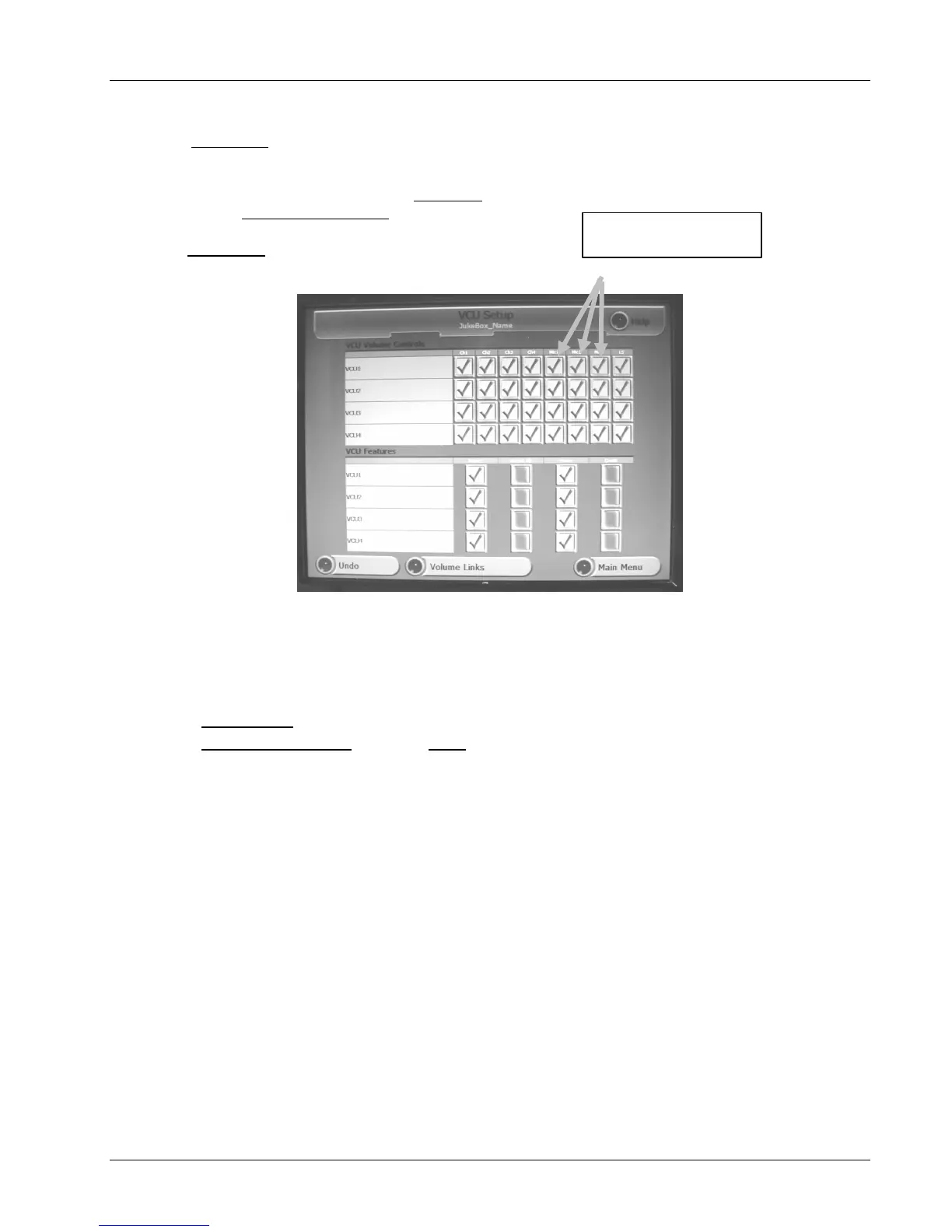
• Touch VCU Setup
to view the VCU Setup screen
• (see Figure 4-3).
Figure 4-3 - VCU Setup Screen
• In rows VCU1-VCU4, remove check marks in the columns corresponding with the microphones
you installed by touching them. This prevents location personnel from changing your settings
using the VCU.
• Touch Main Menu to save your changes and return to Hardware Setup.
• Touch Exit Service Mode, Touch Yes.
Remove check marks


 To Next Page