NiteHAWK Internet Jukebox Installing Hard Drive & Testing
22022602 2-5
Audio Test
NOTE: Speakers must be connected prior to performing the Audio Test. Refer to Section 3
for speaker installation diagrams.
Play a local music selection by following the procedure below:
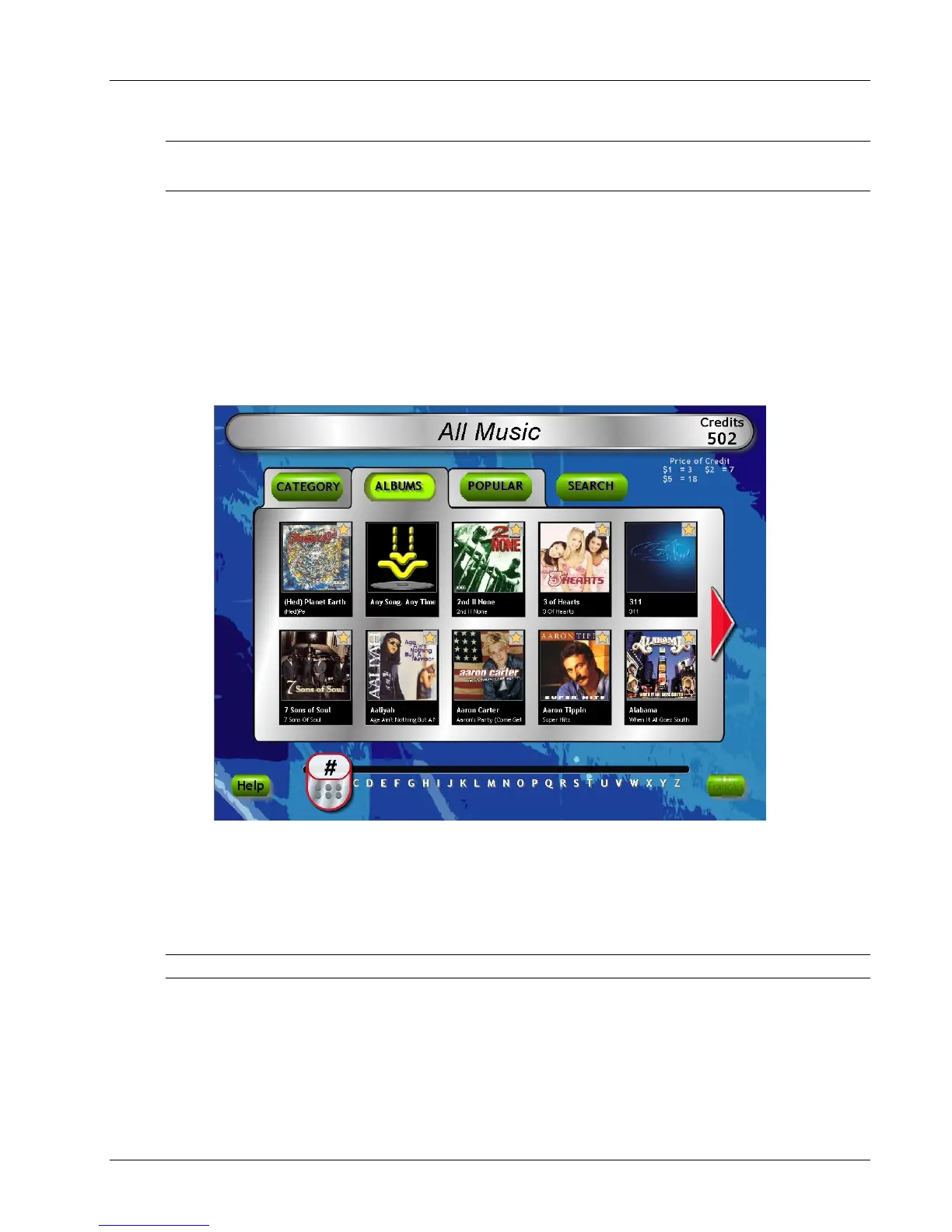
1. Browse through album covers on the local jukebox by touching the red arrow keys on
either side of the panel showing the album covers.
2. To view the songs on an album, touch the album and the song list will appear.
3. Scroll down or up with the double arrows to view all songs on the album. Make a song
selection by touching the song title.
4. Confirm your selection by touching the “YES” box. The song will be selected as long as
there is at least 1 credit under “Credits” in the top right-hand corner of the screen.
Figure 2-7 - Jukebox User Interface
Music Selection And Pricing
See the included manual “Network Setup, Jukebox Operation, Operator Setup Screens” to
understand how to use all of the features associated with the User Interface.
The local music selection and pricing were pre-configured for each hard drive.
NOTE: For Operators Pre-testing the Jukebox In Their Own Facilities:
Any features in the application associated with the network - such as the “Music On
Demand” feature, which accesses all songs in the AMI Entertainment
®
music library will not
work unless the jukebox is connected to the Internet. See the included manual “Network
Setup, Jukebox Operation, Operator Setup Screens” for setup information.


 To Next Page