English
7
32
Theanti-scalefiltershouldbereplaced
whenever indicated by the machine.
7
Beforedescaling,removetheanti-scale
filter from the water tank.
7
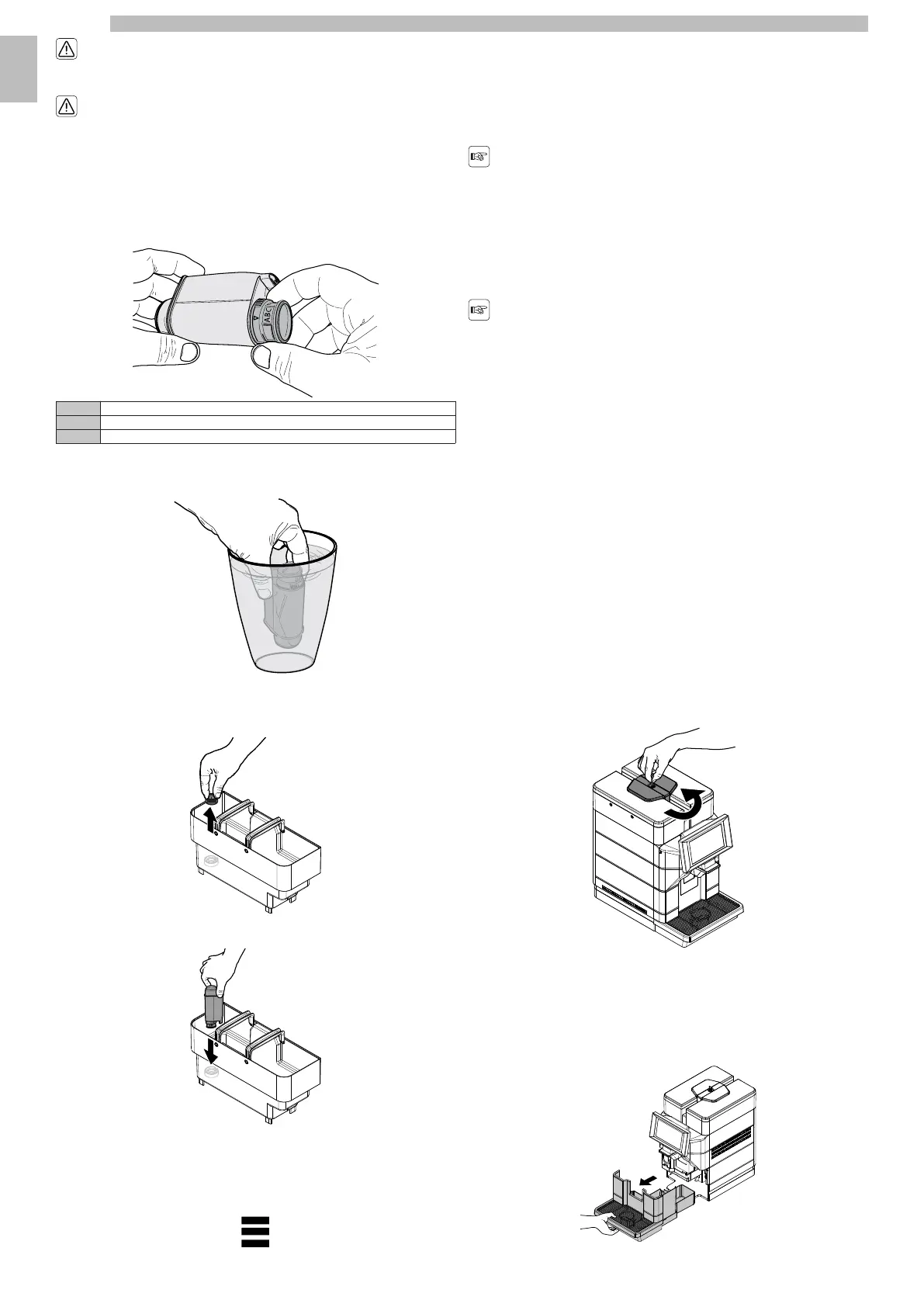
Remove thewater filterfrom itspackaging. Setthe filterinthe standardposition on
letterB.Usethewaterhardnessteststripprovidedwiththemachine.Setthe
"IntenzaAromaSystem"asspecifiedonthefilterpackage(seesection"Measuring
and Adjusting Water Hardness").
7777
ASoft water
BHard water (standard)
CVery hard water.
777
Immersethewaterfilterverticallyincoldwater(withtheopeningpositioned
upwards) and gently press its sides to let the air bubbles out.
7777
Remove the tank from the machine and empty it.
7
Removethesmallwhitefilterfromthetankandstoreitinadryplacesheltered
from dust.
7777
Put the filter into the empty tank. Press it to its limit stop.
7777
Fillthetankwithfreshdrinkingwaterandreinsertitintothemachine.Placea
container under the hot water dispensing spout.
7
Accesstheprogrammingofthemachineasdescribedintheparagraph"Accessto
theprogrammingmenus".Tapthe"menu"icontoviewtheappliance'smenu
functions.
7777
Select"Machinesettings".Select"Maintenance".Select"Waterfiltersettings".
Activate the water filter.
7
OncetheoperationisfinishedfillthewateragainuptheMAXlevelwithfresh
drinkingwater.TheFilter100%iconappearsonthemachine-readyscreento
indicate that the filter has been installed.
7
7.6.1Replacing the water filter
7
Thefiltericonturnsredwhentherangeof
thefilterdropsbelow10%.Replacethe
filterwhenthenoticeisdisplayedorwhen
its range is below 1%.
77
Replacethewaterfilteratleastevery3
months,evenifthemachinehasnotyet
indicated the need to replace it.
7
Pulloutthewaterfilter.Followthestepsindicatedinthe"Waterfilter"section.
Replacethefilterandactivatethenewone.Thedisplayautomaticallyupdatesthe
numberoffiltersused.Thisdatumisupdatedonthemenuonlyiftheuserhas
installedanewfilterbeforeexhaustingthepreviousone,orinanycase,not
exceedingtheeighthfilterinarow.FillthewatertankagainuptotheMAXlevel
with fresh drinking water.
77
Replacing
the
Filter
after
Using
8
Filters
7
Pulloutthewaterfilter.Followthestepsindicatedinthe"Waterfilter"section.All
operationsrelatingtothedescalingphasearerequestedaswell.Thedisplay
updatesthenumberofusedfiltersautomatically,takingitto0/8.However,only
afterdescalinghasfinishedandbeforethenewfilteractivation.Fillthewatertank
again up to the MAX level with fresh drinking water.
77
7.7Closing the Upper Lid
7
(*
only
versions
M2,
M2+,
B2
and
B2+).
7
After refillingandduringnormal operation,theupper protectioncovermustalways
befittedandlockedusingthespecialkeyinordertopreventaccessto
unauthorisedpeople.Inordertolocktheupperlid,positionitandcloseitusing
the special key supplied.
777
7.8Coffee Grind Adjustment
7
Themachineallowsthecoffeegrindtobeslightlyadjustedinordertoadaptitto
thekindofcoffeeused.Foranyadjustments,usetheleverlocatedontheinner
side of the service compartment.
7
Remove the drip tray.
7777










 To Next Page