English
9
51
9.9Emptying the coffee grounds drawer and drip
tray
9
Thisoperationmustbeperformedwiththe
machine turned on and/or in stand-by mode.
99
Themachinenotifieswhentheresiduecollectorhasreachedmaximumcapacityif
thatissetintheprogramming.Thefirstnotification,ifpresetintheprogramming,
notifiestheuserthattheresiduecollectordrawermustbeemptiedandthe
machinestillpermitsthedispensingofcoffee.Anewnotificationisaddedtothe
status panel.
9999
Iftheresidueisnotemptiedafterthefirstnotification,themachineallowsthe
dispensingofbeveragescontainingcoffeeuntilthemaximumcapacityisreached.
Oncethethresholdisreachedthemachinedisablesallthebeveragescontaining
coffee and a new notification is added to the status panel.
9999
Inthiscase,themachinedoesnotallowbeveragescontainingcoffeetobe
dispensed.Tobeabletodispensebeveragescontainingcoffee,itismandatorythat
the coffee residue collector drawer be emptied.
9
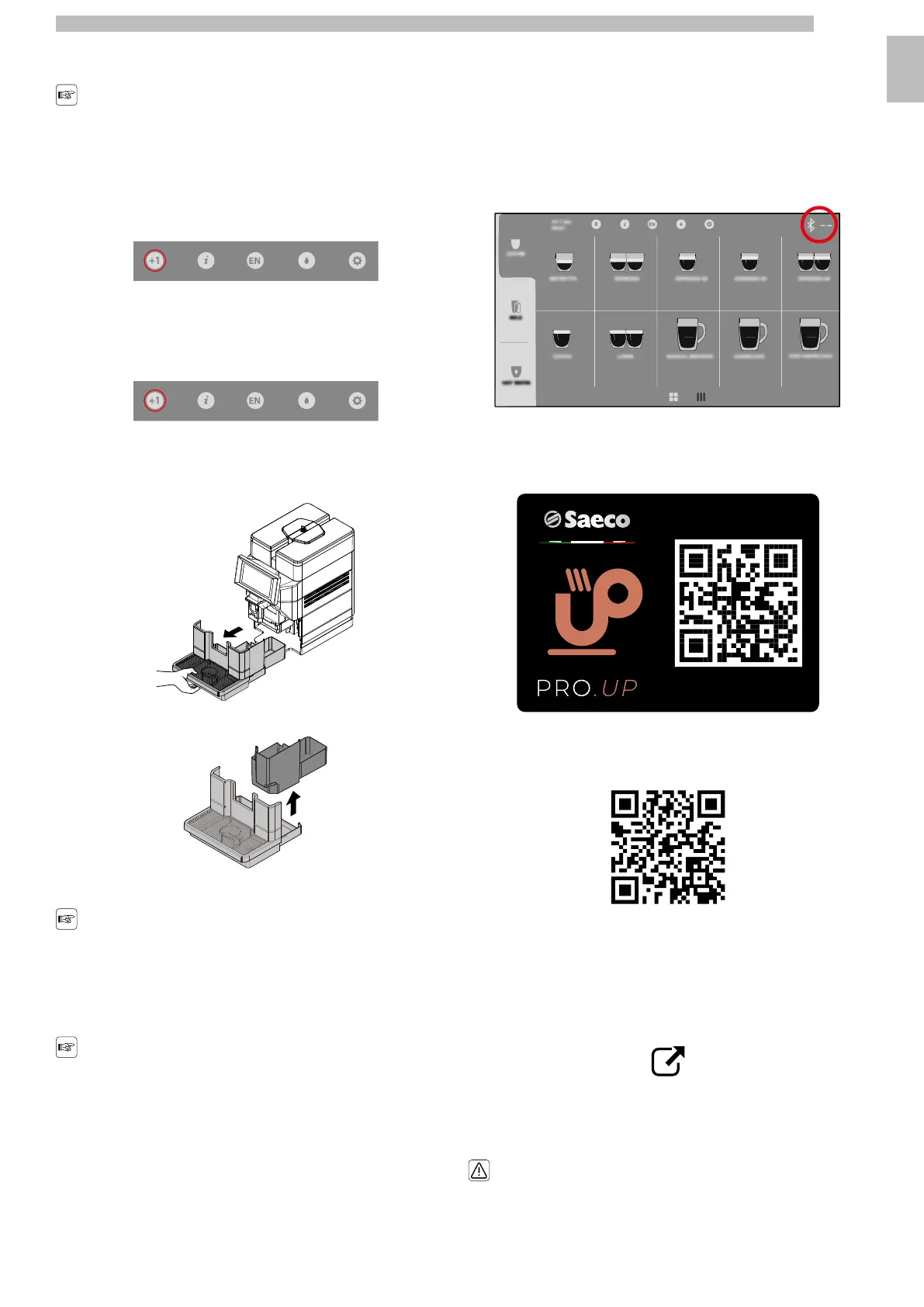
Extract the drip tray and the coffee grounds drawer.
9999
Raise the coffee grounds drawer.
9999
Empty the coffee grounds drawer and the drip tray.
99
Liquidsandcoffeegroundsmustbe
disposed of separately, as appropriate.
99
Insert the residue collector drawer and the drip tray into the machine.
99
Ifthedriptrayisinsertedwithoutthe
coffeegroundsdrawer,themachinewill
not dispense products.
99
Afterhavinginsertedthemthemachineisreadytobeusedandthecoffee
beverages can once again be dispensed.
99
9.10"Touchless option"
9
ThemachineissetuptouseaBluetoothconnection.TheBluetoothconnection
mustbeenabledthroughtheprogrammingmenu,"TouchlessOption"item,"Saeco
ProUp"sub-item,"SaecoProUpSettings"sub-sub-item.Refertothe"Description
ItemsoftheProgrammingMenu"ofthe"ProgrammingMenu"chaptertodisplay
the description of the commands available.
99
WhenBThasbeenactivatedappears,therelativelogoappearsintheeasy-to-use
screen in the top right with the machine identification if set.
99999
The BT makes it possible:
9
•
Tomakeselectionsremotelythroughthe"SaecoProUp"app,alsowithout
registration. The app can be downloaded by framing the following QR code.
9999
•
Setthemachinetooperatecreditsthroughthe"SaecoProUp"portal.The
dedicatedmanualisavailableontheeCommerceEVOCAsite.Followingisthe
linktotheeCommerceEVOCAsite.https://ecommerce.evocagroup.com/The
site can be accessed also by framing the following QR code.
9999
-
Perform the authentication procedure.
9
-
Select the Saeco brand.
9
-
Select "Search".
9
-
Select "Documents".
9
-
Select "Manuals kit" in the "Document type" box.
9
-
Enter "Magic" in the "Model Description" box.
9
-
Press the "Search" key.
9
-
Click on the following icon:
9999
-
Select the dedicated manual.
9
•
Order and/or load themachine credits from the "SaecoPro Up" app, iflogged with
registered and enabled user.
9
•
Maketheadjustmentofthetechnicalsettingdirectlyfrom"SaecoProUp"appif
logged with registered and enabled user.
9
Foranytechnicalmaintenanceoperation,it
is mandatory to power the machine off.
9










 To Next Page