English
10
58
If they do not match, proceed as described below:
10
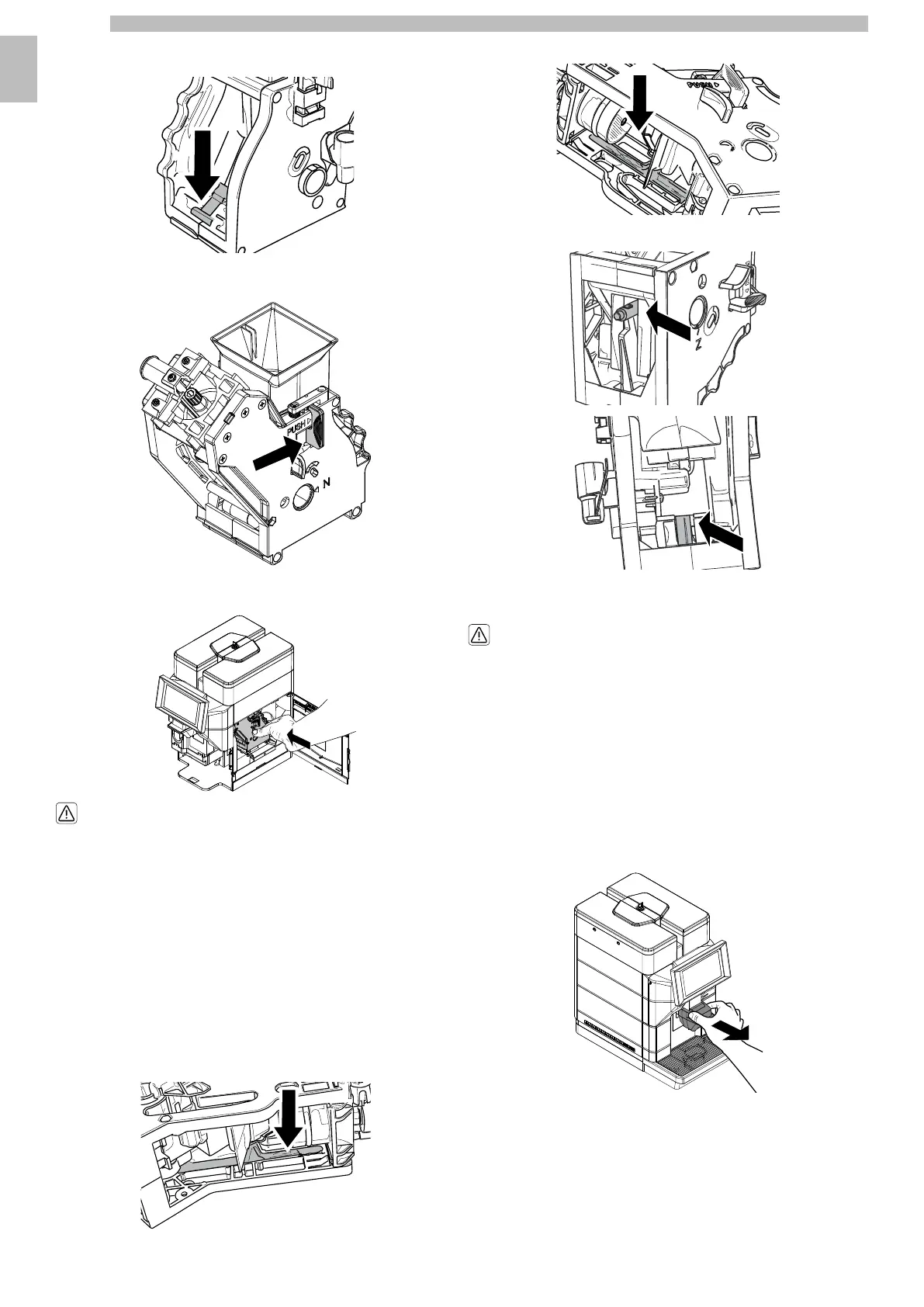
Ensure that the lever is in contact with the brew group base.
10101010
Makesurethatthehookwhichlocksthebrewgroupisinthecorrectposition.
Firmly press the "PUSH" button to check its position.
10101010
Insert the brew group into its seat again until it locks into place WITHOUT pressing
the "PUSH" button.
10101010
Check the correct blocking of the brew group
in the housing, pulling it toward the exterior.
1010
Close the service door.
10
Re-insertthescrewpreventingaccidentalopeningoftheservicecompartmentflap.
(* 120V USA version only).
10
Insert the coffee grounds drawer and the drip tray.
1010
10.2.11Brew group lubrication
10
Lubricatethebrewgroupafterapproximately500cupsofcoffeeoronceamonth.
Thegreaseforlubricatingthecoffeeunitandtherelativeaccessoriescanbe
purchased from your local dealer or the authorised support centres.
10
Beforelubricatingthecoffeeunit,cleanitunderrunningwaterasexplainedinthe
chapter "Manual cleaning of the coffee unit".
10
Lubricate the brew group guides using Saeco grease only.
10101010
Apply the grease evenly on both side guides.
10101010
Lubricate the shaft too.
101010101010
Insert the brew group into its seat again until it locks into place WITHOUT pressing
the "PUSH" button.
1010
Check the correct blocking of the brew group
in the housing, pulling it toward the exterior.
1010
Close the service door.
10
Re-insertthescrewpreventingaccidentalopeningoftheservicecompartmentflap.
(* 120V USA version only).
10
Insert the coffee grounds drawer and the drip tray.
1010
10.2.12Cleaning coffee dispenser container
10
Clean the coffee dispenser container after about 500 deliveries or once a month.
10
Below please find how to disassemble the container:
1010
Remove the aesthetic cover.
10101010




 To Next Page