© Safe Fleet | 2020 | All rights reserved | Part #: 700-1234 R1
DH4 Installation Guide
p. 17
DH4 Administration
Live View
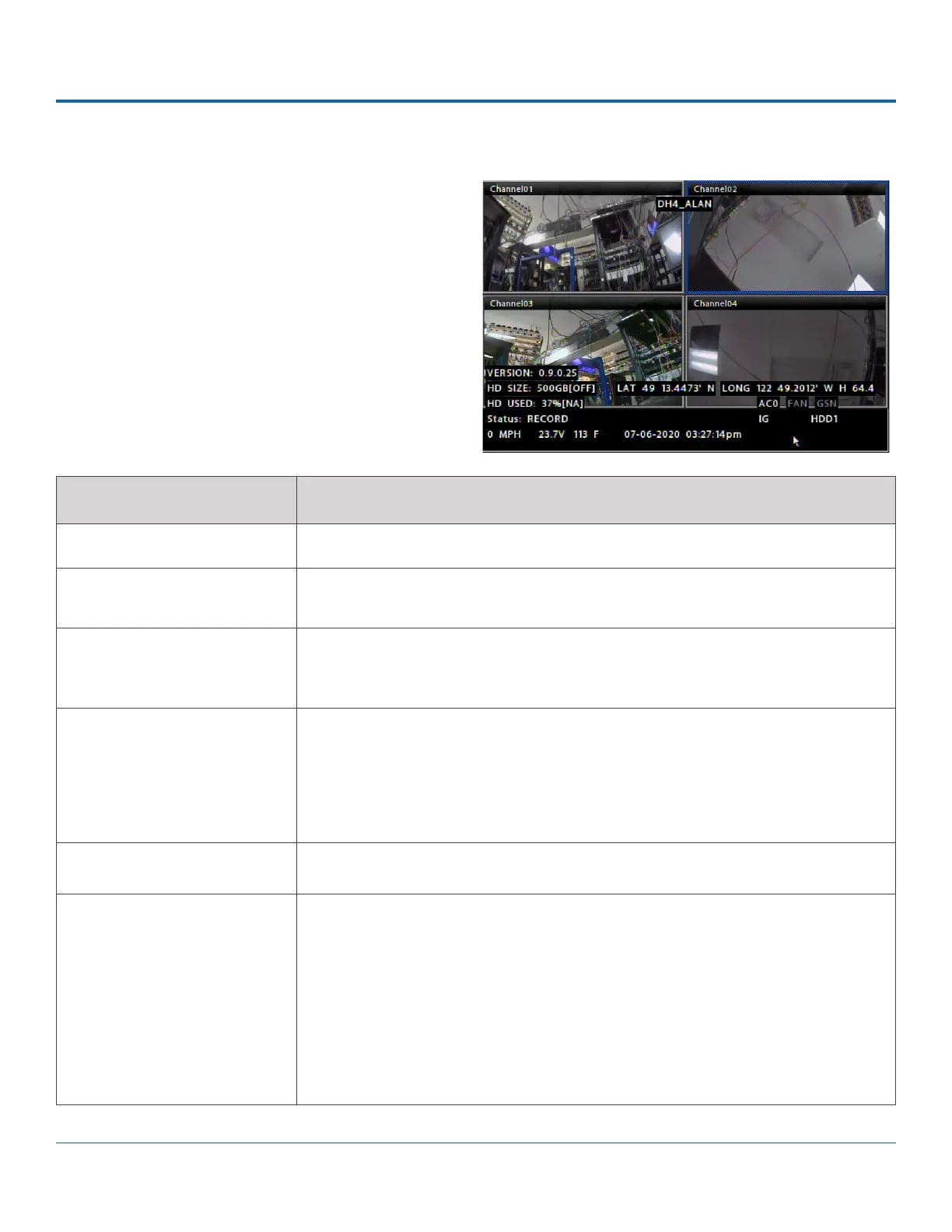
During live viewing and recording, in addition to active
camera feeds, the information displayed on the OSD
includes the items shown in the image and table.
DH4 Conguration:
Camera Settings.
FEATURE DESCRIPTION
[MAIN_TITLE] Main title of the DVR; max. 32 characters.
[CAMERA_TITLE] Appears in the top-left corner of each viewing section (in the example, "FRONT",
"MID"....)
HD SIZE Formatted size of the primary recording media, in gigabytes (GB). The second value
in square brackets is the size of the SD card. "OFF" indicates the storage media is not
present.
HD USED Percentage of primary media storage spaced used by recorded video. The second
value in square brackets indicates the percentage of recorded video on the SD card.
"OFF" indicates the storage media is not present.
At 100%, the message displayed depends on the Repeat Record settings in the
Recording Settings menu.
VERSION Firmware version.
STATUS DVR operational status:
• - LIVE (live mode - not recording)
• - PLAYBACK (DVR playing locally)
• - RECORD (normal recording)
• - ALARM (alarm recording)
• - V.LOSS (video loss or camera signal loss)



 To Next Page