7-20 EB 6493 EN
Start-up and conguration at the device
Proceed as follows for a PI controller
1. Switch to manual mode (
).
2. In the CNTR menu, set the function -CO- C.PID = PI CP.YP.
3. In the PAR menu, set the parameters KP = 0.1 and TN = 9999s.
4. In the operating level, set the set point W to the required value.
Î Press
to select W and use the cursor keys ( , ) to set the value.
5. In the operating level, change the manipulated variable Y so that the controlled variable
X has the same value as the set point W (error Xd = 0).
Î Press
to select Y and use the cursor keys ( , ) to set the value.
6. Switch to automatic mode (
).
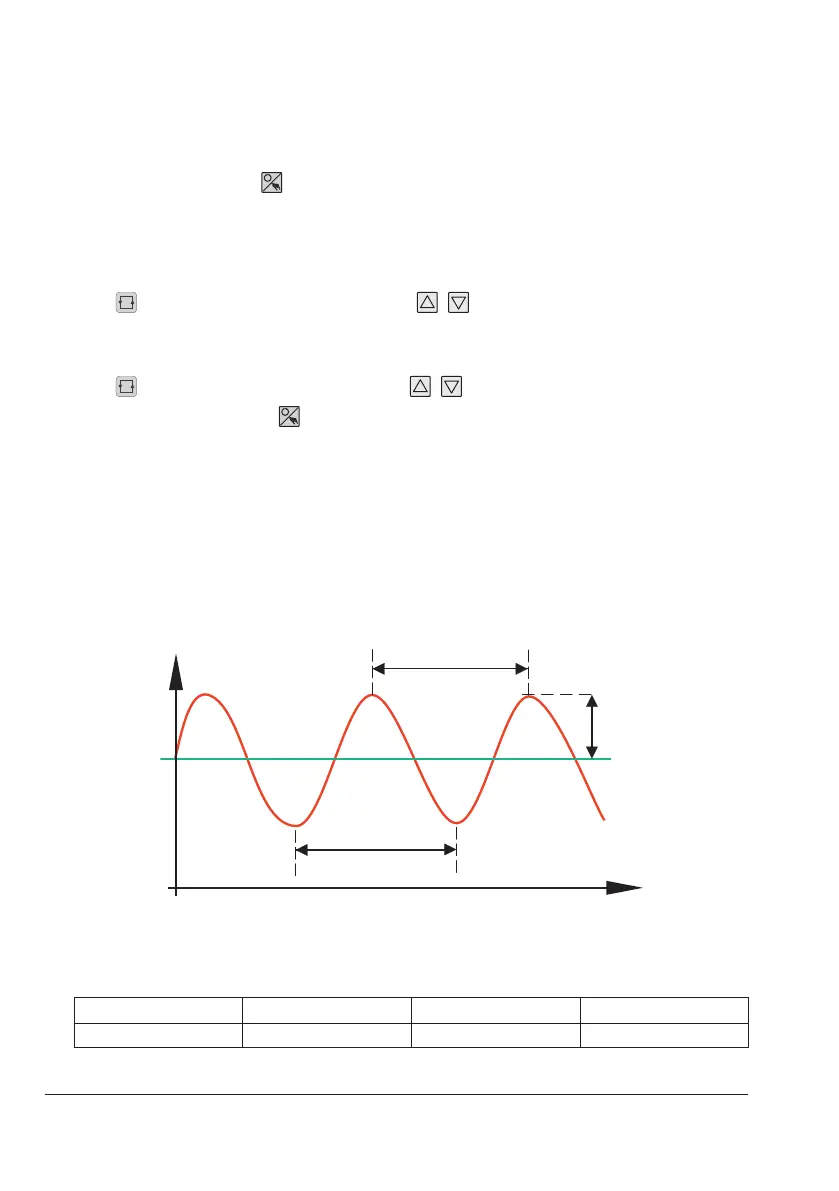
7. In the PAR menu, step up the KP parameter until the controlled variable shows an har-
monic oscillation pattern.
Every time the KP increases, let the controlled system oscillate, e.g. by making small
changes to the set point.
8. Write down the adjusted KP value as the critical proportional-action coefcient K
P,crit
.
9. Time how long it takes for one entire oscillation to nd T
crit
.
To achieve a more precise result, time several oscillations and calculate the average time
from the results.
krit
Tkrit
Set point
Amplitude
Controlled variable
t in s
10. Multiply K
P,crit
and T
crit
by the factors listed in the table below. Use the results for KP and
TN accordingly.
KP
TN TV
PI controller 0.45 x K
P, crit
0.85 x T
crit
–



 To Next Page