2 Introduction
2.2 Functional overview
Page 12
Art. no.: 2.510474 rev.: d
ARGUS LCM/PLUS
2.2 Functional overview
2.2.1 Buttons of the Argus LCM PLUS
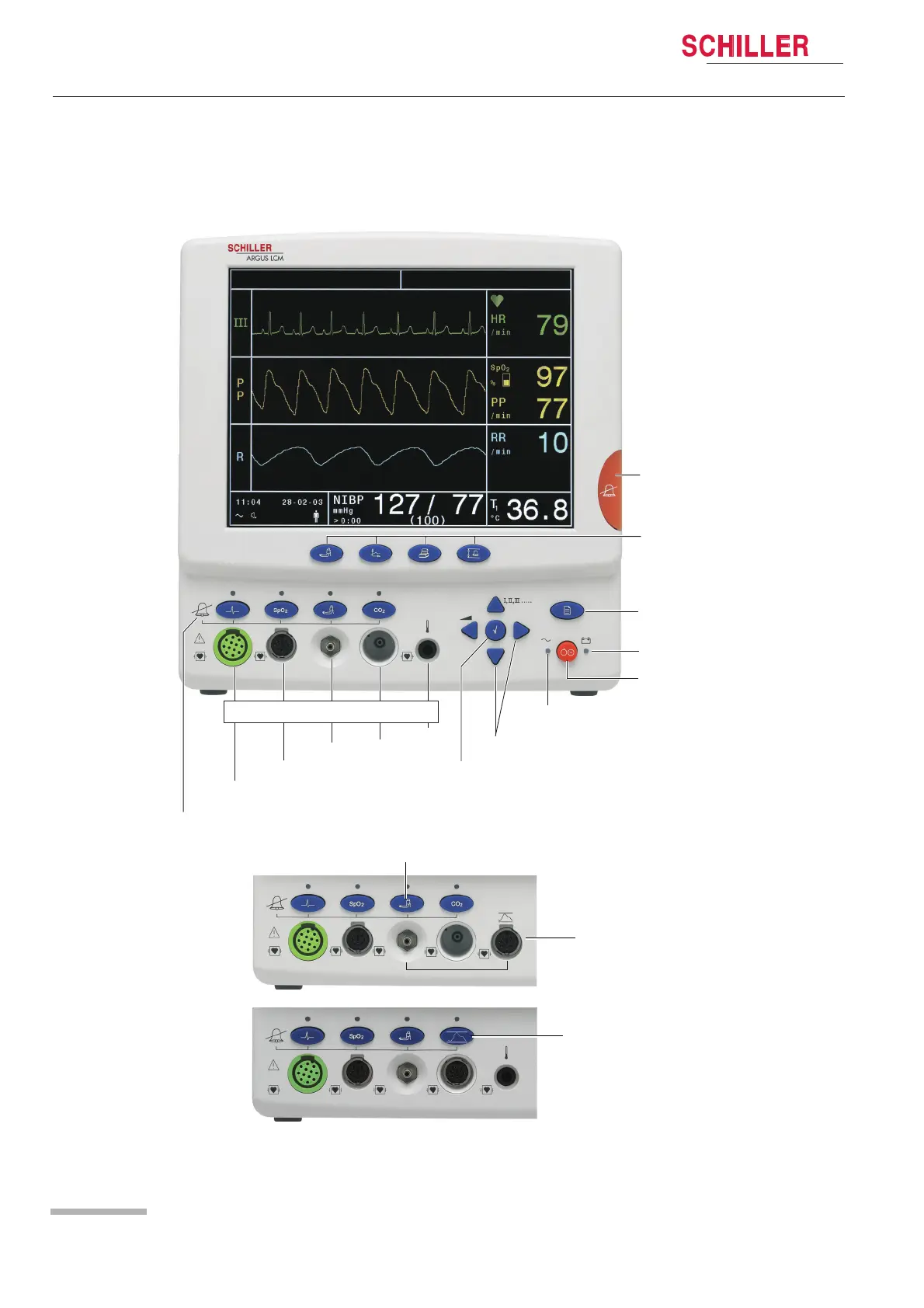
Fig. 2.1 ARGUS LCM front view
Patient connections
2
3
4
1
Audible Alarm
suppress/acknowledge
Direct buttons for :
1. NIBP s
2. Trend display
3. Print
4. Setting alarm limits
tart/stop
Menu access button
LED indicating battery
operation
LCM ON/OFF button
LED indicating main supply operation
Navigation buttons down/up, /leftright
Program and enter button
Alarm OFF
ECG
SPO
2
NIBP
CO
IBP
2/
°C/°F
i
Access to the menu IBP and NIBP alarm
on/off and IBP calibration.
IBP connection instead of CO
2
This is the LCM plus
version E.
This is the LCM plus
version D.
IBP connection instead of Temperature













 To Next Page