Page 35
Maintenance 5
Operating Instruction Zero and two point CO
2
calibration 5.5
Art. no.: 2.510474 rev.: d
ARGUS LCM/PLUS
5.5 Zero and two point CO
2
calibration
5.5.1 Starting the zero point calibration
5.5.2 Starting the two point calibration
•CO
2
scrubber not more than one year old.
• Watertrap
• Calibration gas 10% CO
2
Bal. N
2
• Or calibration kit including above items and accessory Art.no. 2.100741
• Calibrate the sensor's zero point voltage at dry, clean air and at room temperature.
• Zero point calibration must be carried out every two weeks. A zero point calibration
is successful if the CO
2
value is in the range of 0.0% to 0.3%.
• Two point calibration must be carried out every six months. A two point calibration
automatically includes zero-point calibration. A two point calibration is successful
if the CO
2
value is 10% after one minute.
• The calibration date is saved by the LCM and displayed in the CO
2
settings panel.
When the calibration interval has elapsed, a message is displayed.
To reduce the calibration time, you can change the respiration source to CO
2
in the
menu About+/Param. The pump starts as soon as the menu is closed.
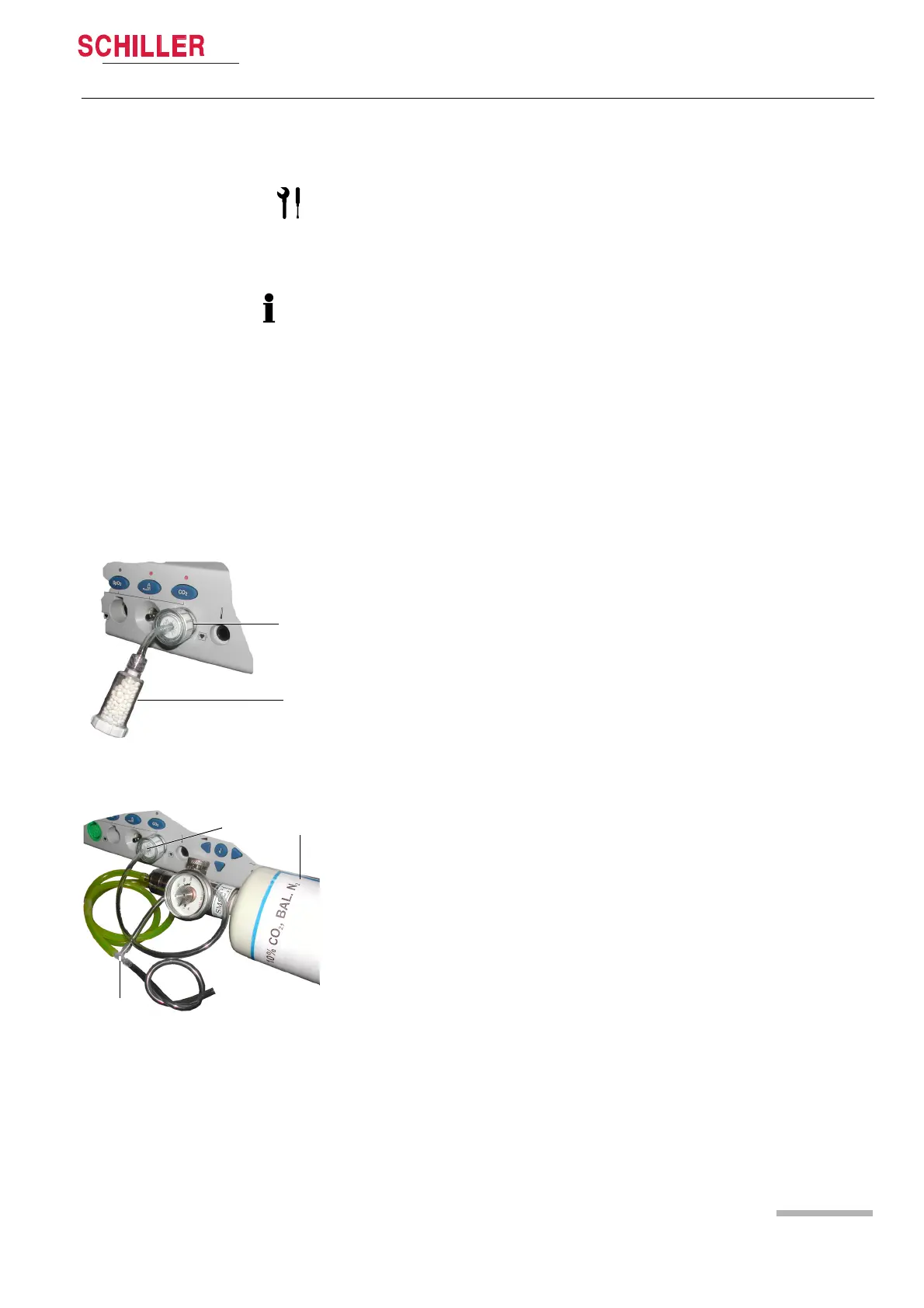
1. Connect the watertrap (1) to the CO
2
socket.
2. In the CO
2
screen, select Start zero point calibration and confirm with enter.
The pump is started.
3. Continue with enter. You are prompted to connect the CO
2
scrubber.
4. Connect the CO
2
scrubber (2) to the watertrap (1).
5. Press enter to continue. The pump must run five min. before the calibration is car-
ried out automatically.
6. When the calibration is finished, a message is displayed. Finish the calibration by
pressing enter.
1. Connect the watertrap (1) to the CO
2
socket. (See zero point calibration.)
2. In the CO
2
screen, select Start two point calibration and confirm with enter. The
pump is started.
3. Continue with enter. You are prompted to connect the CO
2
scrubber.
4. Connect the CO
2
scrubber (2) to the watertrap (1).
5. Press enter to continue. The pump must run five min. before the calibration is car-
ried out automatically. When the zero point calibration is finished, you are prompt-
ed to connect the calibration gas.
6. Remove the CO
2
scrubber and connect the calibration gas (3) to the watertrap (4)
using a T-piece (5).
7. Open the valve of the gas bottle. An eCO
2
value of about 10% is indicated, and
the calibration is carried out.
8. When the calibration is finished, a message is displayed. Finish the calibration by
pressing enter.
1
2
3
5
4













 To Next Page