7 General Description of Functions
30 / 86 EN-US · 30.30.00.00424 · 07 · 10/23
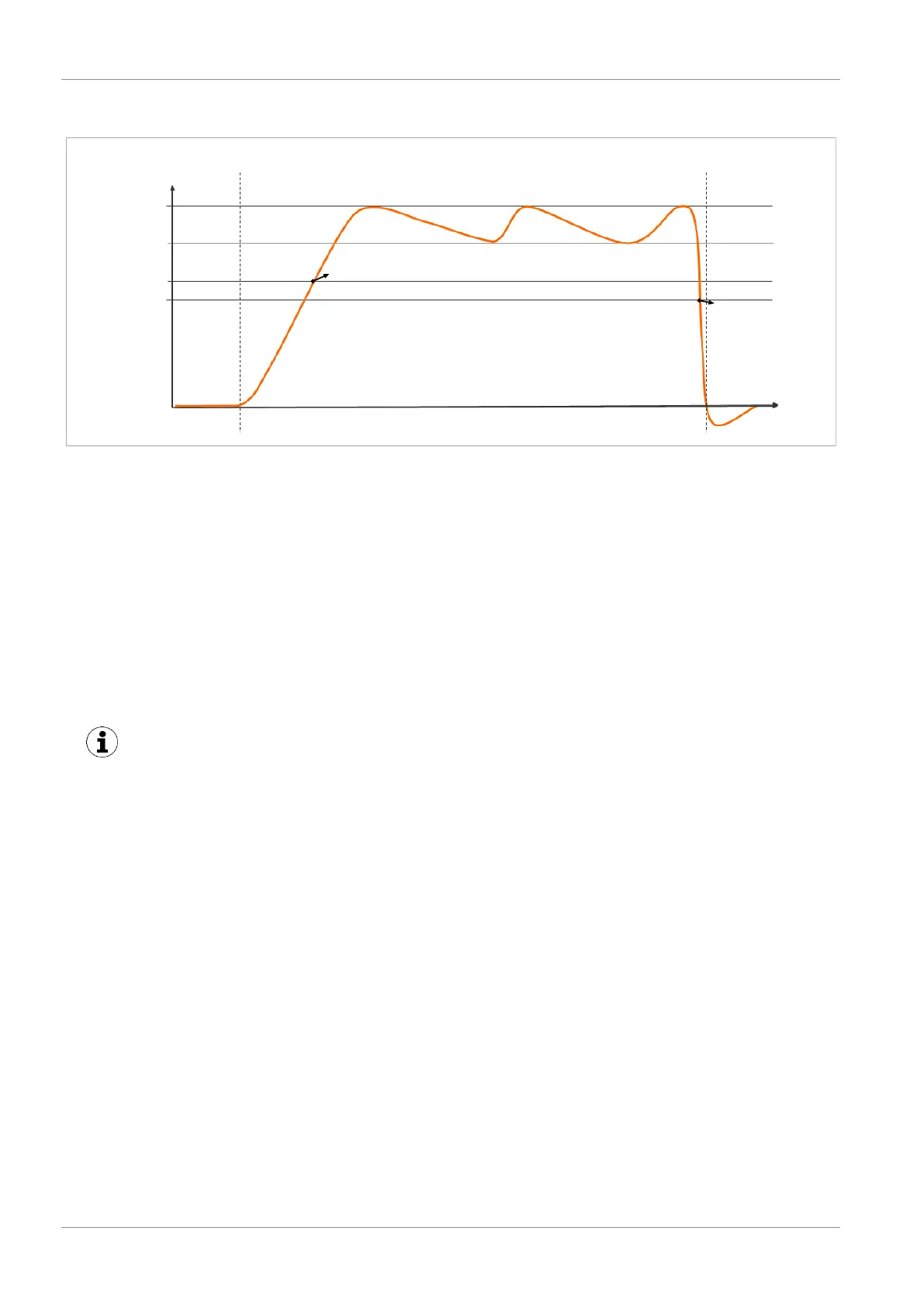
The diagram below shows the vacuum curve for when the air saving function is activated:
H1
H1-h1
H2
H2-h2
Vacuum
[mbar]
Vacuum on
Time [s]
OUT=on
OUT=off
The ejector has an integrated air saving function and automatically regulates the vacuum in suction
mode:
• The electronics switch the venturi nozzle off as soon as the set vacuum limit
value (switching point H1) is reached.
• When objects with airtight surfaces are picked up, the integrated non-re-
turn valve prevents the vacuum from dropping quickly in the event of a
power failure.
• If the system vacuum drops below the limit value switching point H1-h1 due
to leaks, the venturi nozzle is switched back on.
• Depending on the vacuum, the H2 process data bit is set once a workpiece is
picked up safely. This enables the further handling process.
If small volumes are to be evacuated, the set limit value H1 may be exceeded considerably
before the vacuum is switched off. This system behavior does not constitute an error.
7.2Depositing the Workpiece/Part (Blowing Off)
In blow off mode, the vacuum circuit of the ejector is supplied with compressed air. This ensures that the
vacuum drops quickly, allowing the workpiece/part to be deposited quickly.
The ejector provides three blow off modes for selection:
• Externally controlled blow off
• Internal time-controlled blow off (not applicable for pulse variant)
• External time-controlled blow off
The current process state is indicated by the LED status indicators.
If the “Suction” signal input is still present in the pulse-controlled ejector variant (IMP) after “blow off”, it
is not evaluated. The ejector does not switch to “suction” status until another pulse is activated.
During blow off, [-FF] is shown on the display.



 To Next Page