12 Warnings and Errors
64 / 86 EN-US · 30.30.00.00424 · 07 · 10/23
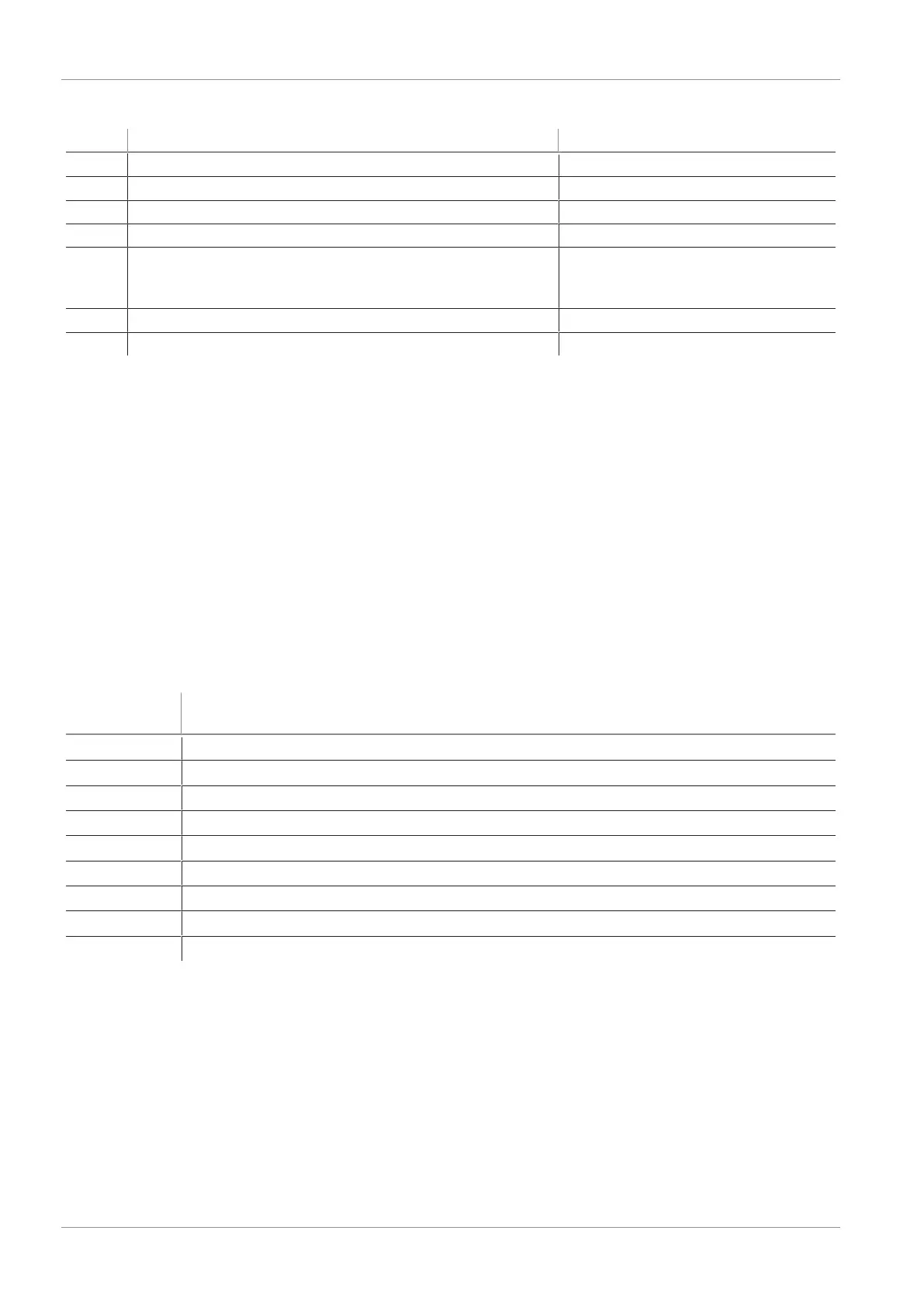
The table below explains the coding of the condition monitoring warnings:
Bit Event Update
0 Valve protection function activated Cyclic
1 Set limit value t-1 for evacuation time exceeded Cyclic
2 Set leakage limit value -L- exceeded Cyclic
3 Limit value H1 was not reached Cyclic
4 Dynamic pressure > (H2-h2) and < H1 As soon as a corresponding dy-
namic pressure value has been de-
termined
5 Supply voltage U
S
outside the operating range Constant
7 Input pressure outside operating range Constant
The four bits with the lowest values describe events that can only occur once per suction cycle. They are
reset at the start of every suction cycle and remain stable until after suctioning has finished.
Bit number 4, which describes dynamic overpressure, is initially deleted when the device is switched on
and is updated when a dynamic pressure value is detected.
Bits 5 and 7 are regularly updated independently of the suction cycle, and reflect the current values for
the supply voltage and system pressure.
The values measured by the condition monitoring system, namely the evacuation times t
0
and t
1
and the
leakage value L, are reset at the beginning of the suction process and updated once they have been mea-
sured.
12.4Error Messages in IO-Link Mode
When a known error occurs, this is reported in the form of an error number. In SIO mode, error messages
are shown on the display. An “E” followed by the error number appears on the display.
The following table shows all the error codes:
Code dis-
played
Explanation
E01
Electronics error – internal data management, EEPROM
E02
Electronics error – internal communication
E03
Zero-point adjustment of the vacuum sensor outside ± 3% FS
E07
Supply voltage is too low
E08
IO-Link communication is interrupted
E17
Supply voltage is too high
E18
Input pressure outside operating range
FFF
Present vacuum exceeds the measurement range
-FF
Overpressure in vacuum circuit; this normally happens exclusively in Blow off mode.
The error [E01] remains on the display after being shown once. Delete the error by switching off the
power supply. If this error occurs again after the power supply is switched back on, then the device must
be replaced.



 To Next Page