Portable X-ray Units
Service Manual
SM-1076R2
14
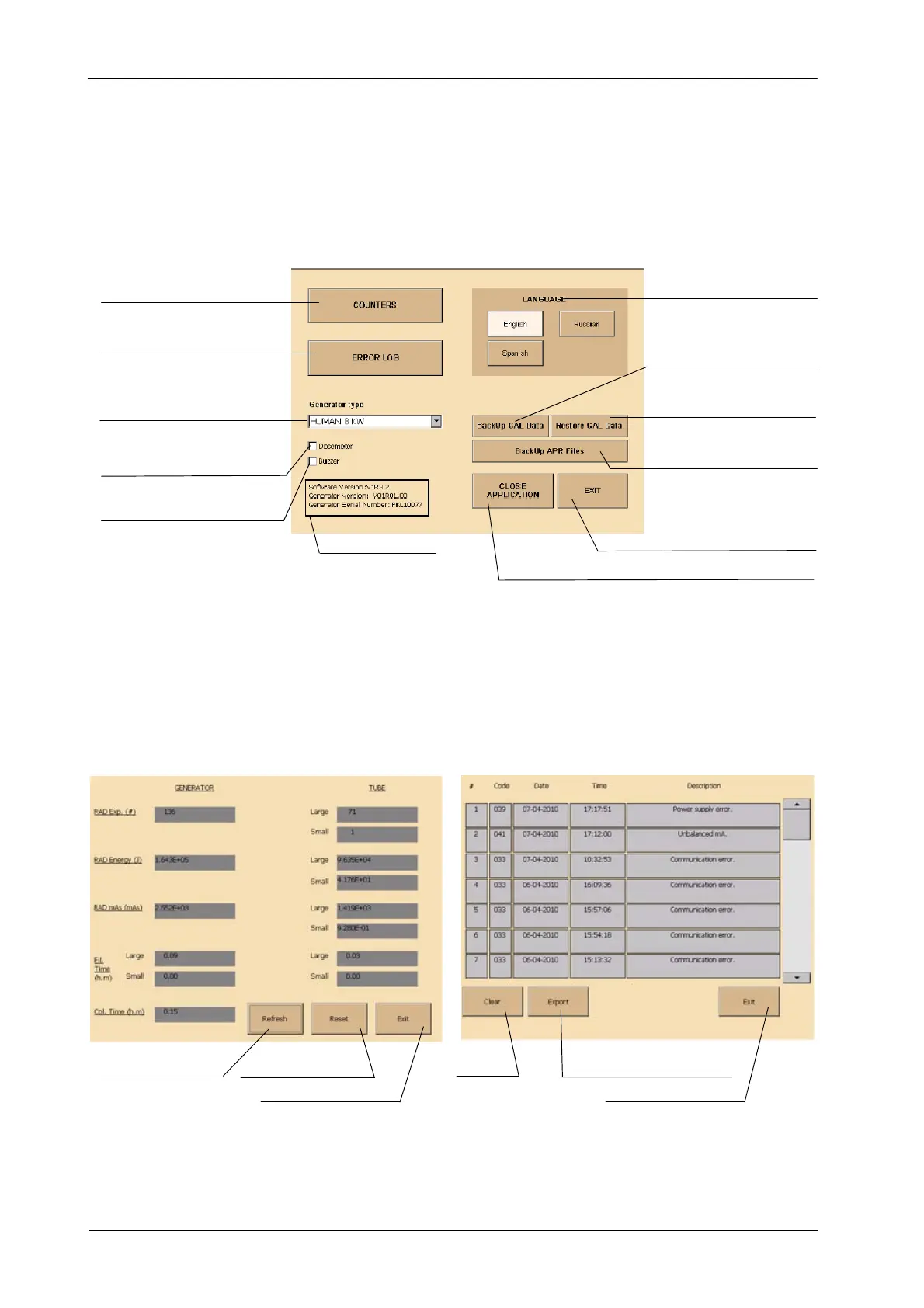
Illustration 2-1
Service Applications in the Touch Screen console
Once inside the Touch Screen Service Mode, the following is displayed:
Selects the language
Exit from Service Mode
Factory S et --
only affects to the length of
selectors (sliders)
Performs a Backup copy in the
Selected Drive (SD by defect)
Restores the calibration data
from the FFSDISK (it is like
C:/ in a PC)
Performs a Backup copy of the
APR in the Selected Drive
Access to Counters Screen
See below
Access to Error Log Screen
See below
System Information
Turns ON/OFF the buzzer for
errors
Activates the Dose reading when
installed a Dosimeter
Closes the RAD program. It is used to access to the OS
of the Unit. ONLY TRAINED STAFF should TOUCH this
button. The only way to run the application again is
to enter in mydevice/FFSDISK/SEDECAL.EXE
Counters Screen
Error Log Screen
Updates all counters
Resets all counters
Back to Touch Screen
Service Mode Screen
Back to Touch Screen
Service Mode Screen
Erases all
Error info
Exports a file in CSV format to
the SD or FFSDISK


 To Next Page