Portable X-ray Units
Service Manual
SM-1076R2
31
3.2.6 MANUAL MODIFICATION OF kVp GAIN AND mA GAIN
In some situations in which it is difficult to perform the calibration
of kVp Gain and/or mA Gain or when the value is already known,
these values can be manually set.
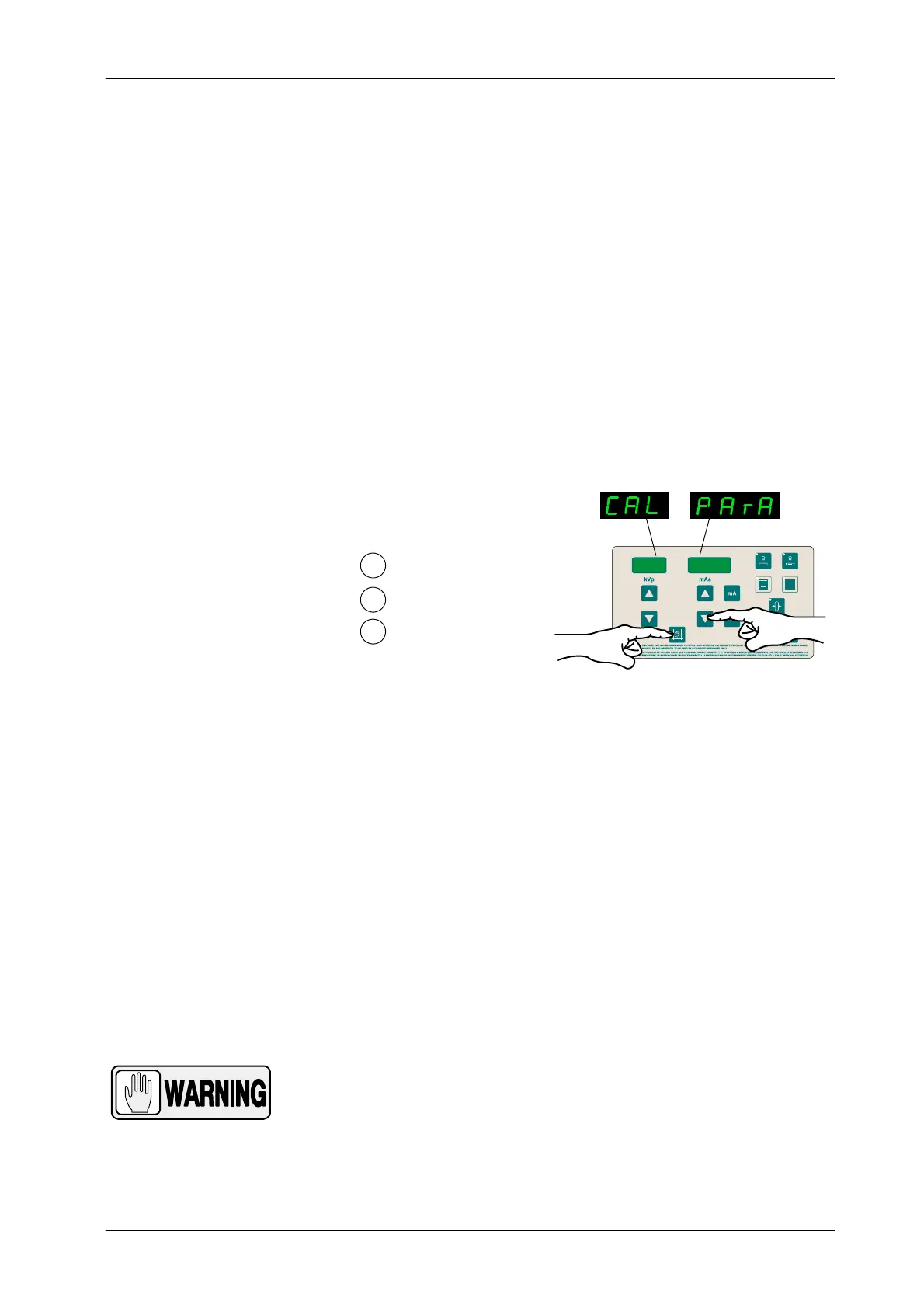
1. To enter Calibration Menu, press and hold “Collimator Light”
push-button and then press and release “mAs Decrease” push-button
(two beeps sound). (CAL PArA) appears on the displays while
“Collimator Light” is pressed. Then release “Collimator Light”
push-button. The kVp Display shows P01 and one of the Focal Spot Leds
blinks.
1
2
Press and hold Collimator Light
Press and release mAs Decrease
Release Collimator Light
3
kVp
mAs
In case you have to manually modify the mA Gain instead of the
kVp Gain, select menu P02 by pressing the “kVp Increase”
push-button (kVp Display shows P02).
2. Press any “Focal Spot” push-button to check the current Gain value (kVp
o mA Gain), it is displayed on the mAs display for a couple of seconds.
3. Press “mAs Decrease” or “mAs Increase”, to set the new value.
4. Press “Reset” push-button to save the value, a long beep sounds.
5. Exit Calibration by pressing and holding “Collimator Light” push-button
and then press and release “mAs Decrease” (two beeps sound). Then
release “Collimator Light” (kVp and mAs parameters are shown).
IF THE D IP-SWITCH SW1-1 OF THE PORTABLE CONTROL
BOARD HAS BEEN SET IN “ON” POSITION TO ENABLE
SERVICE MODE, DO NOT FORGET TO SET IT IN “OFF”
POSITION (SERVICE MODE DISABLED) ONCE THE
CALIBRATION IS FINISHED.
Note .
Note .



 To Next Page