10
Connections
Sequential
Connections
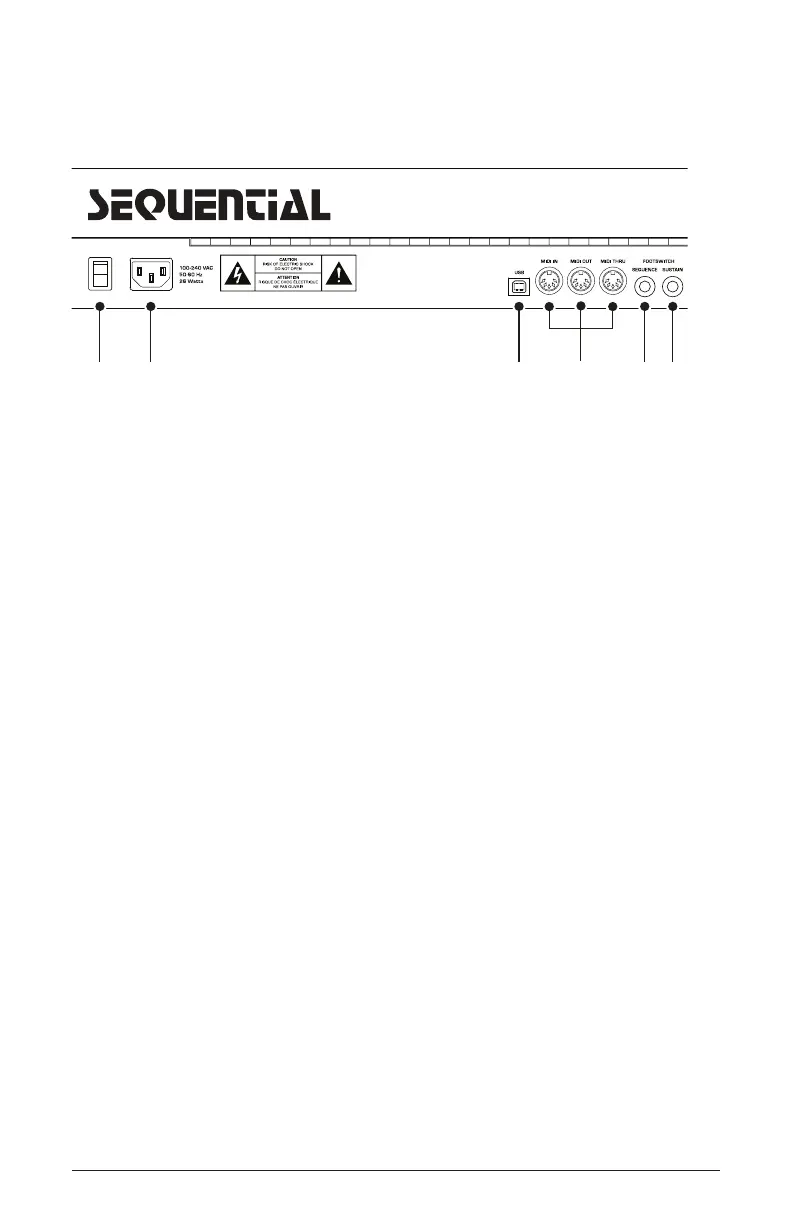
1. On/Off Switch—Turns the synth on and off.
2. AC Power Connector—Accepts a standard, grounded IEC power
cord. Operates over a range of 100 to 240 volts and 50 to 60 Hz.
3. USB Connector—For bidirectional MIDI communication with a
computer. The Trigon-6 is a Class Compliant USB device and does not
require additional drivers when used with Mac OS or Windows. See
Using USB on page 62 for more information.
4.MIDI In, Out, and Thru—Standard 5-pin MIDI DIN connectors.
5. Footswitch-Sequence—Accepts a momentary, normally open or
normally closed footswitch to turn the sequencer or arpeggiator on and
off. Alternatively, an audio signal connected to this jack can be used to
either control sequencer/arpeggiator playback, or to gate the lter and
amplier envelopes while notes are held. See “Seq Jack” on page 15
for more information about choosing the appropriate mode for these
behaviors.
6. Footswitch-Sustain—Accepts a momentary, normally open or
normally closed footswitch to control sustain. See “3. Sustain +/- :
Nor, Rev, n-r, r-n (Normally Open, Normally Closed, Sustain Normally
Open/Sequencer Normally Closed, Sustain Normally Closed/Sequencer
Normally Open)—The Sustain pedal polarity parameter affects both
the sustain pedal and sequencer jack input ports. There are two types
of momentary footswitches, normally open and normally closed. Either
5 6
4
31 2















 To Next Page