12
GB
Page
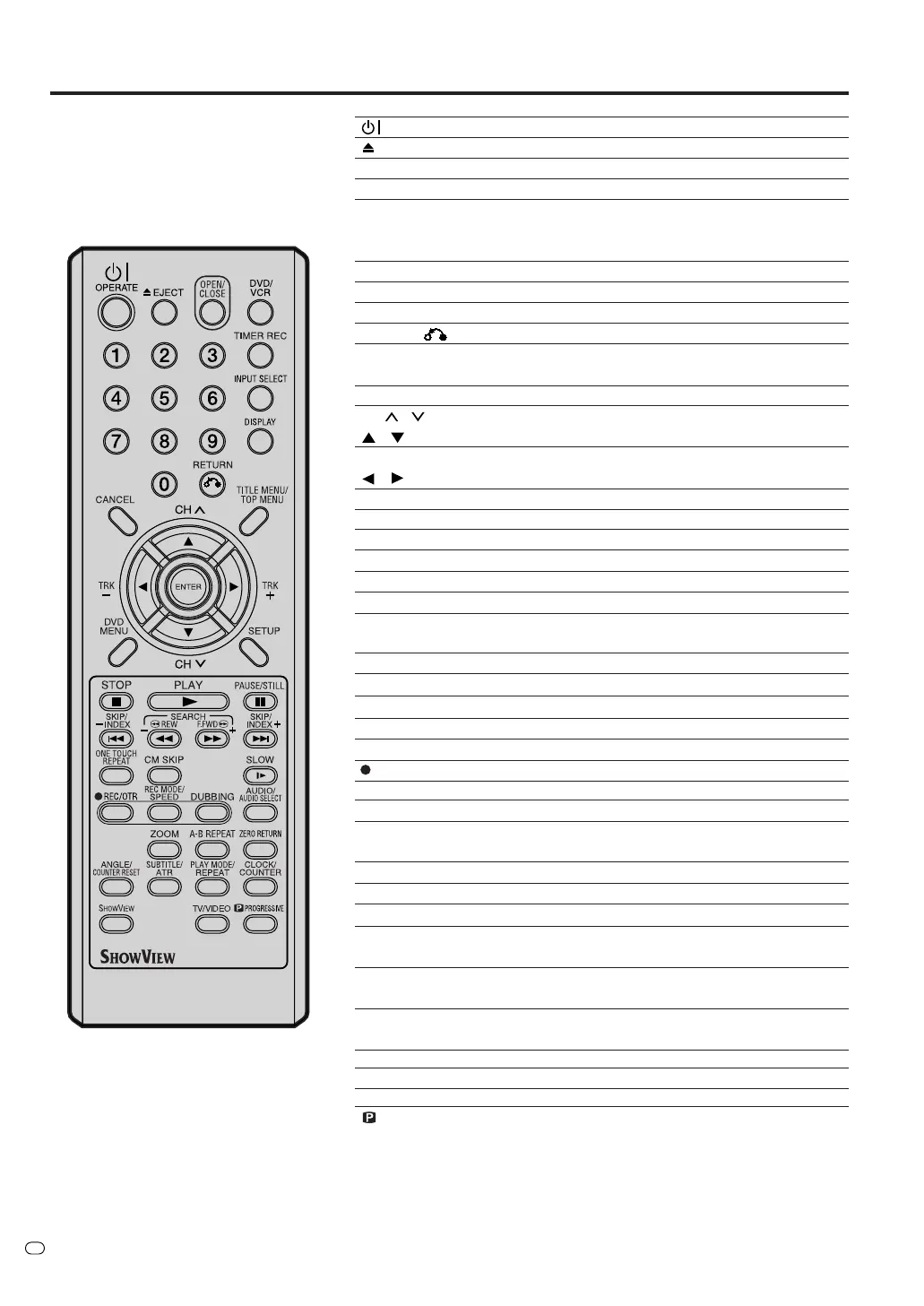
Remote control
OPERATE Turns power on/off. 17,18
EJECT Ejects the cassette tapes. 45
OPEN/CLOSE Opens or Closes the tray. 29
DVD/VCR
Switches to operation between VCR and DVD.
29, 46, 77, 78
0-9 Direct channel selection of TV. 51, 53
Setting input. 19, 33, 75
Entering a password. 20
TIMER REC Sets the unit to start recording at a preset time. 60
INPUT SELECT Scart input or AV-Front input. 79, 80
DISPLAY Displays VCR or DVD operation status. 31, 47, 64
RETURN
Close the menu window. 18, 41
CANCEL Deletes the Timer recording program. 60
Cancels input data in the setting mode. 19, 76
TITLE MENU/TOP MENU
Displays titles of a DVD disc. 30, 35, 38, 63
CH /
Channel selection. 51, 53
/ Cursor buttons.
TRK (TRACKING) +/–
Manual tracking in the playback mode for VCR. 47
/ Cursor buttons.
ENTER Option selection in the menu.
DVD MENU Displays the menu of the DVD disc. 30, 35
SETUP Displays the setup menu. 18, 58
STOP 3 Stop. 29, 46, 52
PLAY 1 Playback. 29, 46
PAUSE/STILL 4 Still picture/Recording pause on/off. 32, 47, 52
SKIP 6/7
Skips chapters in the forward or reverse direction.
32, 42, 71
INDEX – 6/+7 Searches for the INDEX mark of a tape. 48
REW/SEARCH – 8 Rewind/Review playback. 32, 46, 47
F.FWD/SEARCH + 9
Fast Forward/Forward search playback. 32, 46, 47
ONE TOUCH REPEAT
Skips the DVD playback back 10 seconds. 34
CM SKIP Skips commercial breaks. 33, 47
SLOW n Slow motion playback. 32, 47
REC/OTR
Recording/One-touche Timer Recording (OTR).
51, 53, 79
REC MODE/SPEED Selects the recording mode. 51, 53, 77
DUBBING Copies VCR to DVD or DVD to VCR. 77, 78
AUDIO
Changes the soundtrack language of the DVD. 37
AUDIO SELECT
Switches sound between mono and stereo. 61
ZOOM Zoom (for DVD/VIDEO CD). 36, 42
A-B REPEAT Repeats playback between A and B. (DVD/CD) 34
ZERO RETURN
Stops the tape when the counter reaches 00
H
00
M
00
S
.48
ANGLE Changes playback angle of a DVD disc. 36, 42
COUNTER RESET Resets the counter to 00
H
00
M
00
S
.48
SUBTITLE Selects subtitles of the DVD disc. 36
ATR Digital AUTO TRACKING. 47
PLAY MODE Displays the playback mode. 33
REPEAT Repeats playback. 34, 47
CLOCK/COUNTER Changes the front panel display mode. 48
SHOWVIEW Display the SHOWVIEW program screen. 55
TV/VIDEO Select to operate TV/VCR 52
PROGRESSIVE Activates the progressive scanning mode. 44
TV/VIDEO



 To Next Page