26
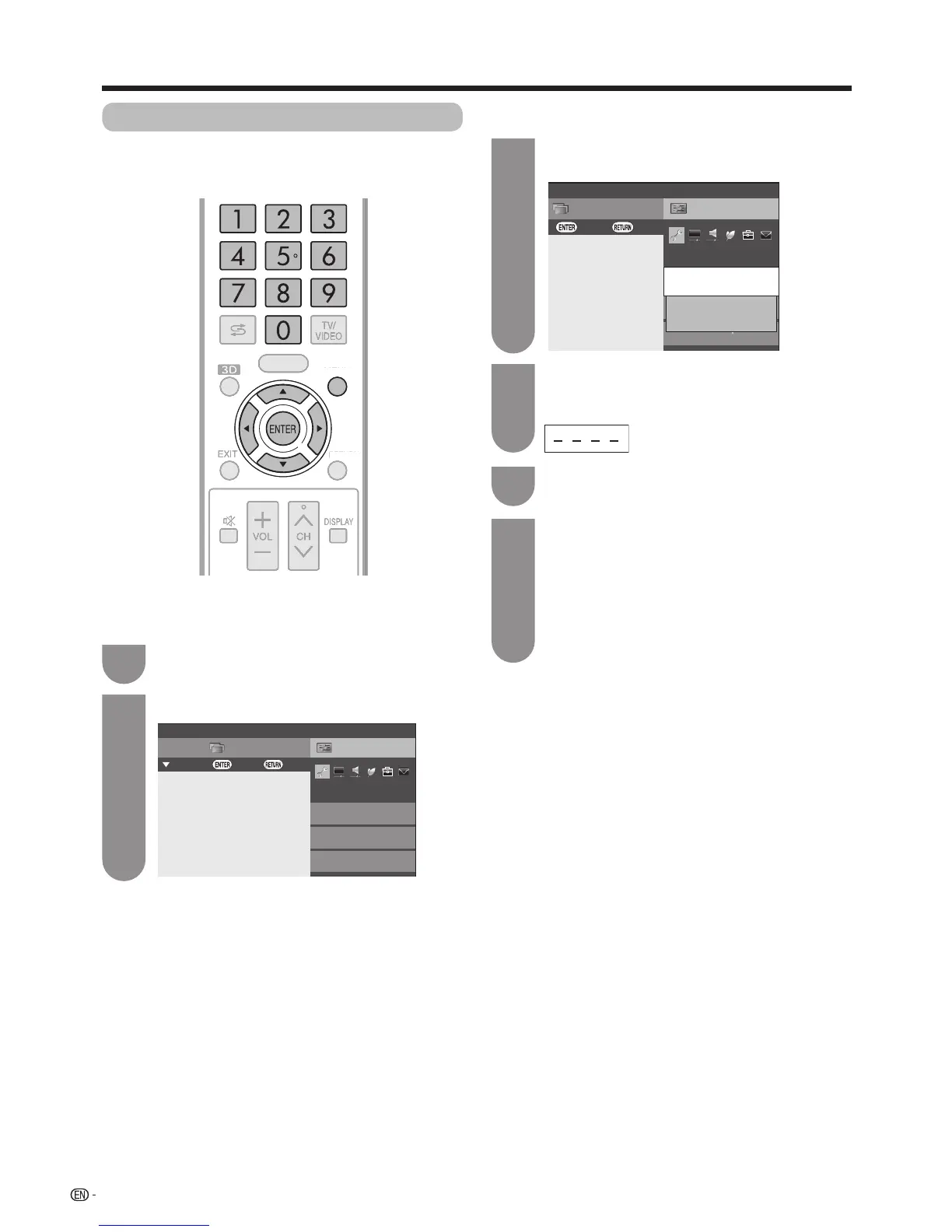
Press
MENU
andtheMENUscreendisplays.
Press
a
/
b
to select “Auto installation”, and
then press
ENTER
.
1
3
SetupCH list
Menu
View setting
:Back:Enter
Network setup
Channel settings
[Off]
Auto installation
Execute auto installation
4
6
Press
a
/
b
to select the desired language
listed on the screen, and then press
ENTER
.
Press
c
/
d
toselect“DigitalSearch”or
“AnalogueSearch”,andthenpress
ENTER
.
Youdonotneedtodoanythingduringthe
auto search.
Press
c
/
d
toselect“Yes”,andthenpress
ENTER
.
5
Watching TV
Setting channels automatically
Youcanrunautoinstallationagain,evenaftersetting
up the preset channels.
Press
b
/
c
/
d
toselect“Viewsetting”.
2
SetupCH list
Menu
View setting
:Back:Enter:Select
Network setup
Auto installation
Channel settings
HOME
MENU
Ifyouhavealreadysetthepassword,enterit
here.
• Seepage35forsettingapassword.




 To Next Page