25
(5.5.2) Editing FX
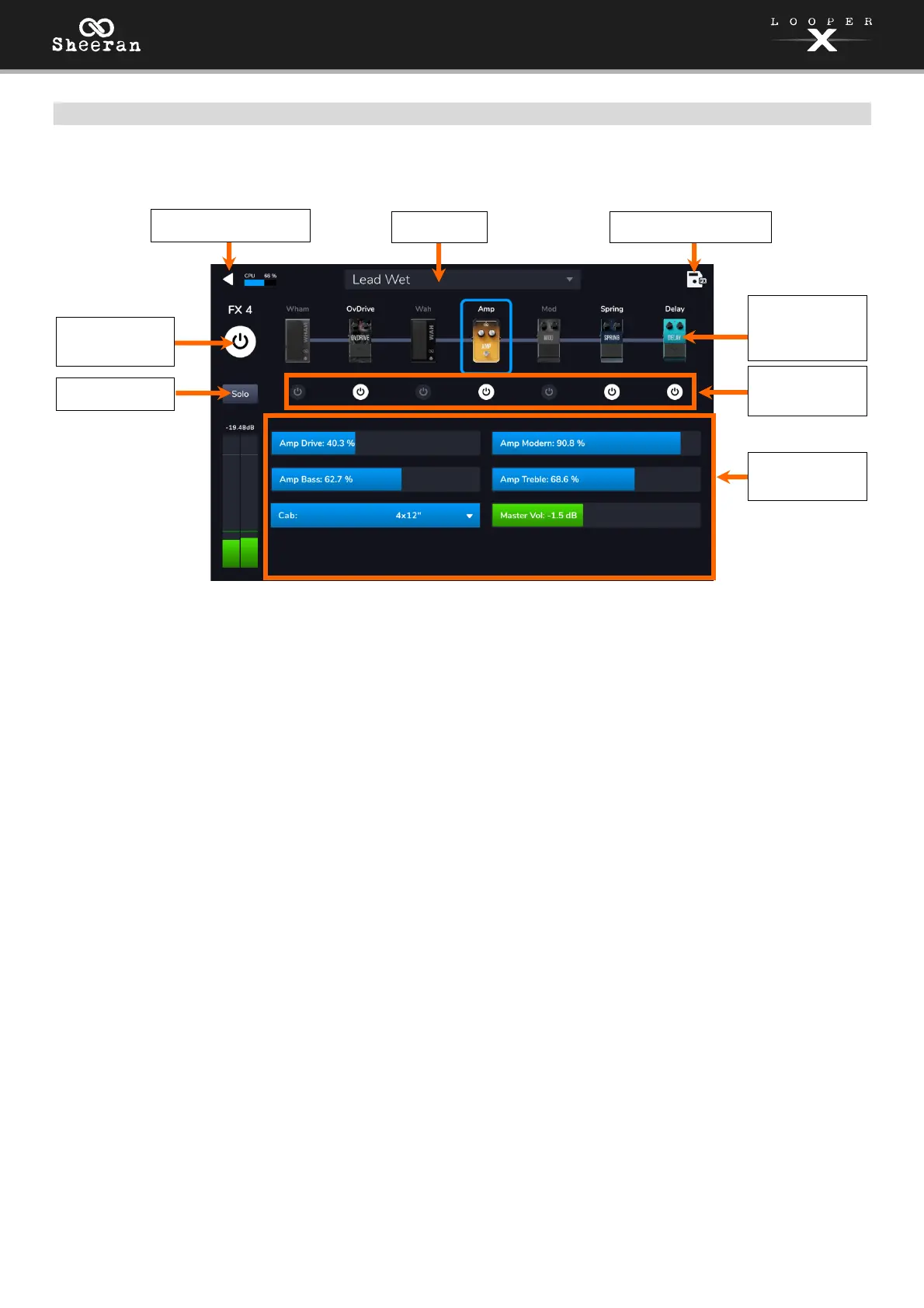
On this page, you can select from included FX presets and edit effect parameters.
To enable or bypass the full FX Rack, tap the Enable/Bypass button in the top-left corner of the
touchscreen, underneath the back arrow. You can also press the Track 1–4 pedal associated with the track
you are editing.
To load a factory or previously saved FX Rack preset, tap the Preset drop-down menu, and then tap the
preset you would like to load.
To enable or bypass individual effects within the FX rack, tap the Enable/Bypass buttons located under
each individual effect’s name.
To solo the track, tap the Solo button.
To view and adjust an individual effect parameter within the FX rack, tap the individual FX rack’s name,
and then tap and drag a parameter slider in the lower section. You can also tap the parameter slider and
then turn the encoder for fine adjustment.
To save your settings as an FX Rack preset, tap the save icon in the top right corner of the touchscreen.
Enable/Bypass
FX Rack
Return to FX Page
Save FX Rack
Individual FX
Parameters
Access
Individual FX
Parameters
Load
Solo Track
Enable/Bypass
Individual FX



 To Next Page