19
(5.0) Menu
This chapter describes the different menus and functions of Sheeran Looper X. These are primarily
accessed via the navigation menu, but also through the Function pedal.
(5.1) Navigation Menu
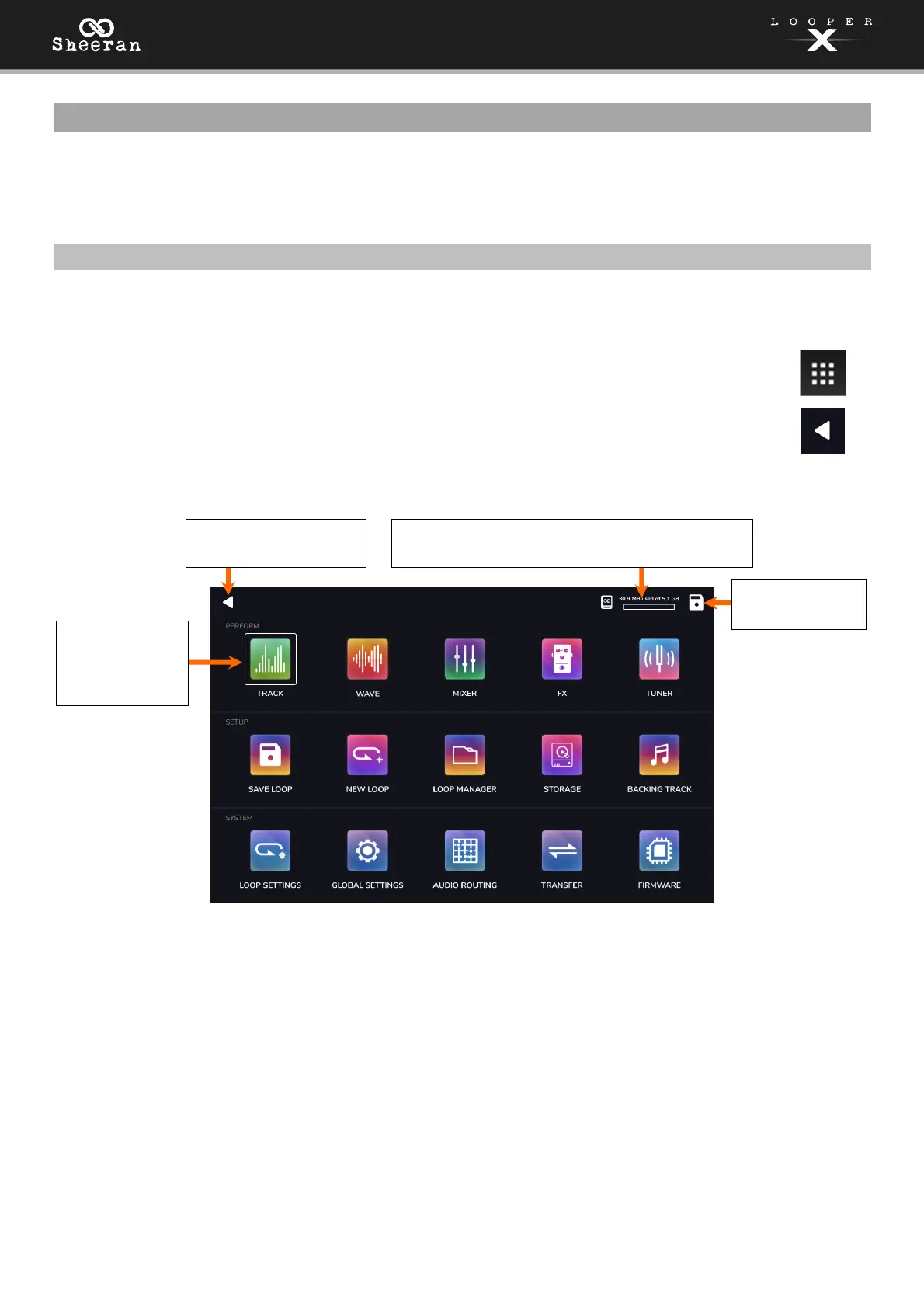
The Navigation Menu can be accessed in most pages by tapping the squares icon in the top-left corner of
the touchscreen. This menu is used to access the various features of the Sheeran Looper X.
To access the menu screen, tap the Menu icon in the upper left corner of the Main screen.
To return to the Main screen, tap the icon in the upper left corner of the Menu screen.
To access another page view or menu, tap the icons in the center of the screen.
Click an icon above or the names below to jump directly to that section of the manual:
PERFORM
• Track: Tap here to access Sheeran Looper X’s main track performance view.
• Wave: Tap here to access the waveform looping view.
• Mixer: Tap here to adjust volume and panning of looper tracks, the click track, and the backing track.
• FX: Tap here to assign and use the built-in FX.
• Tuner: Tap here to access the tuner feature.
Tap here to return to
the previous page.
This indicator shows the amount of space used
on the currently selected storage device.
Tap the icons to
access each
page view or
menu.
Tap here to save
the current loop.



 To Next Page