26
(5.5.3) Pedal Assignment
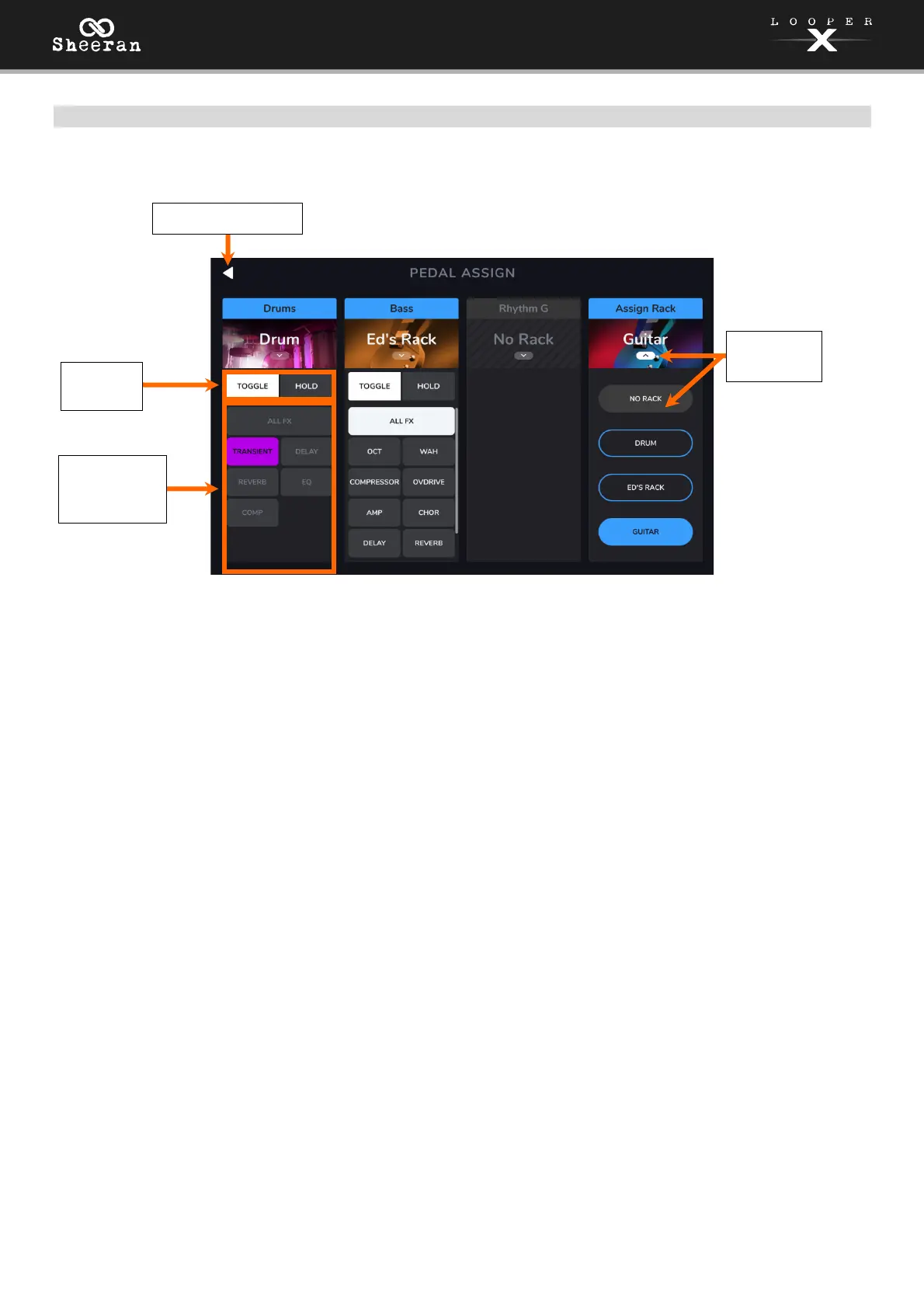
On the Pedal Assign page, you can modify the functions of Sheeran Looper X's pedals in an FX Rack.
To select the FX Rack controlled by the pedal, tap the icon that shows the name of the FX Rack (e.g.,
Vocal, Guitar, Lo-Fi), and then select the new FX Rack to control. To hide the selections, tap the block with
the name of the FX Rack again.
To change the trigger behavior of the pedal, tap Toggle or Hold (momentary) buttons.
To assign a pedal to enable/bypass all active FX within an FX Rack, tap to select the ALL FX block for
the pedal.
To assign a pedal to enable/pass individual FX within an FX Rack, tap to select the desired individual
FX blocks for the pedal.
Trigger
Behavior
Assign All or
Individual FX
to Pedal
Return to FX Page
Select FX
Rack



 To Next Page