29
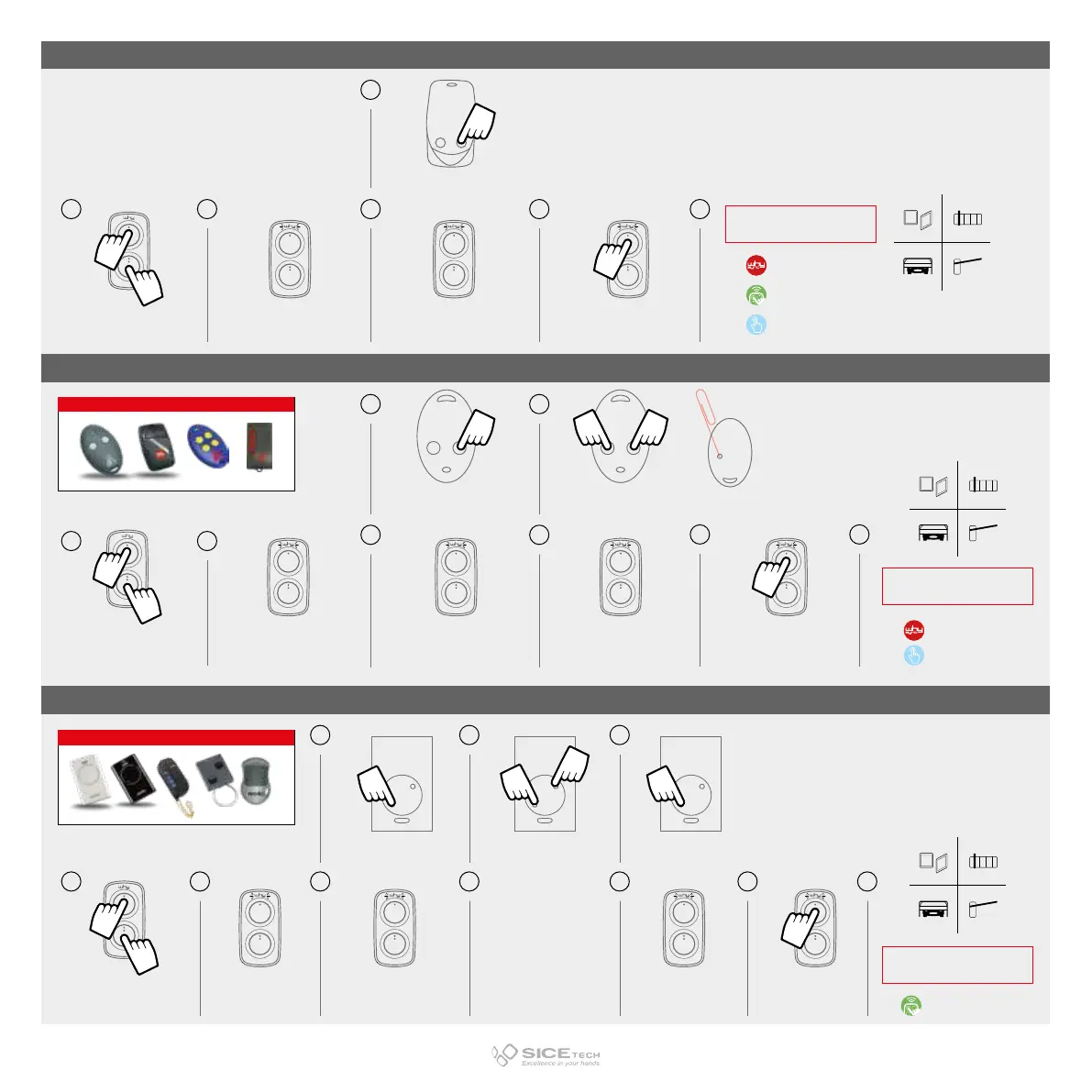
press the button to copy
x4
press and hold button 1
and meanwhile
press 4 times button 2
LED flashes
every 2 sec.
LED flashes fast
press the button
where you want
to memorise the code
press the button
to copy
press buttons 1 and 2 of the
BFT transmitter (source code)
simultaneously **
x4
press and hold button 1
and meanwhile
press 4 times button 2
LED flashes
every 2 sec.
LED flashes twice LED flashes fast
press the button
where you want
to memorise the code
press the button
to copy
press both buttons together
and release them when LED
flashes
while LED is flashing,
press the button to copy
x4
press and hold button 1
and meanwhile
press 4 times button 2
LED flashes
every 2 sec.
LED flashes twice fast LED flashes fast
press the button
where you want
to memorise the code
*consultare la lista di compatibilità
**In older versions, using one
pin press the hidden button at the back
of the transmitter
IMPORTANT: CHECK THAT THE REMOTE CONTROL TO BE COPIED IS A MASTER.
By pressing any button, LED must emit a double flash instead of turning on immediately with a steady light.
ROLLING SIMPLE
ROLLING COMPLEX (BFT MITTO)
ROLLING COMPLEX (FAAC/GENIUS)
*See compatibility list
RECEIVER INSERTION
PROCEDURE*
WHY SYNC TECHNOLOGY
DIRECT FUNCTION
ACTION ON RECEIVER
REQUIRED
RECEIVER INSERTION
PROCEDURE*
WHY SYNC TECHNOLOGY
ACTION ON RECEIVER
REQUIRED
DIRECT FUNCTION
RECEIVER INSERTION
PROCEDURE
COMPATIBLE RCs
COMPATIBLE RCs
21 5 6
21
7 8
21 9 10
4
3
4
3
6
5
4
3
6
5
8
7



 To Next Page