30
WHY EVO MINI ---> WHY EVO MINI
press the button
to copy
press again the button
to copy
x4
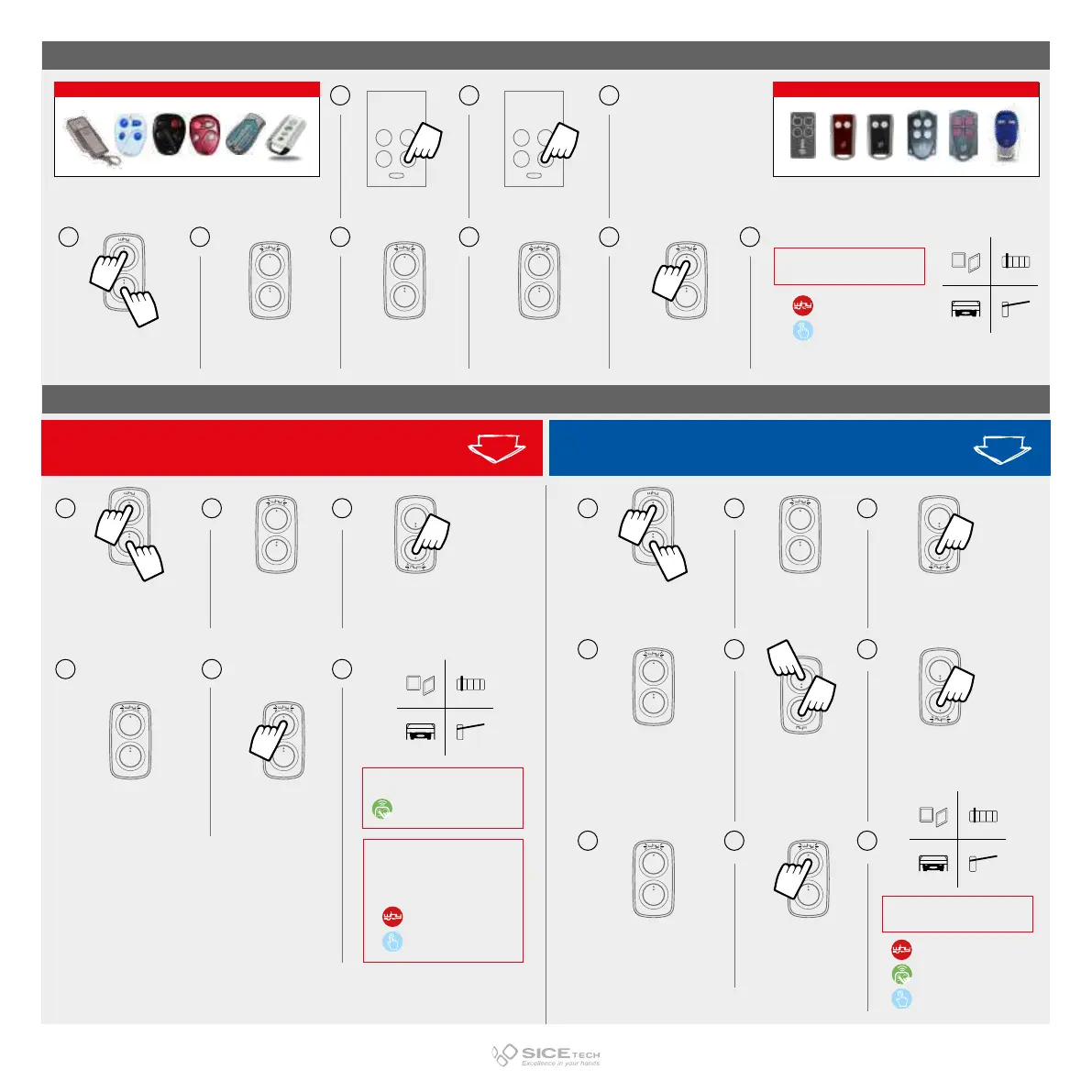
press and hold button 1
and meanwhile
press 4 times button 2
LED flashes
every 2 sec.
LED flashes twice LED flashes fast
press the button
where you want
to memorise the code
ROLLING COMPLEX (AVIDSEN/V2)
RECEIVER INSERTION
PROCEDURE*
WHY SYNC TECHNOLOGY
ACTION ON RECEIVER
REQUIRED
ROLLING COMPLEX (AVIDSEN/V2)
V2 RCsAVIDSEN RCs
LED on NEW WHY
flashes twice
press the buttons 1 and 2
on OLD WHY at the same
time and release them
when LED starts flashing
while LED on OLD WHY flashes,
push the button to copy
LED on NEW WHY
flashes fast
press the button
on NEW WHY
where you want
to memorise the code
press the button
to copy on OLD WHY
press the button on
NEW WHY
where you want
to memorise the code
5 6
x4
press and hold button 1
and meanwhile
press 4 times button 2
on NEW WHY
LED on NEW WHY flashes
every 2 sec.
press the button
to copy on OLD WHY
2 31
54 6
87 9
If code is ROLLING COMPLEX
4
If code is a FIX CODE or ROLLING SIMPLE
x4
press and hold button 1
and meanwhile
press 4 times button 2 on NEW
WHY
LED on NEW WHY flashes
every 2 sec.
press the button
to copy on OLD WHY
2 31
FIX CODE
ROLLING SIMPLE
RECEIVER INSERTION
PROCEDURE
WHY SYNC TECHNOLOGY
ACTION ON RECEIVER
REQUIRED
DIRECT FUNCTION
RECEIVER INSERTION
PROCEDURE
DIRECT FUNCTION
ACTION ON RECEIVER
REQUIRED
WHY SYNC TECHNOLOGY
2
3
1 4
5
6
7
8 9



 To Next Page