65 71 165 D3639
D3639.201.01.02.02 10.2016
33
Sirona Dental Systems GmbH 4Transport and commissioning
Operating Instructions CEREC SpeedFire 4.6Commissioning
båÖäáëÜ
4.6.4.4
Remove the unit
✔ The unit is not in operation.
1. Click on the
"Configuration"
button in the system menu.
2. Click on the
"Devices"
button.
3. Click on the unit that you wish to uninstall.
4. Click on the
"Delete Device"
button.
You will be asked if you would like to remove the unit.
5. Click on the
"YES"
button.
The device is removed.
4.6.5 Configuration following initial startup of the unit
Here you will be given the option to select the required language and
temperature unit and to set the clock.
The configuration can be found in the
"Settings"
/
"basic settings"
menu.
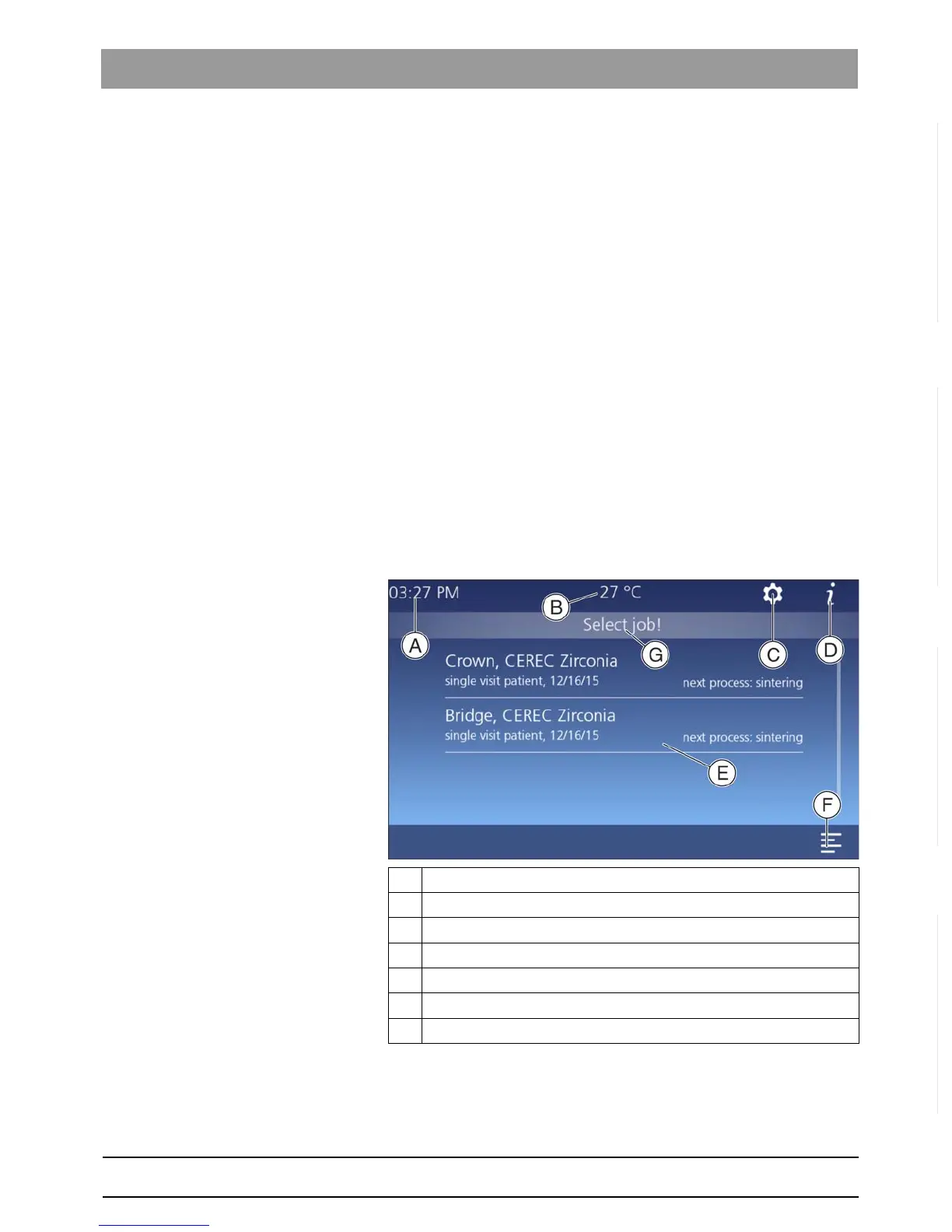
4.6.6 Main screen following startup of the unit
Once connected successfully, the start screen for the unit’s software is
displayed. In this view you shall receive various information on the device
status and operation.
ATime
B Temperature of the furnace chamber
C Settings
D Information
E Overview of received jobs (job list)
F Multi-select option: selection of several jobs
G Status information field and information on next step



 To Next Page