IDP-782 - Hardware Guide
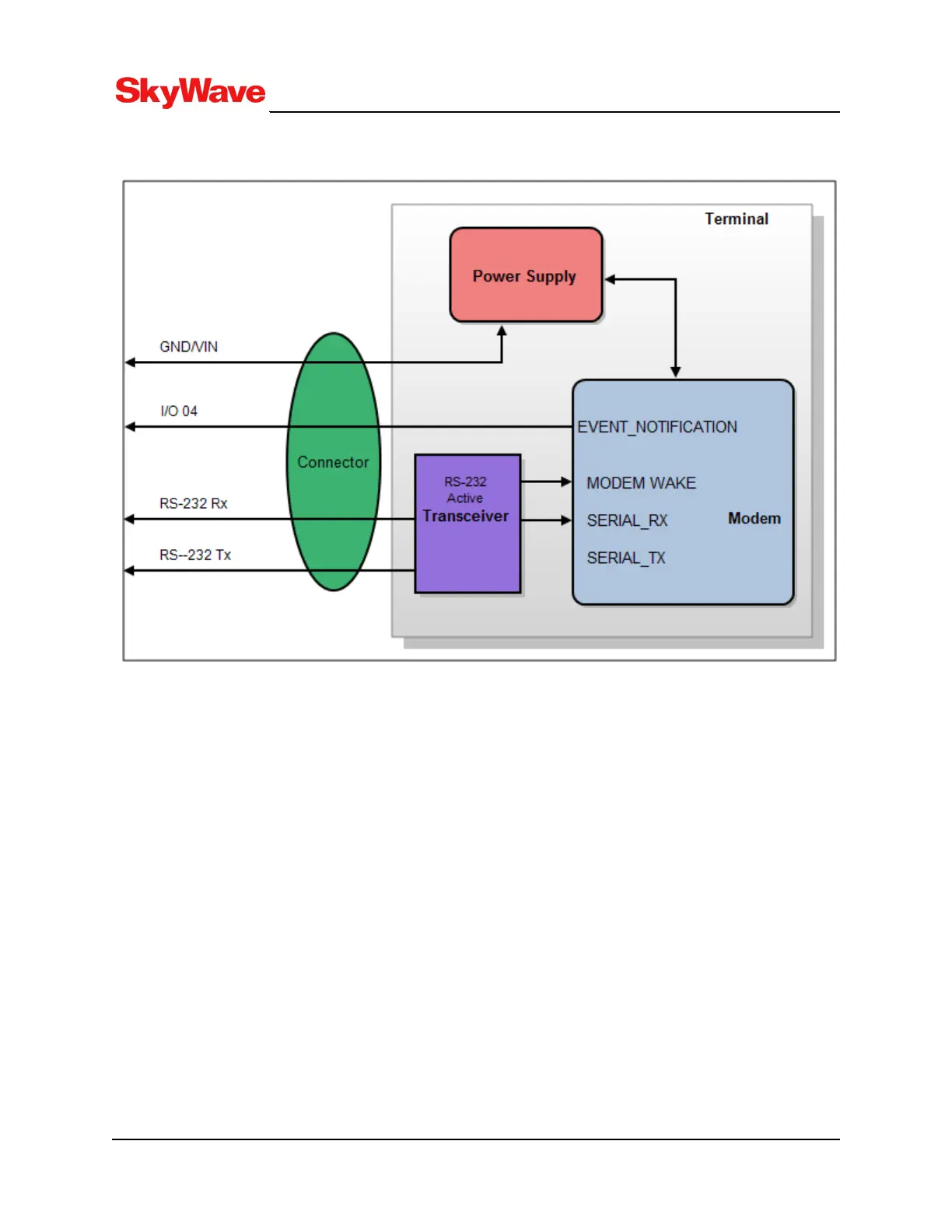
Figure 14: Pass-Through Mode Signals
The terminal's I/O lines are configured as per Figure 14 when in pass-through mode. The modem's serial
data and the EVENT_NOTIFICATION pins are connected to the terminal's external connector.
3.5 Serial Interfaces
Terminals have the following interfaces:
l 1 x CAN bus
l 1 x RS-485/J1708
l 2 x RS-232
l 1 x iButton Reader (1-Wire)
l 1 x USB
3.5.1 CAN
The driver provides CAN Bus link layer interfaces for sending and receiving frames.
l Open/Close CAN device.
l Configure/change CAN frame format, baud rate, acceptance filters.
T213, Version 02
34
© SkyWave Proprietary


 To Next Page