CHAPTER 1
WELCOME
4 smarttech.com/kb/171225
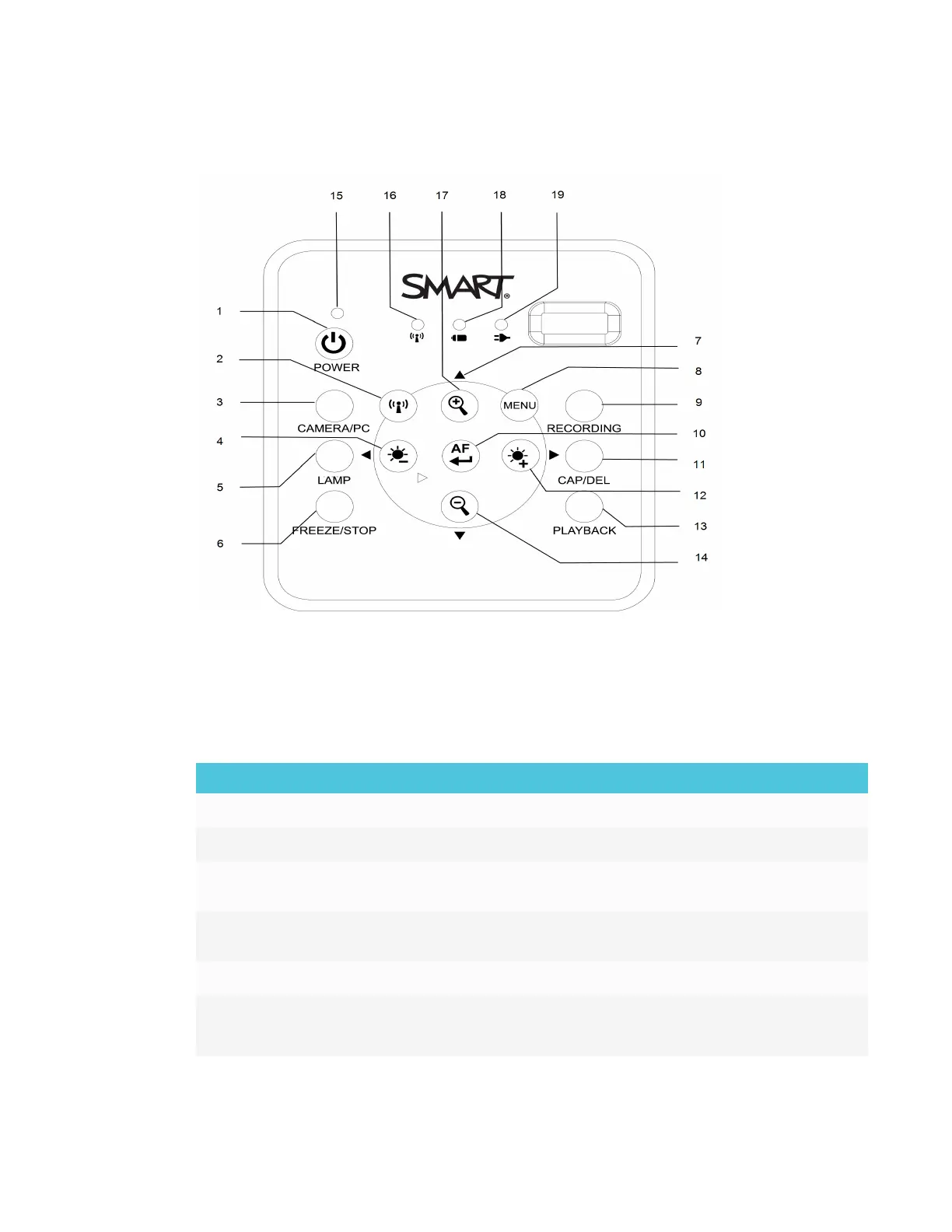
Control panel
The control panel to enables you to switch between Camera, Computer Pass-Through, and
Playback modes. Additionally, using the control panel allows you to adjust the settings and
features in the Camera mode’s on-screen display (OSD) menu.
The control panel of the document camera consists of the following:
No. Name More information
1 Power Power ON/OFF the document camera
2 WiFi/USB mode Switch between WiFi and USB mode
3 Camera/PC mode Switch the video signal between a computer and camera with
the use of the HDMI IN port
4 Brightness
decrease
Decrease the level of brightness when capturing a live images
5 Lamp Power ON/OFF the overhead light
6 Freeze/Stop
l
Pause or resume an image frame in Camera mode
l
Stop video playback in Playback mode



 To Next Page