46
D735 User Manual Directories
- Click on in the line containing John Miller's name. The data is shown in "Add or Edit"
area.
- Enter the phone number in the text field of "Number".
- Select the number type.
- Optional: Select a contact type and an outgoing identity from the respective drop-down
list.
- Click on "Add Sub".
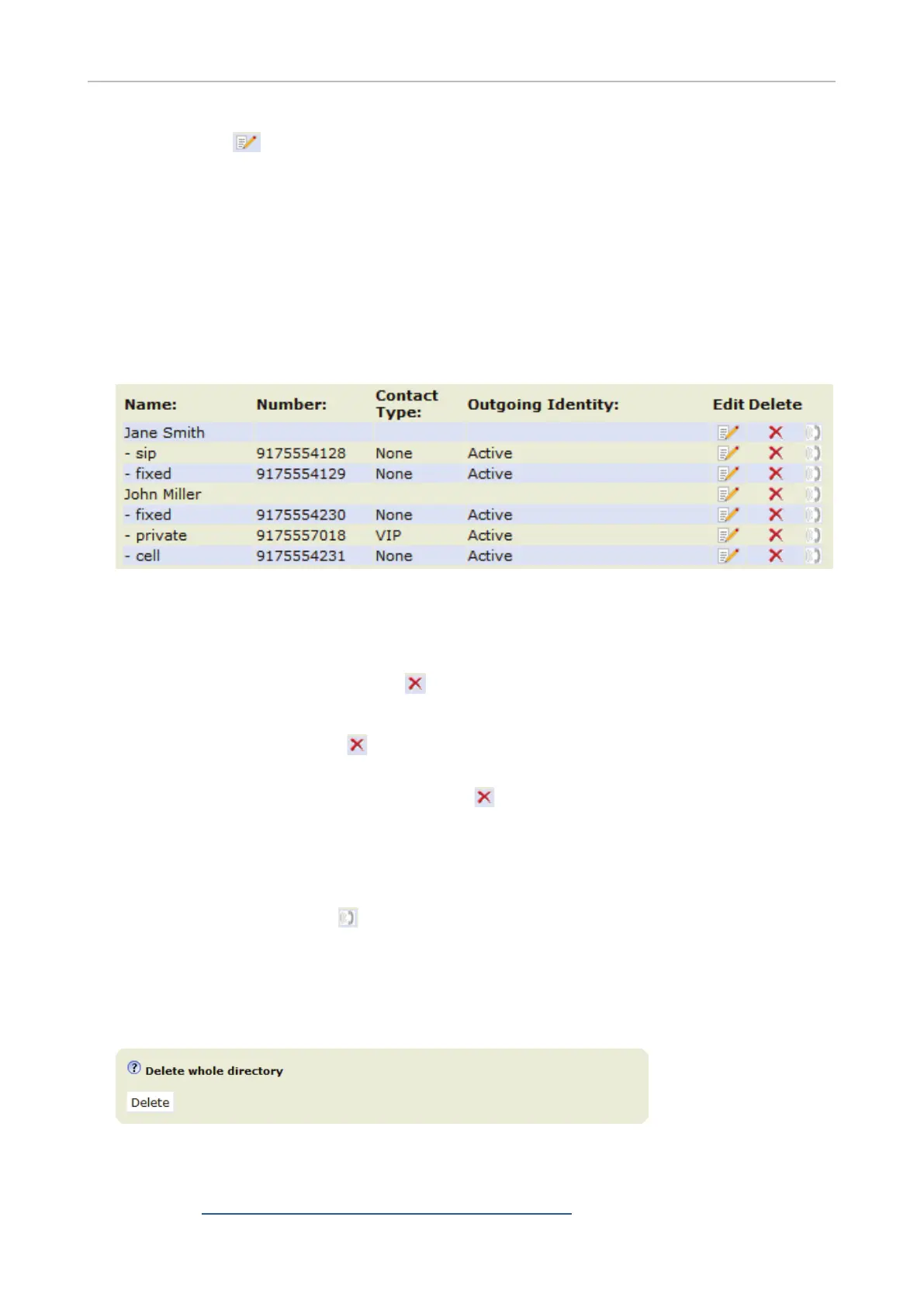
The directory now contains Jane Smith's landline number and John Miller's mobile phone number
(Fig. 4).
Fig. 4
Deleting entry on web interface
• Entry with one phone number. Click on
in the entry's lines to delete the entry.
• Entry with more than one phone number.
◦ Deleting the entry. Click on
in the line of the master record to delete the name and all
associated phone numbers.
◦ Deleting one of the phone numbers. Click on
in the line of a phone number subentry to
delete that subentry, but keeping the master record and all other subentries.
Dialing from phone directory
To dial, click on the phone symbol on the right side of the line with the phone number.
Deleting whole directory
Deletes the entire directory irretrievably!
Importing/Exporting Directory
See our Wiki at http://wiki.snom.com/Web_Interface/V8/Directory.



 To Next Page