84
D735 User Manual Configuring the Function Keys
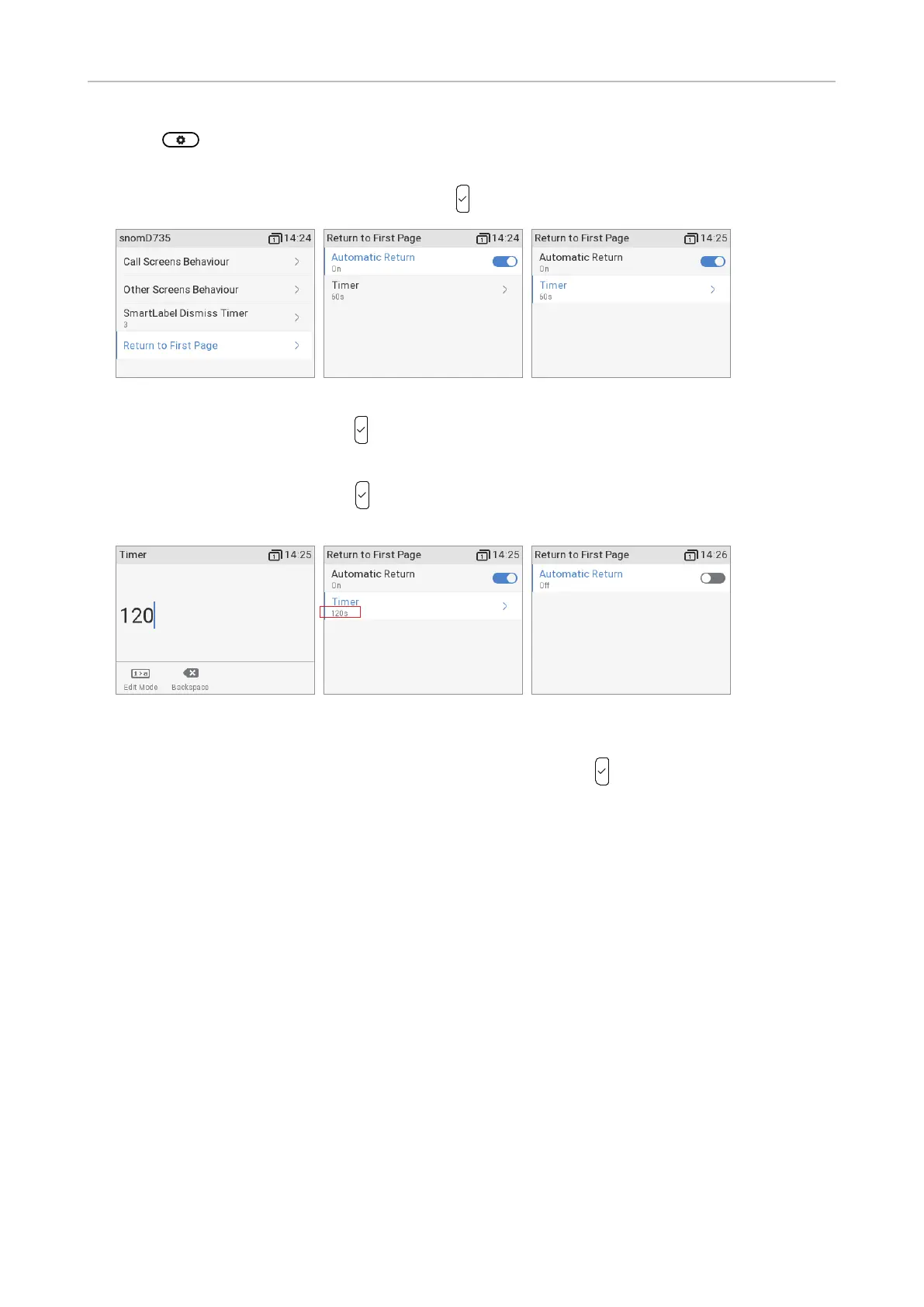
1. Press -> Preferences -> Display -> Primary display (if there is at least one connected
expansion module) -> SmartLabel options.
2. Select Return to first page (Fig. 14) and press
. The preset default is 60 seconds (Fig. 15).
Fig. 14 Fig. 15 Fig. 16
3. Select Timer (Fig. 16) and press .
4. Enter a dierent number of seconds between 0 and 1209600 seconds (Fig. 17) on the
alphanumeric keypad and press
to save and return to the Return to page 1 menu. The timer
now shows the new seconds setting (Fig. 18).
Fig. 17 Fig. 18 Fig. 19
Note: If you do not want the on-screen page to return to page 1 automatically, select
Automatic return (Fig. 15), if not already selected, and press
to turn o the function
(Fig. 19). The Timer line is not visible in the Return to first page menu after the automatic
return has been turned o.



 To Next Page