PROFIBUS Tester 5 (BC-700-PB) - User Manual
20
Copyright 2016 Softing Industrial Automation GmbH
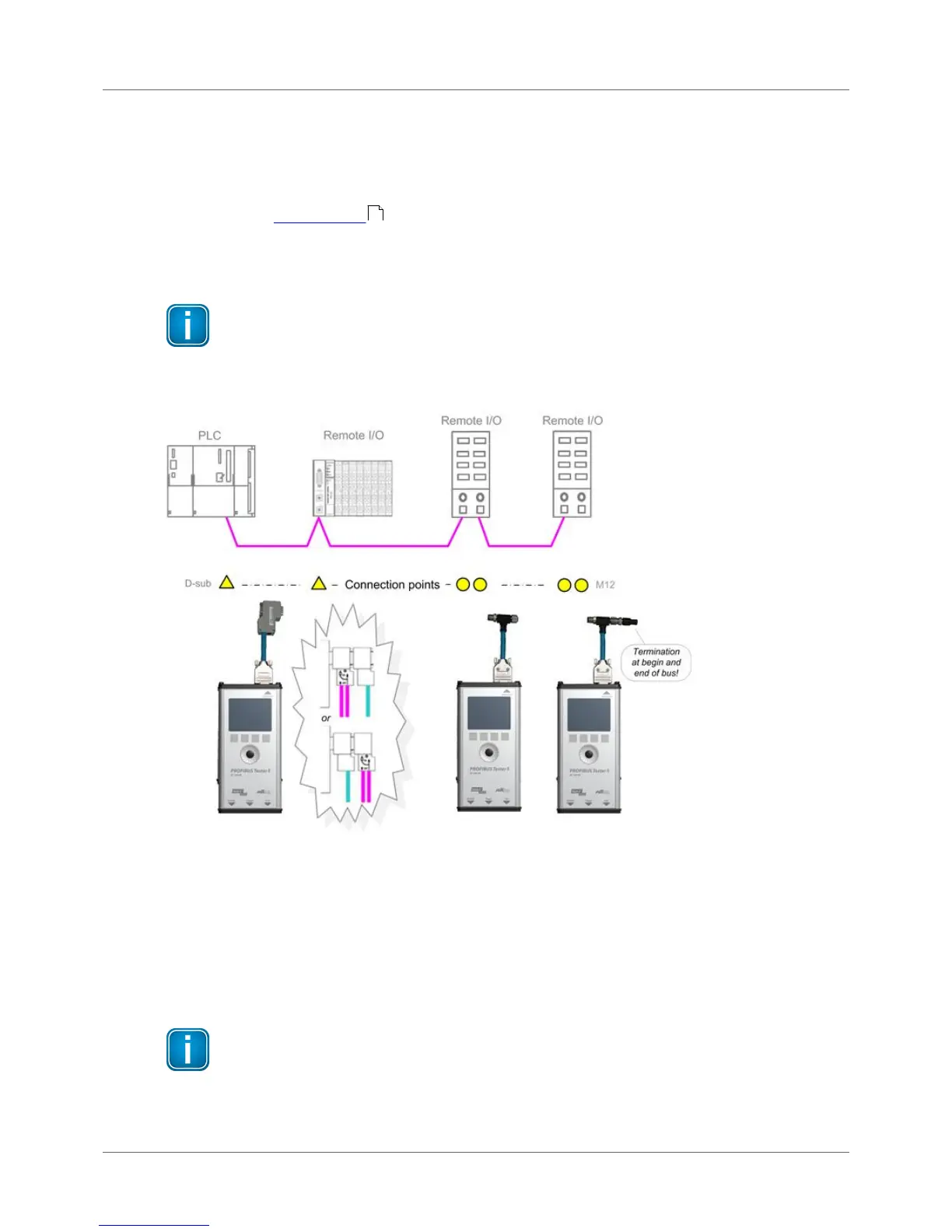
3.2 Simple connection for tests during system shutdown
If all bus stations provide D-sub connectors with an additional service socket, you can simply plug in the
BC-700-PB at that socket. If a D-sub connector does not provide a service socket, you can plug in the
Dsub adapter cable underneath. Keep in mind that you do not cascade more than two D-sub
connectors (see Adapter cable ).
When using M12 connection technology, the M12 adapter cable is looped into the bus. It is essential to
ensure proper termination at the beginning and end of the bus by using the terminating resistor
provided with the M12 adapter set.
Shut down complete installation before connecting
All these simple connection types will divide the bus. You therefore need to shut down the
PLC and all the devices connected to the PROFIBUS; in other words, you need to shut down
the whole installation.
Figure 16: Connection points at system shutdown
3.3 Connection for testing a live bus (DP)
To test a live PROFIBUS with the BC-700-PB during operation, appropriate connection possibilities have
to be provided. If no suitable connection points are available in the existing installation, it is
recommended installing them during system shutdown. This will make future maintenance work much
easier.
Shut down complete installation before connecting
Shut down the PLC and all the devices connected to the PROFIBUS as all these simple
connection types will divide the bus.



 To Next Page