Chapter 3 - Connection to PROFIBUS-DP
Copyright 2016 Softing Industrial Automation GmbH
23
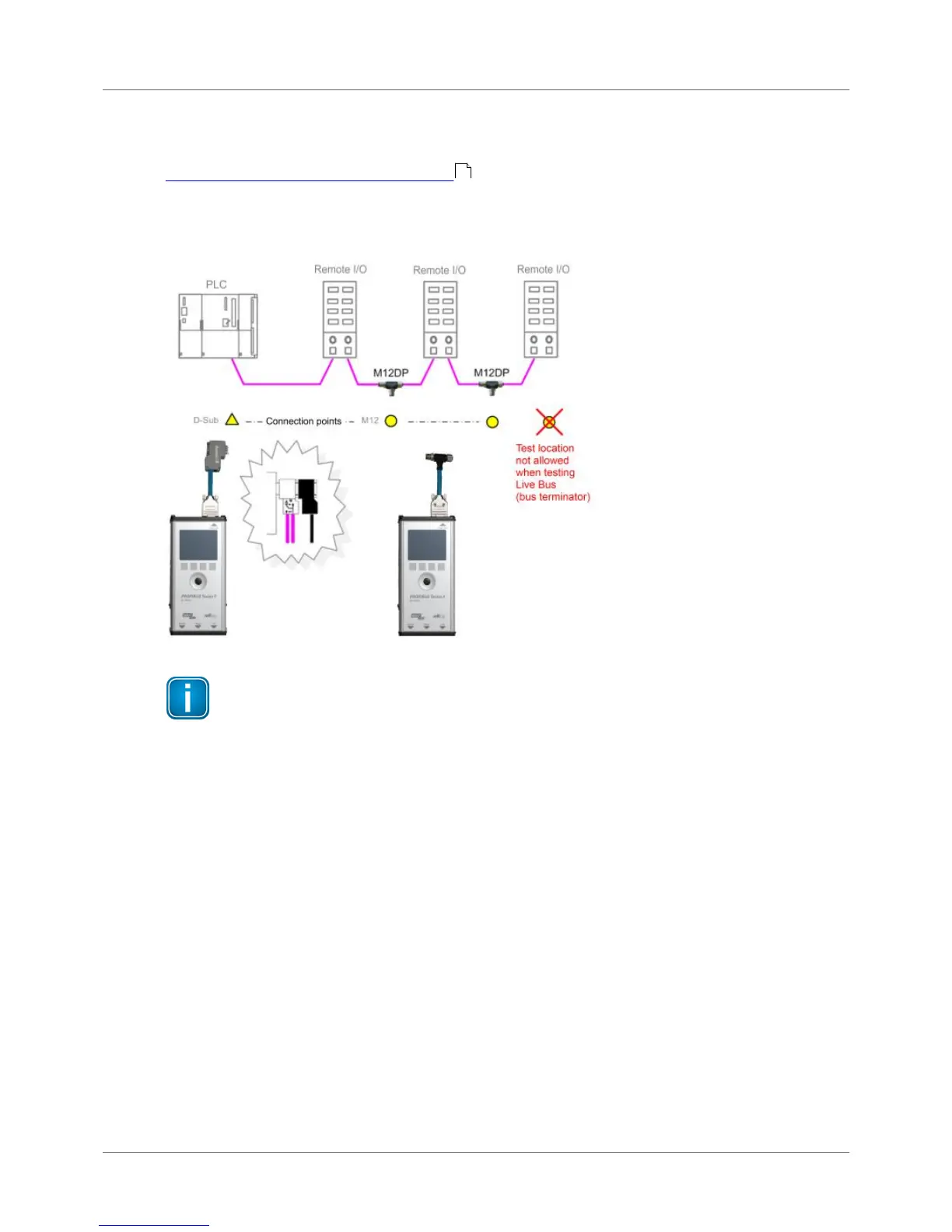
3.3.3 Connection Type M12
To test a live PROFIBUS, you will need additional service interface of the type BC-M12DP-PB (see
Adapter set for M12 connection technology ).
Tests on a live PROFIBUS are only allowed on bus segments providing D-sub connection technology.
Only D-sub connectors with service socket can be used as connection points for the test tool. For this
reason, tests can often only be performed at a bus end.
Figure 19: Connection points for the M12 adapter cable
Connect T-fitting between existing cable and 1 meter connection cable
Always connect one end of the T-fitting to the already existing cable and the other end to
the 1 meter connection cable which is supplied with the service interface.
Do not screw the T-fitting of the M12 service interface directly onto a slave.
3.4 Master simulator, topology scan and cable test
Master simulator
The master simulator allows checking the bus cabling and the station addresses during installation and
commissioning, when the PLC (master) is not in operation yet. In addition, you can use this mode to
check individual suspicious bus stations that have been disconnected from the bus.
Topology scan
The topology scan determines the sequence and distances of all passive bus stations (slaves). This
feature requires correct bus cabling, a very good signal quality, and a connection point located directly
at the beginning or end of the bus.
11



 To Next Page