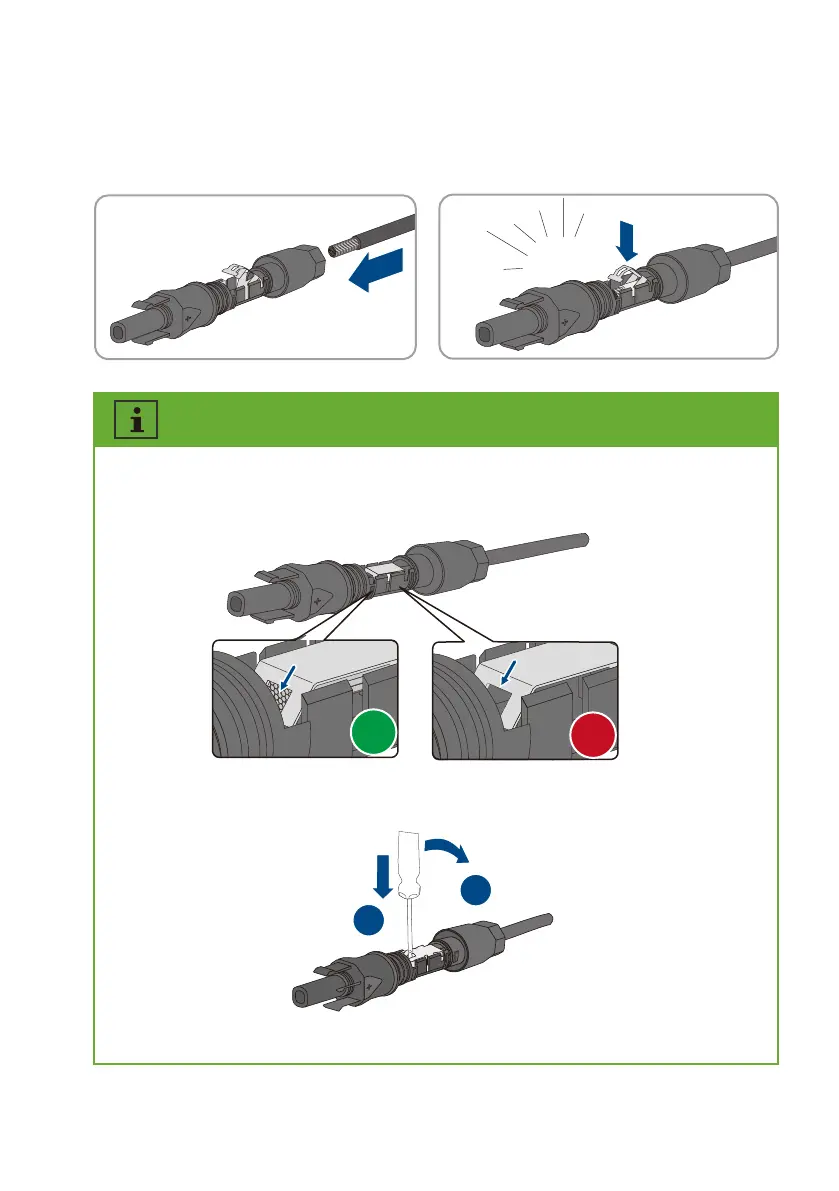
If the stranded wire is not visible in the chamber, the cable is not correctly inserted and the
connector must be reassembled. To do this, the cable must be removed from the connector.
Release the clamping bracket. To do so, insert a screwdriver (blade width: 3.5mm) into the
clamping bracket and pry the clamping bracket open.
Remove the cable and go back to step 2.
Click
+
√
×
Step 2:
Insert the stripped cable into the DC connector up to the stop. Press the clamping
bracket down until it audibly snaps into place. The stranded wire can be seen inside the
clamping bracket chamber.
1
2
UM0035_ASW05-12kH-T2-T3_EN_V01_0523








 To Next Page