Working Instruction, Mechanical
3/000 21-1/FEA 209 544/108 B
© Sony Ericsson Mobile Communications AB
14(53)
2.1.7 PBA
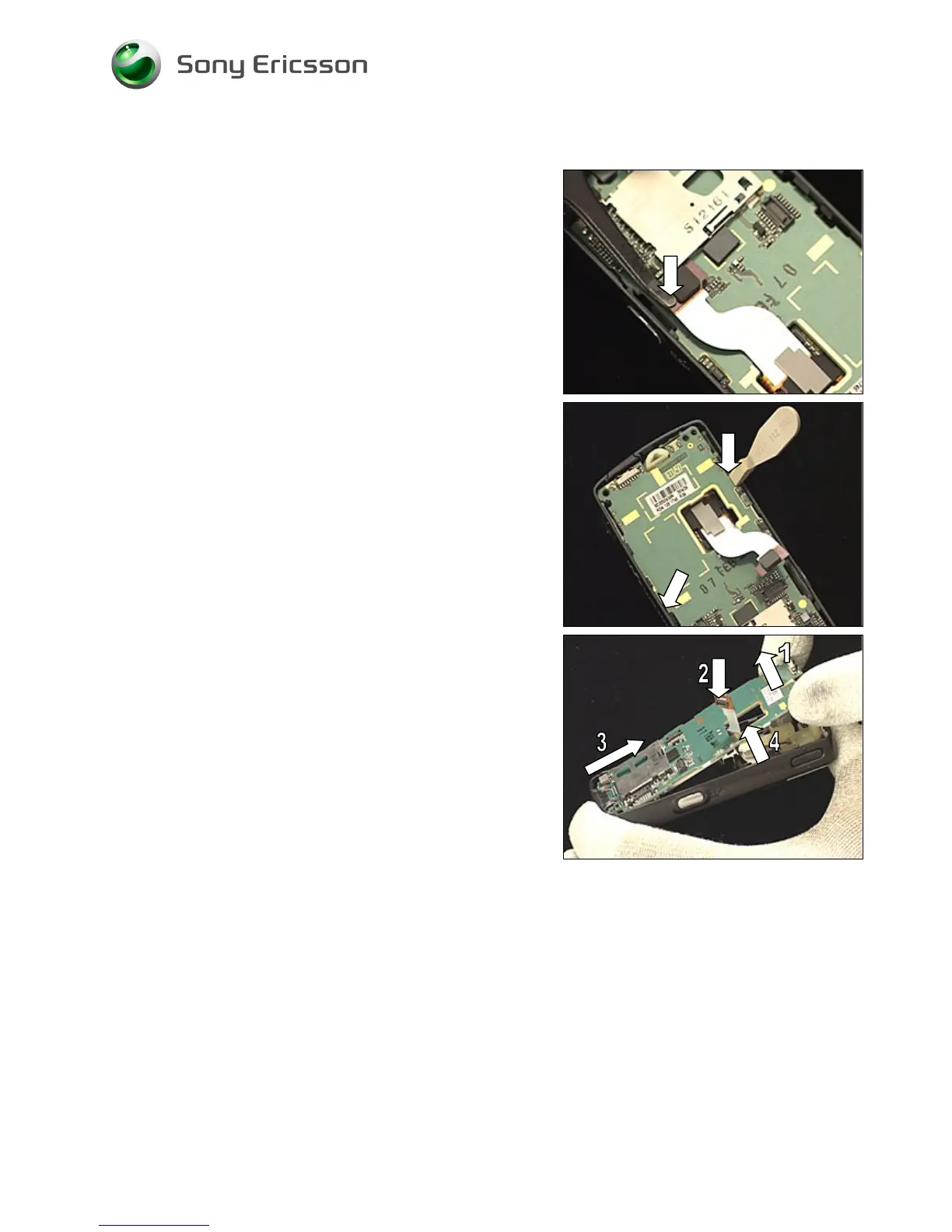
Disconnect the camera flex film board-to-board connector
by lifting it upwards with the ‘flex film assembly tool’.
Use the ‘front opening tool’ to release the PBA from the
frame by placing the ‘front opening tool’ as shown and
pressing down to unsnap the PBA.
Do the same thing on the opposite side in the position
indicated by the arrow.
DO NOT BEND (1) THE PBA TOO MUCH UPWARDS!
M
AKE SURE THAT THE CAMERA FLEX FILM (2) DOES NOT GET
STUCK DURING THIS OPERATION
!
To remove the PBA, lift the top just enough so it can be
pulled out from the bottom (3) and so that the camera flex
film (2) can smoothly pass through the PBA hole (4).














 To Next Page