4-5
DNW-A220
DNW-A220P
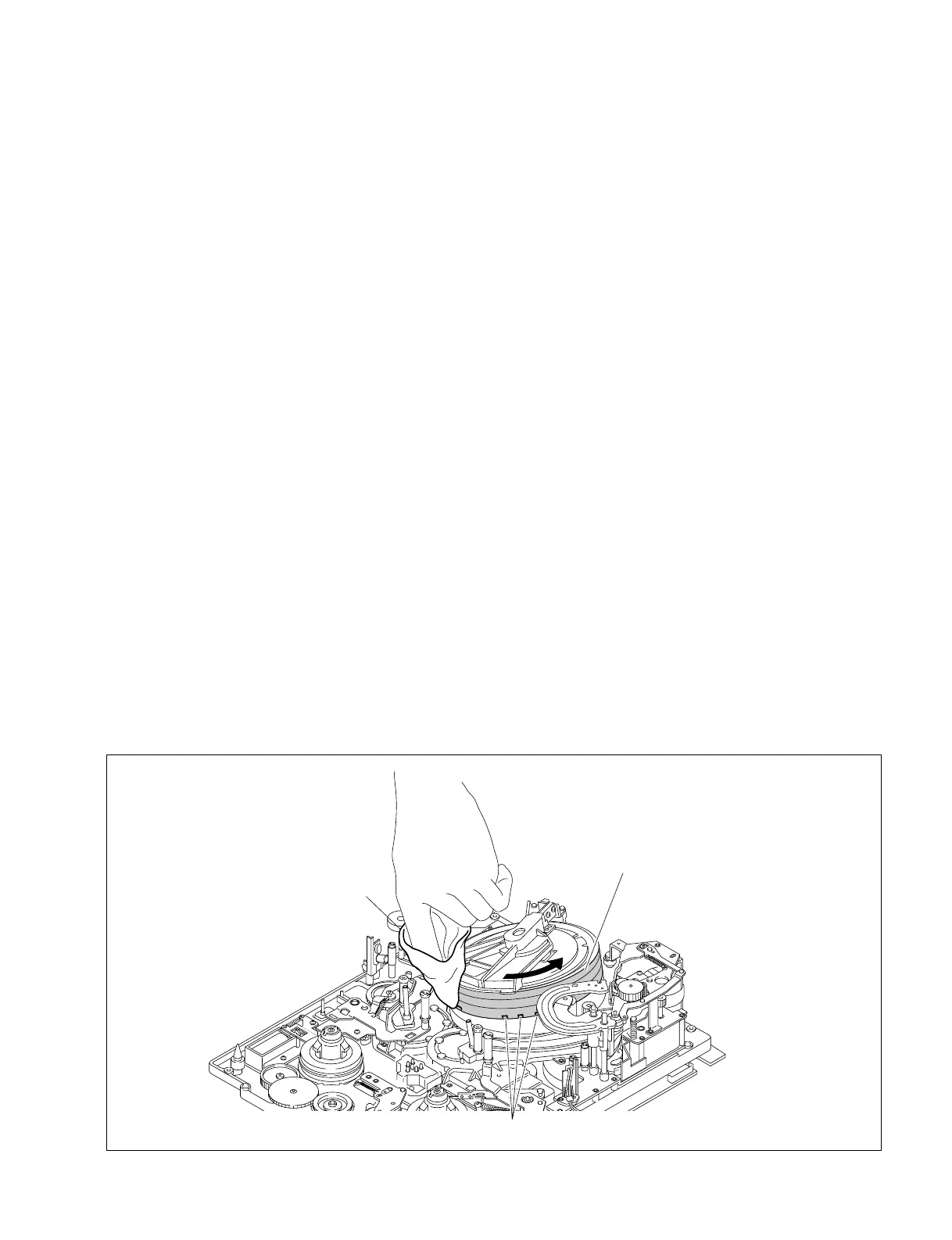
4-2-3. Cleaning of Video Heads and Tape Running Surface of Upper Drum
Caution
Never touch the rotaing drum.
The video heads are the part that can be damaged easily. Be careful not to damage the video heads during
cleaning.
Tools
• Cleaning cloth: 3-184-527-01
• Cleaning fluid: 9-919-573-01
n
Do not use a cotton swab to clean the video heads.
Procedures
1. Hold the cleaning cloth moistened with a cleaning fluid keeping it without becoming wrinkled. And
press the cleaning cloth slightly against the video heads.
2. Rotate the upper drum slowly counterclockwise two or three turns and clean the tape running surface
and video heads with the cleaning cloth moistened with cleaning fluid.
n
Be sure to rotate the upper drum counterclockwise and clean the video heads along the circumfer-
ence. Do not rotate the upper drum in the opposite direction (clockwise) or clean it in the vertical
direction. This may damage the brush and slip ring or the video heads.
3. After cleaning, wipe it with a dry cleaning cloth two or three times.
4-2. Cleaning
Cleaning of Video Heads and Tape Running Surface of Upper Drum
Cleaning cloth
Tape running surface of upper drum
Video heads



 To Next Page