1-25
DNW-A220
DNW-A220P
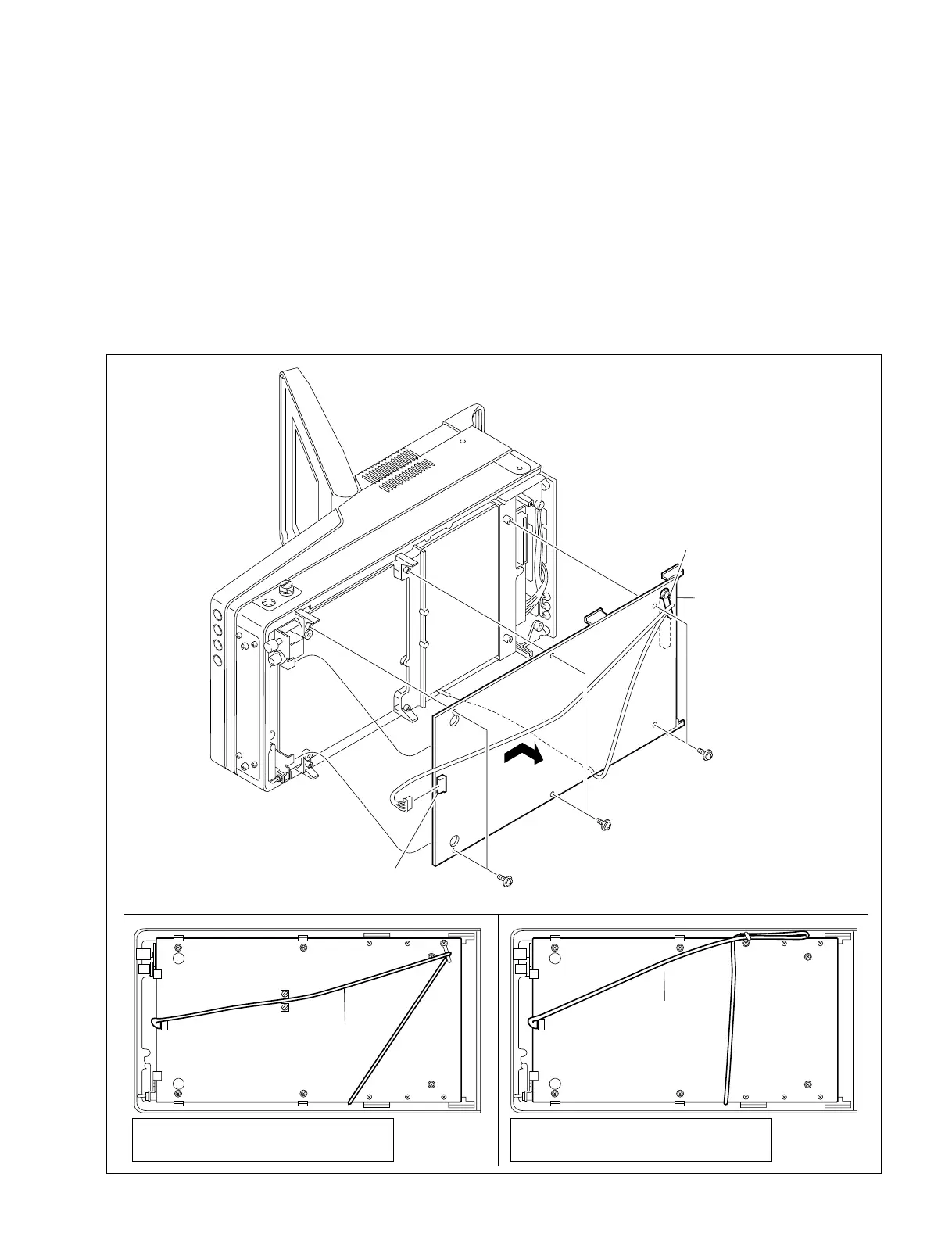
1-8-2. DM-114/114P Board
1. Remove the bottom plate of the player. (Refer to Section 1-6-5.)
2. Remove the six screws and unfasten the harness from the clamp.
3. Disconnect the connector CN1.
4. Remove the DM-114/114P board in the direction of the arrow.
5. Install the DM-114/114P board in the reverse order of removal.
m
. Arrange the harness as shown in the figure. Harness routing differs depending on the serial number
of the VTR.
. When installing, take care the harness is not caught between the bottom plate and chassis.
1-8. Disconnecting/Connecting the Printed Circuit Board
PWH2.6 x 5
PWH2.6 x 5
PWH2.6 x 5
CN1
RV504
RV503
DM-114 board
Clamper
Harness arrangement
Harness
Harness
DNW-A220 (SY)
S/N
31001 through 31090
51001 through 51090
DNW-A220P (SY)
S/N
31001 through 31080
51001 through 51080
DNW-A220 (SY)
S/N
31091 and higher
51091 and higher
DNW-A220P (SY)
S/N
31081 and higher
51081 and higher



 To Next Page