1-16
64
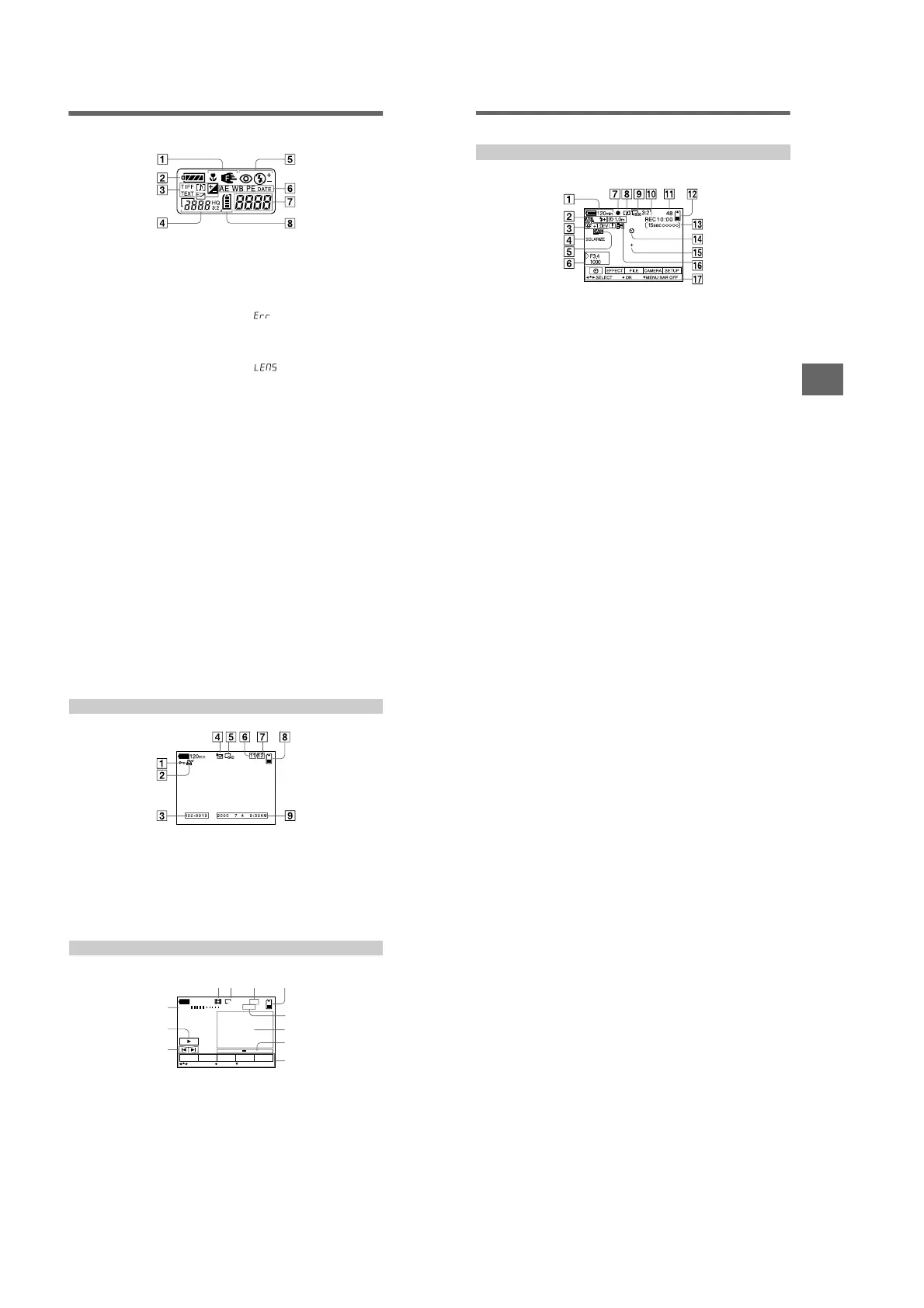
Display window indicators
A Macro/focus mode indicator
B Battery remaining indicator
C Recording/EV level indicator
D Image size indicator
E Flash mode/flash level
indicator
F PROGRAM AE indicator
White balance indicator
Picture effect indicator
Date/time indicator
G Battery usable time indicator
(displayed only during
charging)
Number of recorded images
Error display
: Some kind of misoperation
has occurred. Check the self-
diagnosis display on the LCD
screen (page 62) and take the
appropriate corrective action.
: A problem has occurred
with lens drive. Turn the camera
on and off several times, and if the
problem persists, contact your
Sony dealer or authorized Sony
service facility.
H “Memory Stick” remaining
indicator
Additional information
65
LCD screen indicators
A Battery remaining indicator
B PROGRAM AE/flash level/flash
mode indicator
C White balance/EV level/
sharpness/conversion mode
indicator
D Picture effect indicator
E Date/time indicator
F Aperture/shutter speed
indicator
G AE lock indicator/Focus lock
indicator
H Recording mode indicator
I Image size indicator
J Self-diagnosis function
indicator/recording time
indicator
K Number of recorded images
L Remaining memory capacity
indicator
M Moving image/VOICE recording
time indicator
N Self-timer indicator
O Spot light-metering indicator
P Focus/macro mode indicator
Q Menu bar and guide menu
They appear by pressing v on the
control button and disappear by
pressing V of it.
The indicators during recording
66
A Protect indicator
B Print mark indicator
C File name
D Recording mode indicator
E Image size indicator
F Image number
G Number of stored images in
“Memory Stick”
H Remaining memory capacity
indicator
I Recording date of the playback
image/menu bar and guide
menu
A VOL. (Volume) indicator
B Playback/pause buttons
B: during pause
X: during playback
C Fast-forward/rewind buttons
D Recording mode indicator
E Image size indicator
F Image number/number of
stored images in “Memory
Stick”
G Remaining memory capacity
indicator
H Counter
I Playback image
J Play bar
K Menu bar and guide menu
When playing back still images
When playing back moving images
SETUPTOOLDELETE
INDEX
FILE
SELECT OK
MENU BAR OFF
0:12
320
VOL.
6
/
8
120
min
45 6
7
9
0
qa
1
2
3
8
1-16 E











 To Next Page