71
Installation
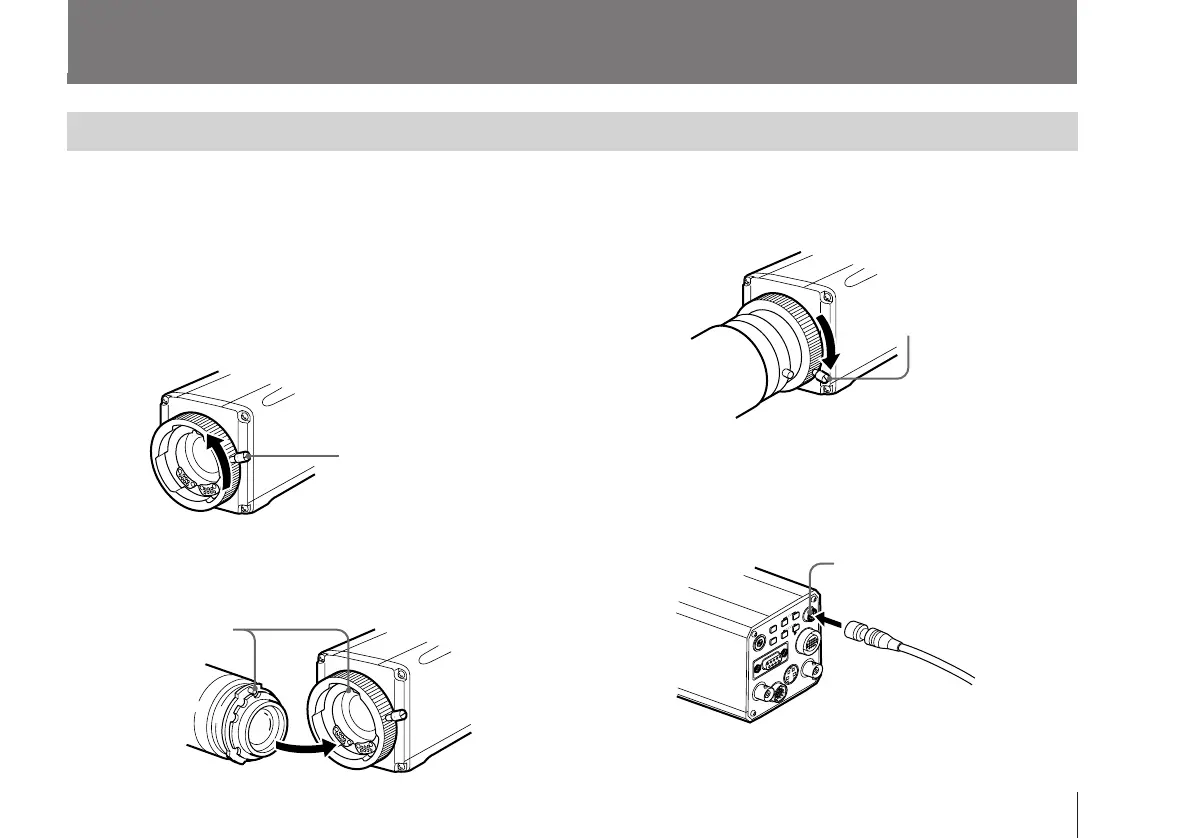
Mounting the Lens
Only
1
/
2
-inch bayonet-mount lenses can be attached to the
camera.
For
2
/
3
-inch lenses, an LO-32BMT lens mount adaptor (not
supplied) is required.
1 Turn the mount lever counterclockwise as far as it goes.
(If the lens mount cap is in place, remove it.)
Mount lever
2 Align the positioning pin on the lens with the matching
hole in the lens mount and attach the lens.
Align the pin
with the
hole.
4 If the lens is a
2
/
3
-inch type, connect the lens cable to
the camera’s LENS connector.
(This step in not necessary for
1
/
2
-inch lenses.)
3 Turn the mount lever clockwise as far as it goes to lock
the lens in the lens mount.
Lens cable
Mount lever
to LENS connector
of the camera



 To Next Page