99
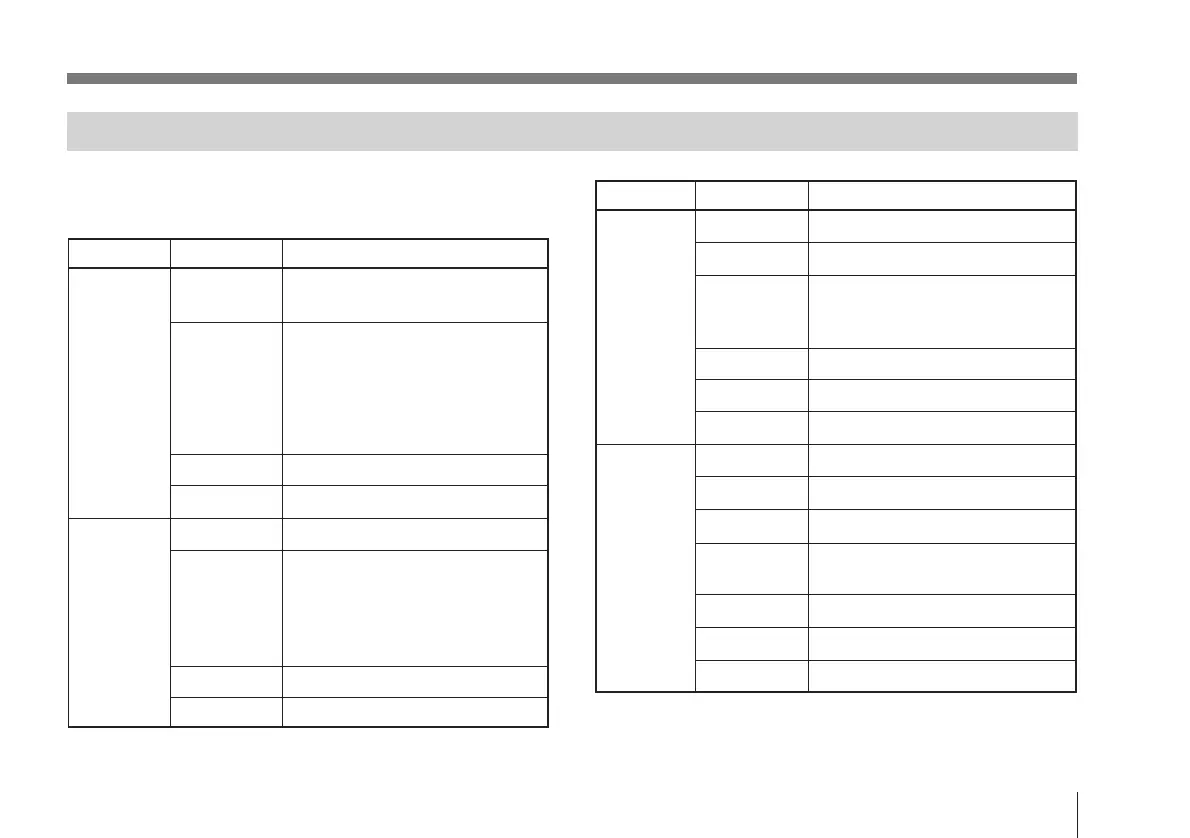
Menu Page Item Initial setting
1. Exposure Gain step, 0 dB
Setup (ISO, 400)
Shutter off
(long exp, off)
(booster, off)
(sync/w.en, sync)
(step, FL)
(c.scan, 260/525)
AE window large
Field/Frame field
2. Color C.Temp 3200K
Setup
WHT.Bal auto
(R paint, off)
(G paint, off)
(R gain, 0)
(G gain, 0)
Linear Matrix on
Shading off
Menu Page Item Initial setting
3. General M.Pedestal 00
Setup
Detail 00
H.Phase 00
a)
SC Phase 00
a)
(SC)fine 00
a)
Gamma on
Knee 1
G sync on
4. System Mem.Bank A
Setup
Mem.Protect off
Data Send A –> B
D-sub out VBS
RGB
Baud Rate 9600
Flash off
Printer Trig. off
Initial Settings
To revert each item to its original setting, press the DATA
UP and DATA DOWN buttons at the same time.
a) If there is no external sync signal, “--” is shown.



 To Next Page