79
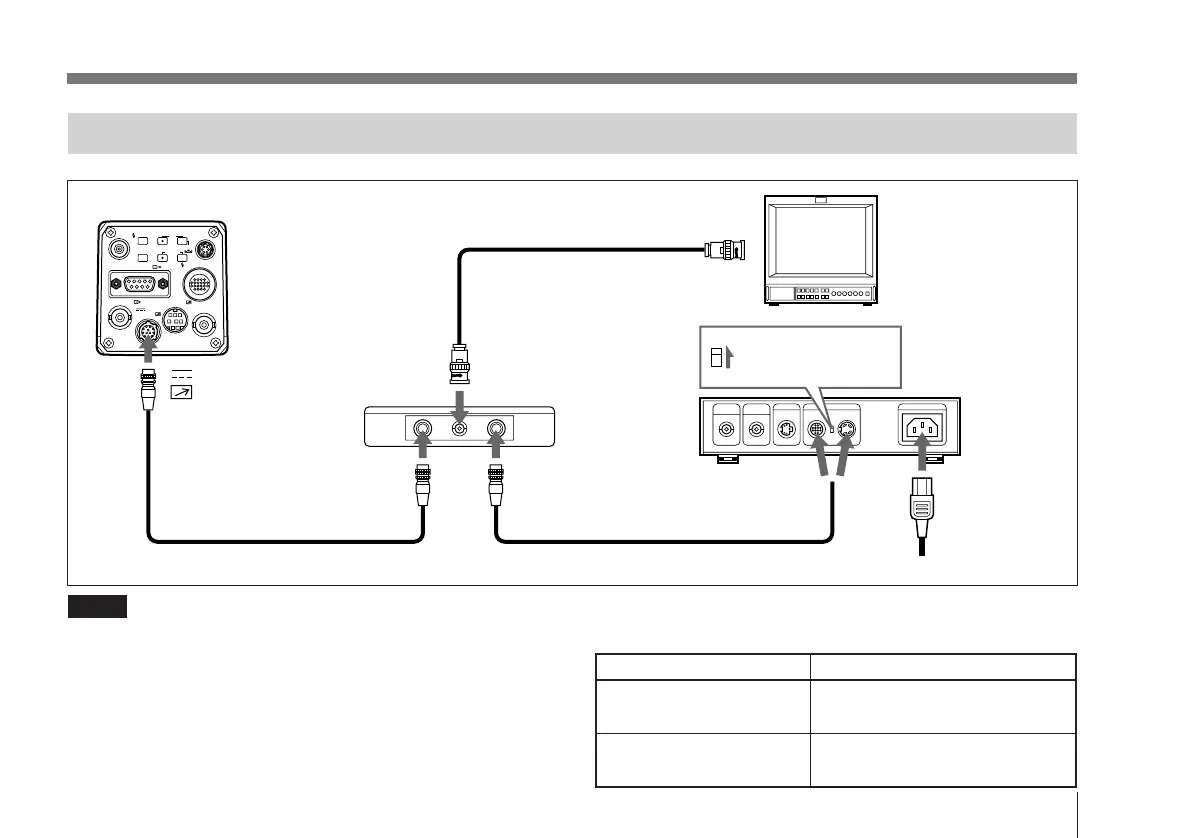
Connecting to the RM-930 Remote Control Unit
VIDEO OUT
GEN LOCK
DC IN/
REMOTE
CCU
FLASH
LENS
MENU FUNCTION DATA
UP
WHITE
BARS
DOWN
RGB/SYNC
REMOTE
1
2
DXC-970MD
75Ω coaxial cable
Set the MODE selector
to the “1” position.
CMA-D2MD
camera adaptor
DC IN
AC IN
CAMERA
(4-pin or 12-pin)
Video monitor,
VCR, etc.
Camera cable
b)
Camera cable
a)
(CCMC cable)
DC IN/
REMOTE
Power cord
CAMERA
MONITOR OUT
Composite
video input
RM-930 remote
control unit
Camera cable
a)
Camera cable
b)
CCMC-12P02/05/10 CCMC-12P02/05/10/25
CCDC-5/10/25/50A
CCMC-12P25 CCMC-12P02/05/10
CCDC-5/10/25/50A
settings, switch the CCU off and then back on again. You
will then be able to control the camera from the CCU.
Notes
• When using the RM-930, use the camera cables as shown
in the table on the right.
• When using the MONITOR OUT connector of the RM-
930, set D-sub out to VBS on the on-screen menu.
Setting functions not available in the CCU-M5
Switch on the power to the CCU while pressing the
function up button on the camera. This will allow you to
make settings in the camera menu. After you have made the



 To Next Page