EasyManua.ls Logo

Sony DXC-970MD - Page 84

Sony DXC-970MD
Print Icon
To Next Page IconTo Next Page
To Previous Page IconTo Previous Page
Loading...
84
VIDEO OUT
GEN LOCK
DC IN/
REMOTE
CCU
FLASH
LENS
MENU FUNCTION DATA
UP
WHITE
BARS
DOWN
RGB/SYNC
REMOTE
1
2
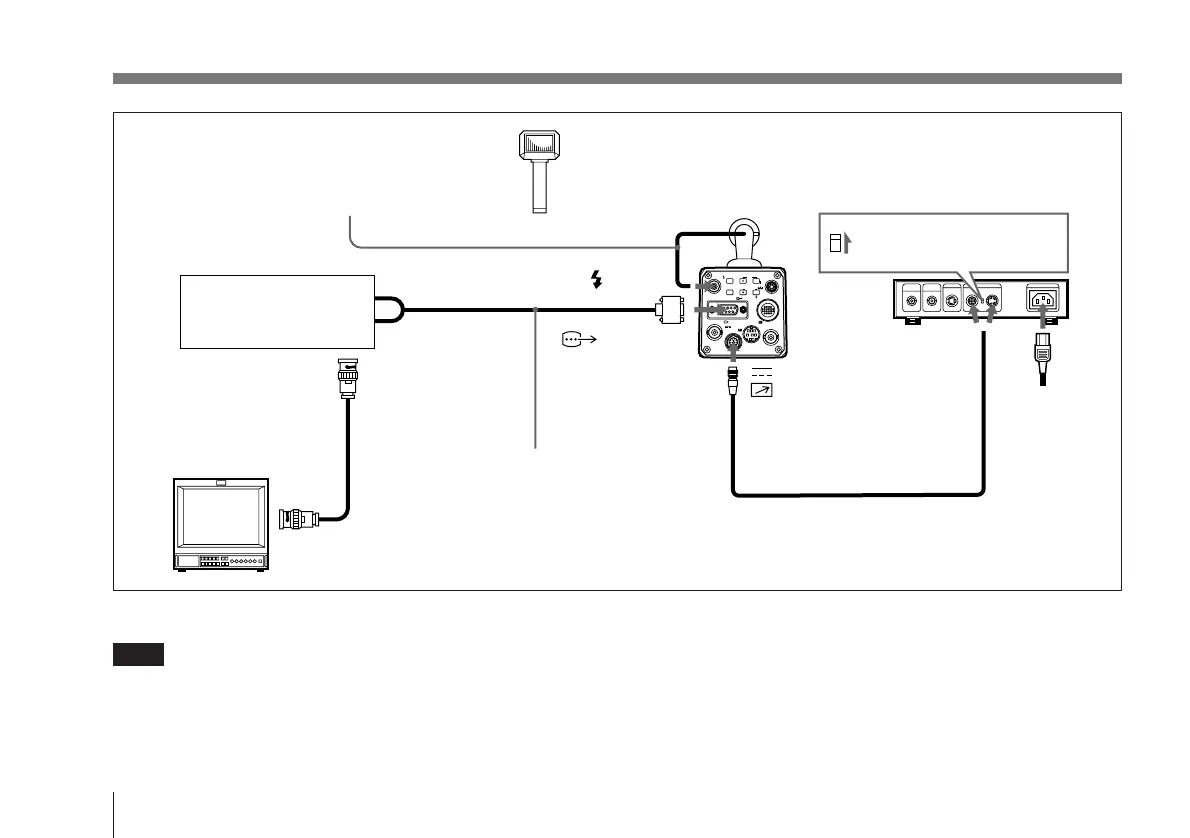
Connecting to a Flash Unit
Connecting the camera
module to a slave unit
Set the MODE selector
to the “1” position.
CAMERA
(4-pin or 12-pin)
DC IN/
REMOTE
CCDC-5/10/25/50A/100A cable or
CCMC-12P02/05/10/25 cable
CCMC-9DSMN cable
Video input connector
Remote connector
Video input
connector
Image processor
or printer
Power
cord
AC IN
CMA-D2MD
camera adaptor
DXC-
970MD
Synchronization cable
Slave unit
RGB/SYNC
FLASH
Video output
connector
Flash
Video monitor, VCR, etc.
Slave mode connection
Note
Only a limited selection of printers are directly compatible
with the DXC-970MD. For details, connect your authorized
Sony dealer.

Table of Contents

Related product manuals