59
VF Menu List
Chapter 4 Menu Configuration and Detailed Settings
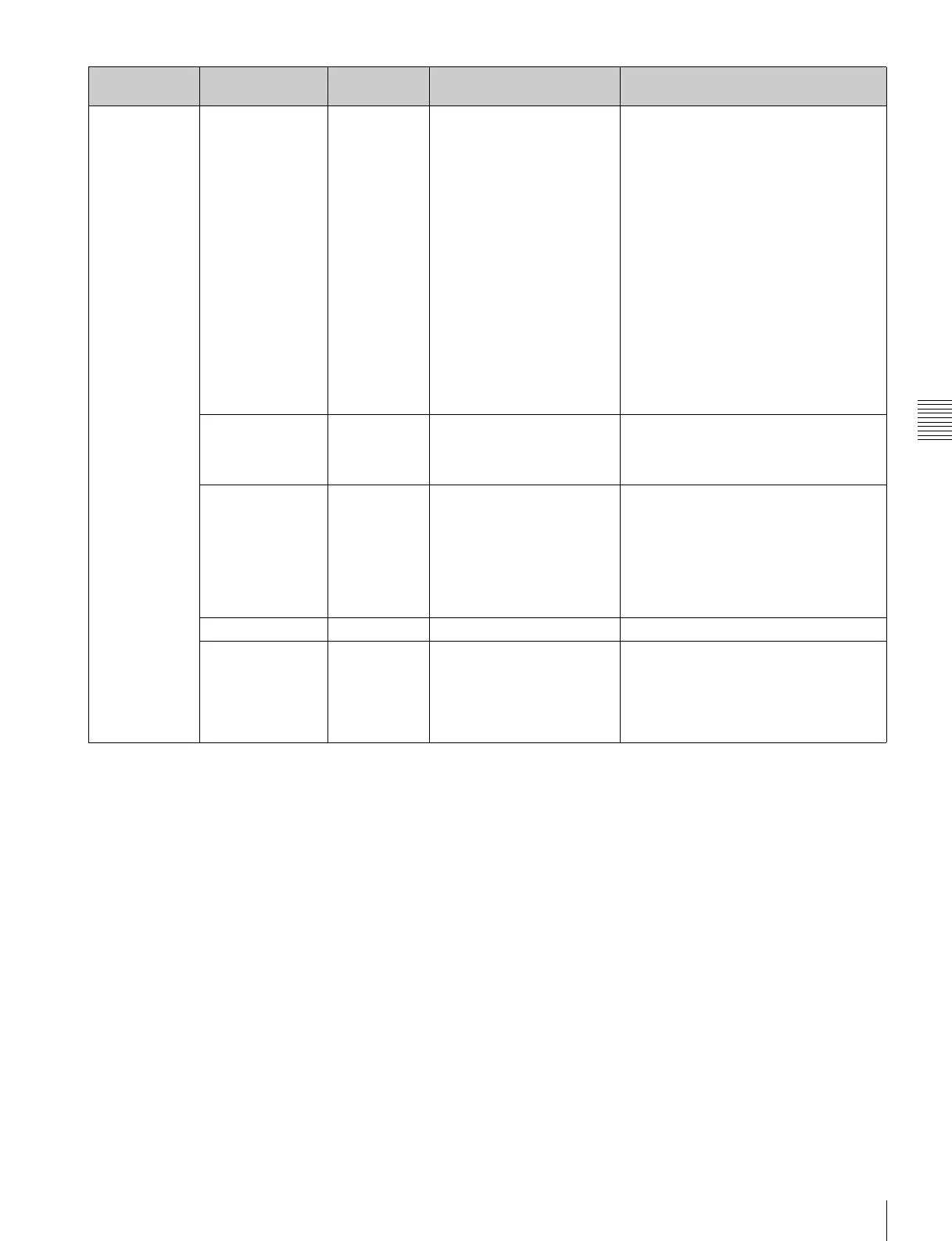
<SDI1 Look>
SDI1 look
settings
1D LUT S-Log2 709(800%), S-Log2,
HG8009G40, HG8009G33,
[User1], [User2], [User3],
[User4], [User5] to [User100]
Selects the 1D LUT for the video output
on the SDI OUT1 connector.
709(800%): Signal extending the
dynamic range up to 800% based on
ITU-R709.
S-Log2: Non-adjustable signal for
required post-production processing.
Up to 1300% input light level can be
reproduced.
HG8009G40: Signal using hypergamma
with 800% dynamic range, 109%
white limit, and 40% video output for
18% gray card.
HG8009G33: Signal using hypergamma
with 800% dynamic range, 109%
white limit, and 33% video output for
18% gray card.
[User1] to [User100]: Imported, user-
defined LUT signals.
a)
3D LUT Through Through, [User1], [User2],
[User3], [User4], [User5] to
[User10]
Selects the 3D LUT for the SDI OUT1
connector’s video signal. When using 3D
LUT, Color is fixed at S-Gamut3.Cine and
1D LUT is fixed at S-Log3.
L3D File Through Through, [User1], [User2],
[User3], [User4], [User5] to
[User10]
Selects the L3D file for the SDI OUT1
connector’s video signal.
When Through is selected, Color is fixed
at S-Gamut3.Cine and 1D LUT is fixed at
S-Log3.
When a L3D File is selected, the
specified Process, Color, 1D LUT, and 3D
LUT will be configured.
ASC CDL Off On, Off Sets whether to apply an ASC CDL.
CDL New CDL New CDL, [User1], [User2],
[User3], [User4], [User5] to
[User100], Edit Mode
[User1] to [User100] is displayed only
when there are imported CCC/CDL files.
Edit Mode is displayed only when editing
ASC CDL values.
The ASC CDL can be modified from a
web browser or tablet device.
Page Configuration
item
Default Settings Remarks



 To Next Page