60
VF Menu List
Chapter 4 Menu Configuration and Detailed Settings
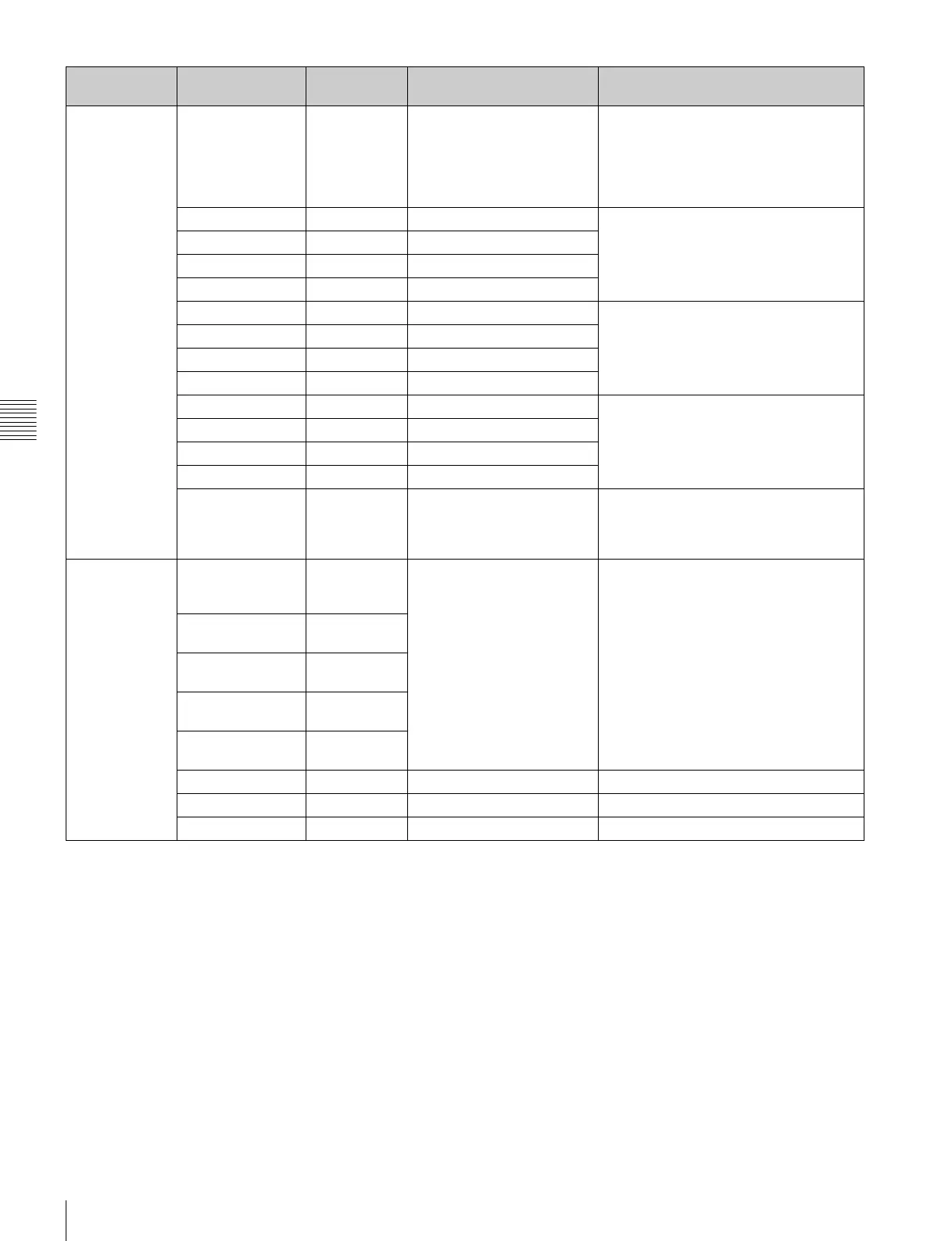
<SDI1 ASC
CDL>
SDI1 ASC CDL
settings
InputDescription -- -- Display only.
Displays the character string defined in
the InputDescription tag of the CDL/CCC
file.
“Undefined” is displayed if the
InputDescription tag is not present.
Slope Adjusts the individual R, G, B values of
the ASC CDL slope function.
Display only. Settings can be modified
from a tablet device.
R 1.000 0.000 to 3.999
G 1.000 0.000 to 3.999
B 1.000 0.000 to 3.999
Offset -- -- Adjusts the individual R, G, B values of
the ASC CDL offset function.
Display only. Settings can be modified
from a tablet device.
R 0.000 –1.000 to 0.999
G 0.000 –1.000 to 0.999
B 0.000 –1.000 to 0.999
Power -- -- Adjusts the individual R, G, B values of
the ASC CDL power function.
Display only. Settings can be modified
from a tablet device.
R 1.000 0.400 to 1.600
G 1.000 0.400 to 1.600
B 1.000 0.400 to 1.600
Saturation 1.000 0.000 to 2.000 Adjusts the value of the ASC CDL
saturation function.
Display only. Settings can be modified
from a tablet device.
<SDI1 Look
Memory>
SDI1 look
memory
settings
1 S-Log2/S-
Gamut, ASC
CDL Off
-- Saves SDI1 look settings and displays
the set values.
You can save up to 16 items on one
page.
2 #1, ASC CDL
Off
3 #2, ASC CDL
Off
4 #3, ASC CDL
Off
5 #4, ASC CDL
Off
Add -- Execute by Enter. Saves the current SDI1 look settings.
Delete -- Execute by Enter. Deletes the selected saved settings.
Preset -- Execute by Enter. Deletes all settings.
Page Configuration
item
Default Settings Remarks



 To Next Page