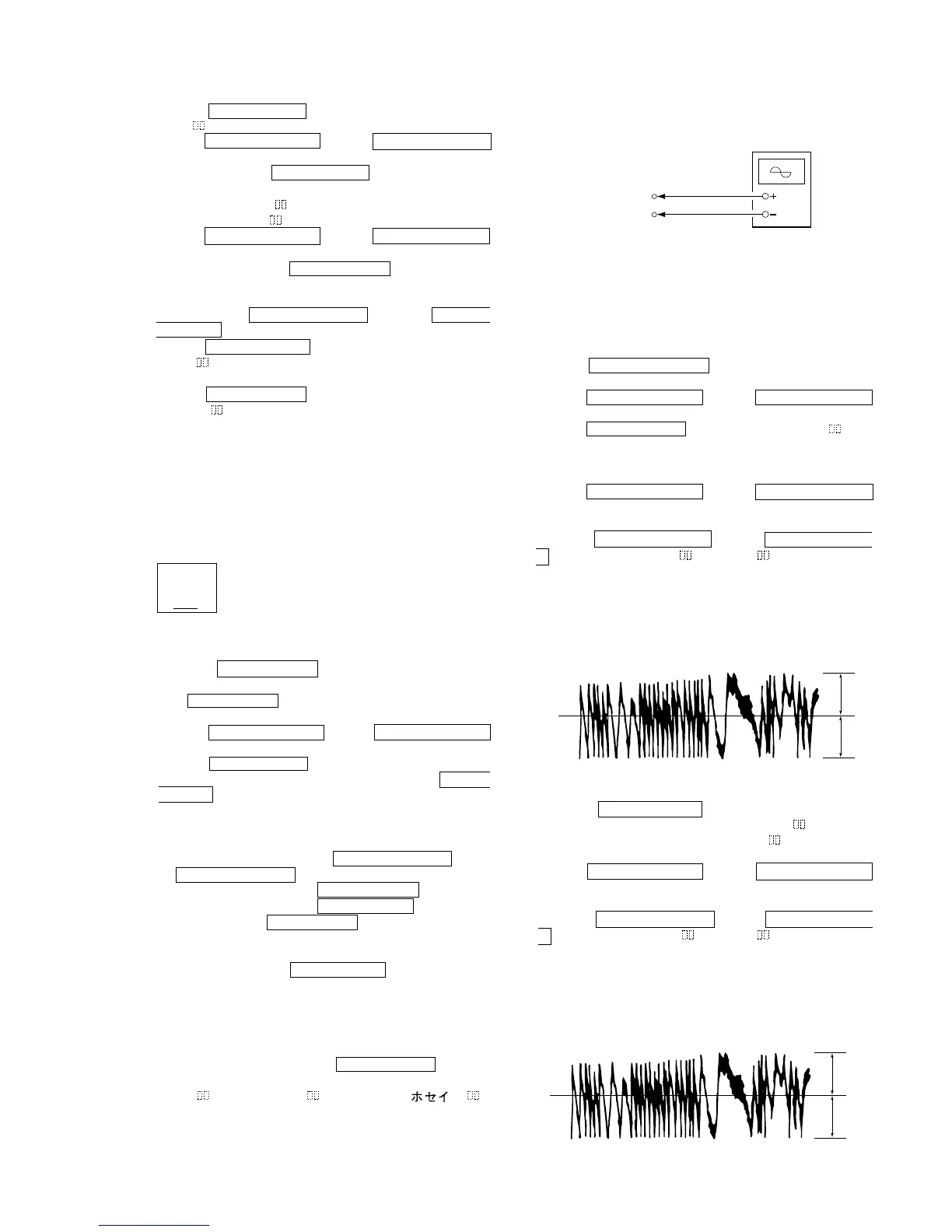
Oscilloscope
BD (MD) board
CN110 pin 3 (TE)
CN110 pin 1 (VC)
VC
A
B
Specification : A = B
VC
A
B
Specification : A = B
KMS
260A
27X40
B0825
N
Iop = 82.5 mA in this case
Iop (mA) = Digital voltmeter reading (mV)/1 (
Ω
)
(For details of the method for checking
this value, refer to “5-8. Recording and
Displaying IOP Information”.)
10. Press the MENU/NO “R” button and display “LDPWR
CHECK” and stop the laser emission.
(The MENU/NO “R” button is effective at all times to stop the
laser emission.)
11. Press the lm/TUNING – button or ML/TUNING +
button to display “Iop Write”.
12. Press the ENTER/YES “R” button. When the display becomes
Ref=@@@.@ (@ is an arbitrary number), press the ENTER/
YES “R” button to display “Measu=@@@.@” (@ is an
arbitrary number).
13. The numbers which can be changed will blink. Input the Iop
value noted down at step 9.
To select the number : Press the lm/TUNING – button
or ML/TUNING + button.
To select the digit : Press the SYNCHRO REC button.
Selection of digit : Press the SYNCHRO REC button and the
ENTER/START button at the same time
quickly. Note 1:
Note 1: If a message “Cannot SYNC!” or “NO TAPE” appears
momentarily, press SYNCHRO REC button several times
until “CD-MD SYNC?” appears momentarily.
14. When the ENTER/YES “R” button is pressed, “Complete!”
will be displayed momentarily. The value will be recorded in
the non-volatile memory and the display will become “Iop
Write”.
Note 2: After step 9, each time the ENTER/YES “R” button is
pressed, the display will be switched between “LD 0.7 mW
$ ”, “LD 6.2 mW $ ”, and “LD Wp $ ”.
Nothing needs to be performed here.
7. Press the ENTER/YES “R” button and save the result of
adjustment to the non-volatile memory (“EFB =
SAVE” will
be displayed for a moment. Then “EFB = MO-W” will be
displayed).
8. Press the lm/TUNING – button or ML/TUNING +
button so that the waveform of the oscilloscope becomes the
specified value.
(When the lm/TUNING – button or ML/TUNING
+ button is pressed, the of “EFB- ” changes and the
waveform changes.) In this adjustment, waveform varies at
intervals of approx. 2%. Adjust the waveform so that the specified
value is satisfied as much as possible.
(Write power traverse adjustment)
(Traverse Waveform)
3. Press the ENTER/YES “R” button once and display “LD 0.9
mW $
”.
4. Press the lm/TUNING – button or ML/TUNING +
button so that the reading of the laser power meter becomes 0.85
to 0.91 mW. Press the ENTER/YES “R” button after setting the
range knob of the laser power meter, and save the adjustment
results. (“LD SAVE $ ” will be displayed for a moment.)
5. Then “LD 7.0 mW $ ” will be displayed.
6. Press the lm/TUNING – button or ML/TUNING +
button so that the reading of the laser power meter becomes
6.9 to 7.1 mW, press the ENTER/YES “R” button and save it.
Note : Do not perform the emission with 7.0 mW more than 15
seconds continuously.
7. Then, press the lm/TUNING – button or ML/
TUNING + button and display “LDPWR CHECK”.
8. Press the ENTER/YES “R” button once and display “LD 0.9
mW $ ”. Check that the reading of the laser power meter
becomes 0.85 to 0.91 mW.
9. Press the ENTER/YES “R” button once more and display “LD
7.0 mW $ ”. Check that the reading the laser power meter and
digital volt meter satisfy the specified value.
Note down the digital voltmeter reading value.
Specified Value :
Laser power meter reading : 7.0 ± 0.1 mW
Digital voltmeter reading : Optical pick-up displayed value ± 10%
(Optical pick-up label)
Adjusting Procedure :
1. Connect an oscilloscope to CN110 pin 3 (TE) and CN110 pin
1 (VC) of the BD board.
2. Load a disc (any available on the market). (Refer to Note 1.)
3. Press the ML/TUNING + button continuously and move
the optical pick-up outside the pit.
4. Press the lm/TUNING – button or ML/TUNING +
button and display “EF MO ADJUST”.
5. Press the ENTER/YES “R” button and display “EFB = MO-
R”.
(Laser power READ power/Focus servo ON/tracking servo OFF/
spindle (S) servo ON)
6. Press the lm/TUNING – button or ML/TUNING +
button so that the waveform of the oscilloscope becomes the
specified value.
(When the lm/TUNING – button or ML/TUNING
+ button is pressed, the of “EFB= ” changes and the
waveform changes.) In this adjustment, waveform varies at
intervals of approx. 2%. Adjust the waveform so that the specified
value is satisfied as much as possible.
(Read power traverse adjustment)
(Traverse Waveform)


 To Next Page