HCD-M90
17
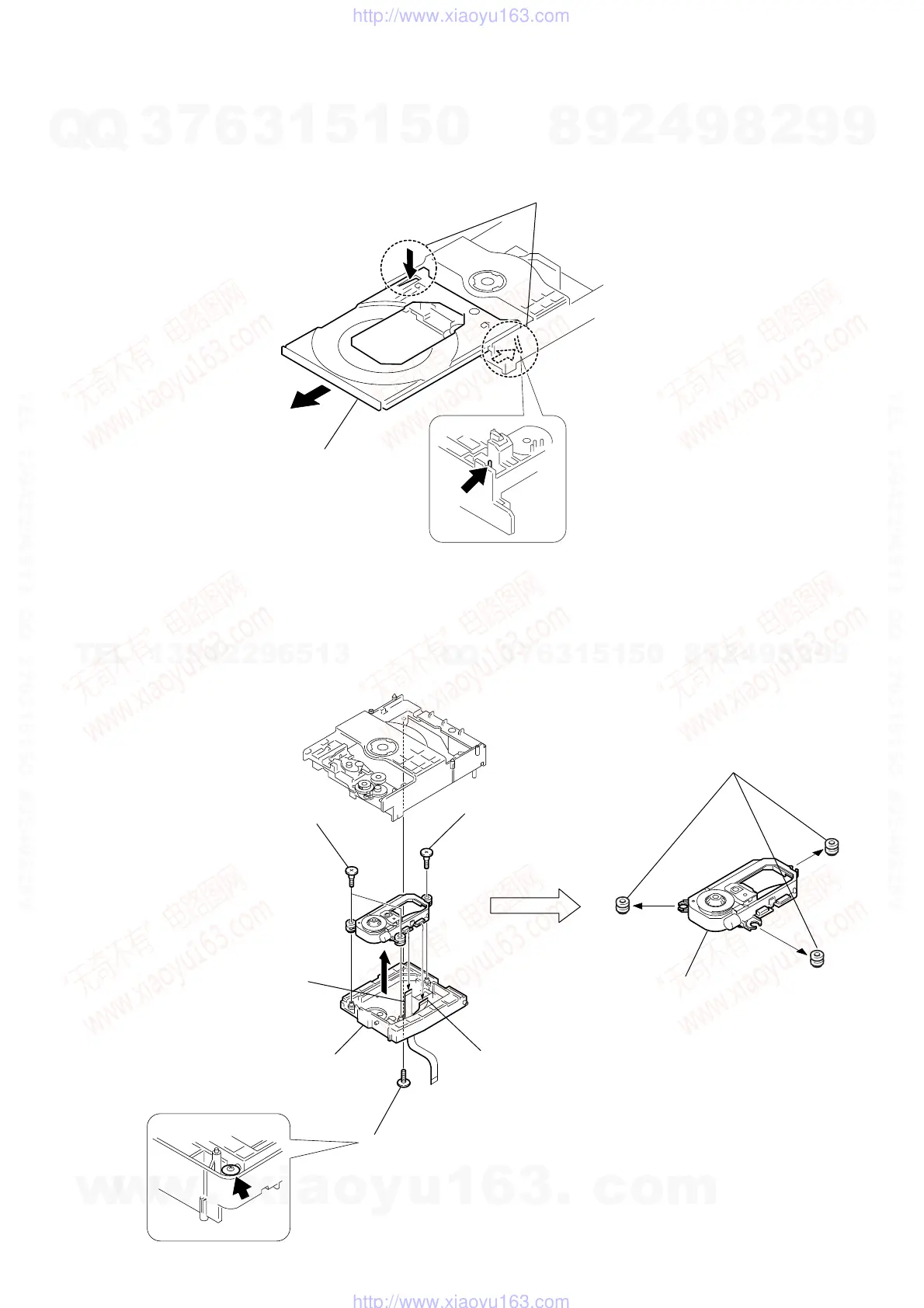
3-14. TRAY
3-15. OPTICAL DEVICE
1
While pushing the two protrusions, release the two claws fixing the tray
and pull out the tray in the direction of the arrow
A
. (Be carefull of the two claws.
2
tray
A
1
floating screw (PTPWHM 2.6)
2
flexible flat cable
(9 core)
3
flexible flat cable
(26 core)
4
step screw (L)
8
three insulators
9
optical device
5
two step screws (M)
6
holder (KHM-240)
7
w
w
w
.
x
i
a
o
y
u
1
6
3
.
c
o
m
Q
Q
3
7
6
3
1
5
1
5
0
9
9
2
8
9
4
2
9
8
T
E
L
1
3
9
4
2
2
9
6
5
1
3
9
9
2
8
9
4
2
9
8
0
5
1
5
1
3
6
7
3
Q
Q
TEL 13942296513 QQ 376315150 892498299
TEL 13942296513 QQ 376315150 892498299
http://www.xiaoyu163.com
http://www.xiaoyu163.com







 To Next Page