SA-WS350/WSD35
5
Sony CONFIDENTIAL
For Authorized Servicer
MODEL IDENTIFICATION
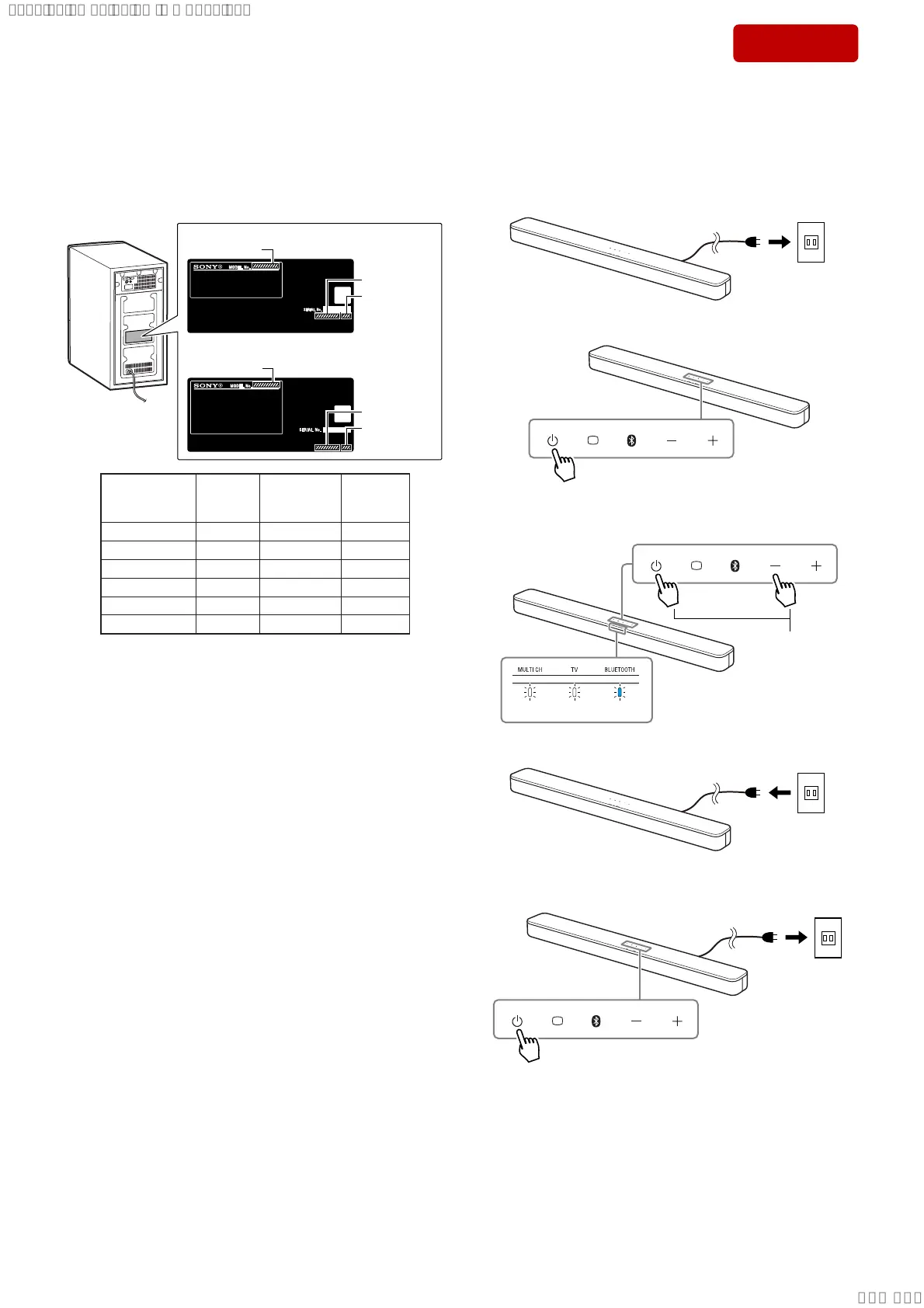
When identifying the destination and model of this unit, check the
part number, destination code and model name printed on the model
number label on the rear side of the main unit.
Note: The content printed and the part number suffi x printed on the model
number label may be changed in the midway of production.
– Rear view –
SA-WS350: US, CND
Except SA-WS350: US, CND
Model Name
Model Name
Part No.
Destination
code
Part No.
Destination
code
Part No.
Desti-
nation
code
Model
Name
Destina-
tion
5-000-988-01 (UC2) SA-WS350 US, CND
5-000-988-11 (CEL) SA-WS350 AEP
5-000-988-21 (CEK) SA-WS350 UK
5-002-489-01 (U2) SA-WSD35 US
5-002-489-61 (CEL) SA-WSD35 AEP
5-002-489-71 (CEK) SA-WSD35 UK
DESTINATION ABBREVIATIONS
The following abbreviations for model destinations are used in this
service manual.
• Abbreviations
AEP : European area (Except for UK, Ireland), East European
area, CIS area (Moldova) and Middle East area (Israel, Jor-
dan) models
CND : Canadian and Latin American area (Puerto Rico) models
UK : European area (UK, Ireland) model
RESET METHOD (for bar speaker)
After the repair of this unit is completed, be sure to reset the bar
speaker by referring to the following before checking the operation.
Reset procedure:
1. Insert the AC power cord of the bar speaker.
Outle
2. Touch the [
1
] button to turn the power on.
3. Touch the [
1
] button and [–] button at the same time for about 5
seconds, then all indicators fl ash 3 times (resetting).
Touch for about
5 seconds.
flash 3 times
4. Unplug the AC power cord.
Outle
5. Insert the AC power cord, and touch the [
1
] button to turn the
power on.
Outle
SYSSET
2019/02/1301:37:00(GMT+09:00)



 To Next Page